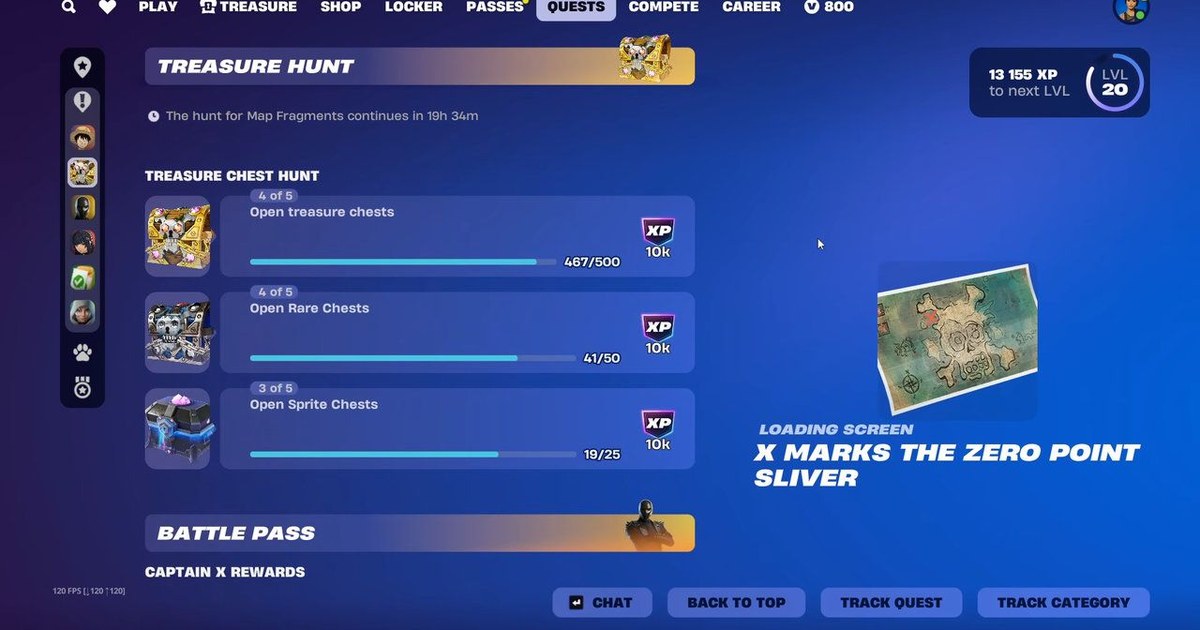
सीधा जवाब: Battle Royale lobby में Quests tab खोलें, बाईं list से Treasure Hunt चुनें, और हर chest type की progress पढ़ें। Regular Treasure Chests, Rare Chests और Sprite Chests अलग-अलग गिने जाते हैं।
2026-11-24 तक वह नंबर मौजूदा Treasure Hunters mini season की quest progress है, और किसी ने ऐसी in game screen confirm नहीं की है जो account बनने से अब तक का lifetime total दिखाए। यह guide पहले बताती है कि कहाँ देखना है, फिर यह कि बड़ा नंबर चाहिए तो कमी कैसे पूरी करें। अगर आप अपने matches का footage भी चाहते हैं तो पूरे setup के लिए how to record Fortnite clips देखें।
जवाब: Quests tab, Treasure Hunt, हर chest type के हिसाब से
Lobby में जाएँ, Quests खोलें, Treasure Hunt चुनें और Treasure Chest Hunt वाला हिस्सा पढ़ें। Count सिर्फ उसी player का बढ़ता है जो chest खोलता है, इसलिए teammates के chests आपके नंबर में नहीं जुड़ते।
Mini season खत्म होने पर quests बदल सकते हैं, इसलिए जो नंबर रखना चाहते हैं उसे screen पर रहते ही लिख लें। अगर आप counter के पीछे भागने के बजाय अपना game सुधारने के लिए chests खोल रहे हैं तो अगला कदम how to get better at Fortnite में है।
अपने खोले हुए chests कैसे चेक करें
- 1Lobby में Quests tab खोलेंयह Battle Royale lobby से करें, match के बीच में नहीं। Tab PC, console और mobile पर एक ही जगह होता है।
- 2बाईं list से Treasure Hunt चुनेंMini season का नाम Treasure Hunters है, पर list में category का नाम Treasure Hunt है। उसे ढूँढने के लिए list में नीचे scroll करें।
- 3हर chest type की progress पढ़ेंTreasure Chest Hunt वाले हिस्से में आपको regular, rare और Sprite chest के नंबर दिखेंगे। इस season का अपना total निकालने के लिए इन्हें जोड़ लें।
- 4कुल संख्या चाहिए तो अपना log शुरू करेंQuest progress season के साथ चलती है, इसलिए जो नंबर आपके काम का है उसे तारीख के साथ नोट करें। अगर आपके पास match video है तो chest खोलने दोबारा भी गिन सकते हैं। Matches को video में बदलने के बारे में how to turn a Fortnite replay into a video में बताया है।
- 5Teammates से अपना-अपना चेक करने को कहेंProgress सिर्फ उसी account को मिलती है जो chest खोलता है। Squad के हर सदस्य को अपना Quests tab खुद देखना चाहिए।
क्या चेक करना है और कहाँ
| आप क्या जानना चाहते हैं | कहाँ देखें | जानने लायक बात |
|---|---|---|
| Regular Treasure Chests | Quests tab में Treasure Hunt, chest quest progress | दूसरे types से अलग गिने जाते हैं |
| Rare (नीले) Chests | वही Treasure Hunt screen | Regular chest के नंबर में मिले हुए नहीं होते |
| Sprite Chests | वही Treasure Hunt screen | Wanted Posters से मिले buried chests भी शामिल हैं |
| इस season का कुल | तीनों progress नंबर खुद जोड़ें | Mini season की progress है, lifetime total नहीं |
| आपका बनाम teammate का | आपका अपना Quests tab | Progress और XP chest खोलने वाले player को जाते हैं |
| कुल मिलाकर सही संख्या | आपका अपना log या record किए हुए matches | हर type के हिसाब से लिख लें, या video पर दोबारा गिनें |
चेक करने से पहले
- आप Battle Royale lobby में हैं, match में नहीं
- आपको Quests list में Treasure Hunt category मिल गई
- आपने regular, rare और Sprite chests अलग-अलग पढ़े
- आप जानते हैं कि नंबर मौजूदा mini season को कवर करता है
- जो नंबर रखने हैं उन्हें आपने तारीख के साथ लिख लिया है
Match record करें तो chests दोबारा गिन सकते हैं
DOR एक free Windows app है। Fortnite launch करें और वह पूरा match अपने आप record करता है, और kills व deaths My Clips में automatic clips के रूप में जमा होते हैं।
Chest खोलने के footage से आप चेक कर सकते हैं कि quest का नंबर सही है या नहीं, फिर जो हिस्सा चाहिए उसे 16:9, 9:16 या 1:1 में trim करके दोस्तों को भेज सकते हैं। Recordings और edit किए हुए results में watermark नहीं होता। Share करने के लिए how to share Fortnite gameplay videos देखें।