Let's start with the conclusion: oCam and GomCam are truly excellent as general-purpose screen recorders, but they are weak on game-focused features (auto-clipping, game detection, low-overhead encoding). For keeping a whole screen, like a lecture, a meeting, or a tutorial, both are good, low-effort choices. But if the main goal of recording is games, that is, if you want to keep good play moments without missing them, you need an alternative tailored to games. This article acknowledges oCam and GomCam's strengths as-is while honestly comparing DOR from a game-recording perspective.
oCam and GomCam were never game-only in the first place
First, to sort out their nature: oCam and GomCam are not game-only tools but general-purpose screen recorders that capture anything. Being able to record whatever is on your monitor, whether a game, a browser, or lecture slides, is their strength, and it is exactly why they are the most widely used in Korea. But this versatility does not directly become a strength in games. Because they simply record the whole screen or a designated region, the program does not know the game context (when a good moment is, which process is the game).
The real limits from a game-recording perspective
The most common problem is performance, that is, frame drops. In oCam, using a software codec (like Open H.264) at high quality raises CPU usage sharply and can drop your game frame rate, and if the game slows to 30 FPS, the recording is kept at 30 FPS too. Even oCam's official docs advise that for heavy games you should use a hardware encoder like NVIDIA NVENC to have almost no frame drops. GomCam also claims to lower the load with CPU optimization, but in the end, without properly riding hardware acceleration, completely avoiding frame loss in high-spec games is hard.
The second is manual operation. Both programs require a person to press a record button to start, so it often happens that you realize you didn't turn on recording only after a teamfight erupts. The third is editing burden. Recording the whole game through leaves tens of minutes of footage, and a person has to find and trim the kills or highlights within it themselves. There are also occasional reports of it being blocked from running due to conflicts with anti-cheat like GameGuard. In short, these are limits from being a general-purpose tool that does not know the game context.
Let's acknowledge what oCam and GomCam do well
That does not mean oCam and GomCam are bad programs at all. Both are far lighter and simpler to operate than broadcasting tools like OBS, so you install them, press a button, and the screen is kept right away. Having been widely used in Korea for a long time, they have abundant Korean-language resources and guides, and the versatility of solving lectures, meetings, and tutorials as well as games in one is a clear strength. If your goal is to just keep a screen as video, they are still an excellent choice. The problem is that when games alone are the main goal, that strength does not carry over into game-focused features.
The alternative DOR, recording automatically to fit games
DOR is a free program built for game recording from the start. Being a tool for games rather than a general-purpose screen recorder, it automatically solves, tailored to the game context, the three things that fell short in oCam and GomCam (manual start, manual editing, frame load). It is completely free and usable with no watermark or recording time limit.
Automatic game detection and automatic kill clipping
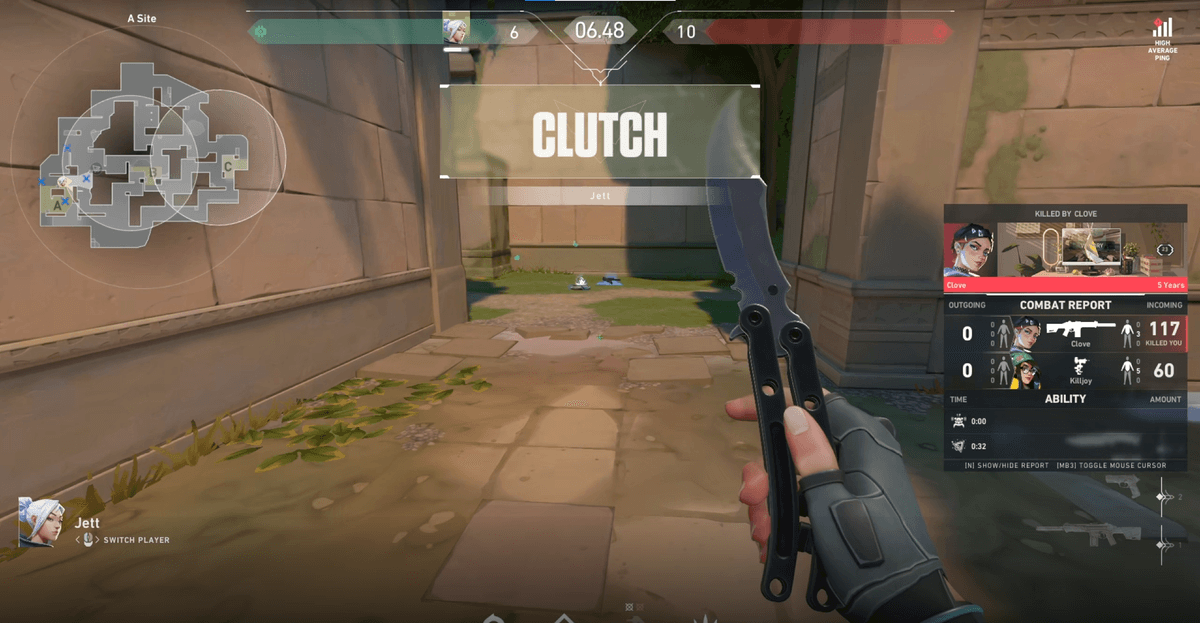
DOR's core difference is automation. Leave it installed and it detects a game launch on its own, starts recording in the background, and auto-trims key moments like kills, aces, and pentakills into short clips. There is no need to press a record button or memorize a hotkey, so the "I forgot to turn on recording and missed the highlight" problem you often hit in oCam and GomCam disappears entirely. Even a Valorant ace round or a League of Legends pentakill are already gathered as highlights when you close the game, so there is no need to scrub through long footage.
Low-overhead recording with NVENC hardware encoding
On the performance side, DOR leverages a hardware encoder like NVIDIA NVENC to hand recording to the GPU. Unlike CPU software encoding, it eats up less of your game frame rate, so it makes the very approach oCam's docs recommend (minimizing frame drops with hardware encoding) the default. When you want to play smoothly in a high-spec game while keeping highlights at the same time, the difference you feel is large.
At a glance: oCam, GomCam, DOR
- Nature: oCam general-purpose screen recorder / GomCam general-purpose screen recorder / DOR game-focused recording
- Automatic game detection: oCam none / GomCam none / DOR yes (auto-recognizes Valorant, LoL, etc.)
- Automatic highlight clipping: oCam none (manual editing) / GomCam none (manual editing) / DOR auto-saves kills and highlights
- Low-overhead encoding: oCam NVENC supported when configured (default has high CPU load) / GomCam CPU-optimization focused / DOR NVENC hardware encoding by default
- Price: oCam free (with ads), paid version available / GomCam free trial, paid / DOR completely free
- Non-game screen recording: oCam strong / GomCam strong / DOR game-centric (low versatility)
Conclusion: choose by purpose
To sum up, if you have to record not only games but lectures, meetings, and tutorials in one, a general-purpose tool like oCam or GomCam is still a good choice. On the other hand, if your core is "the main goal of recording is games, and I want just the good plays gathered on their own, with less frame drop too," the lowest-effort alternative is DOR. Check the recommended settings and actual auto-clip examples on your favorite game's page: Valorant, League of Legends.
 #Valorant