What Is a Browser Clip Editor
A browser clip editor is a tool for refining video clips right inside a web screen, without installing separate editing software. After you record a game, DOR opens your remaining clips straight into this browser editor, handling everything in one place, from keeping only the segments you need to stitching several moments together.
The core idea is simple. You capture your gameplay with DOR, and when you pick the video you want to edit from the clip list, the editing screen opens right in the browser. There is no need to export the file to another program or wait for heavy rendering.
The Hassle of Installed Editors
If you have ever fired up heavy editing software just to trim one short clip, you know the hassle well. By the time you download and install the program, import the clip file, and export it back in the format you want, sharing it easily ends up as an afterthought.
- Installing and updating editing software takes time.
- There are many steps to move a recording into the editing software and export it back out.
- Even a simple trim means firing up a heavy program, so you rarely get around to it.
- You have to mind the save format and quality settings every time.
DOR's browser editor skips this process. It is built so that you flow straight from recording into editing on the spot, with no install and no file shuffling.
Trimming and Merging With the DOR Browser Editor
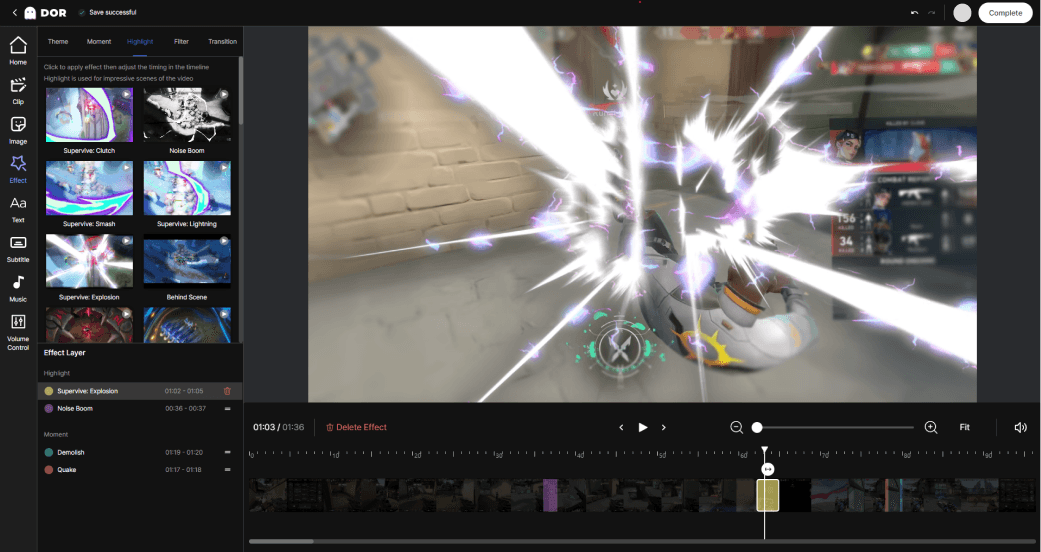
When you open the browser editor, your clip loads onto the timeline. From here you can grab the start and end of the segment you want to keep, cut away the unnecessary parts before and after, and neatly organize just the highlights.
Trimming Segments
Grab the start and end points on the timeline with your mouse and drag them, and only the segment in between remains. You can pick out just the part you want to show, like the moment a kill happens, and easily strip away the dead space before and after that saps the tension. For example, it is great for trimming down to just the decisive moment in a Valorant round.
Merging Multiple Moments
Stitch several separately saved clips together in order and they become a single video. You can gather great moments that happened at different times into a highlight reel, and you can freely change the order of the scenes.
Refining the Start and End
If you are not happy with the overall length even after merging, refine the start and end again to tidy up the flow. Strip away the unnecessary parts one more time and you end up with a clip at a good length for sharing.
From Editing Straight to Sharing
The real strength of the DOR browser editor is that it flows straight from editing into sharing. When you finish editing, you can save the clip or turn it into a link to pass along as is, so you can send great moments to friends and teammates right away without missing the moment.
- When recording ends, check the clips DOR saved from the list.
- Pick the clip you want to edit and open the browser editor.
- Trim the segments and, if needed, merge several moments and refine them.
- Save the finished clip or share it instantly via link.
Especially in a game with long matches like League of Legends, trimming and gathering just the impressive fights makes it much easier to look them up again or share them later.
Wrap-Up
Without the process of installing heavy editing software and moving files around, DOR lets you trim, merge, and refine your finished recordings right in the browser. Thanks to a flow that goes straight from editing on the web with no install to sharing, you can organize and share your best moments right on the spot.
 #Valorant