Once you have trimmed a good moment out of a game and finished editing, the final step is to export that clip as a file you can actually use. But when you actually reach the export screen, questions come up: mp4 or GIF, and how high to push the quality. This article lays out which format and options you can choose when exporting a clip in DOR, and which situation each one fits.
Rather than the how-to itself, the focus here is on the criteria for choosing a format. Even for the same scene, the right format differs when you drop it in Discord, attach it to a community post, or upload it to social media.
The Formats You Can Export in DOR
When exporting a clip in DOR, the formats you can choose fall into two broad options: mp4 video and GIF. The two are completely different in character, so rather than one being better, it is right to choose based on the scene and its use.
mp4: Scenes With Sound and Length
mp4 is the video file we usually think of. It can carry sound as is and handle scenes anywhere from a few seconds to tens of seconds without trouble. If a scene only truly lands with the in-game callouts, kill sounds, or team voice, mp4 is the default choice.
GIF: Short, Looping Moments
A GIF is a short image that loops automatically but has no sound. It fits a few-second decisive moment that comes across even without sound, like a single aim shot or a funny meme scene. Its advantage is that it moves right away as a preview in the chat window.
- mp4: Has sound, handles long scenes, plays in a video player on most platforms
- GIF: No sound, mainly short scenes, auto-loops, moves right in the chat window
- Choosing criteria: mp4 if you need sound or it is long, GIF if it is short and works without sound
Choosing a Format by Use Case
Even for the same clip, the right format changes depending on where you post it. Deciding where you will use it first makes the format and quality questions much simpler.
When Dropping It Straight in Discord
When sharing a moment that just happened with friends, a short GIF is convenient. It moves right there in the chat window, so there is no effort of opening it. That said, if the scene needs sound or is a bit long, it is better to export it as mp4 and post that.
When Attaching It to a Community Post
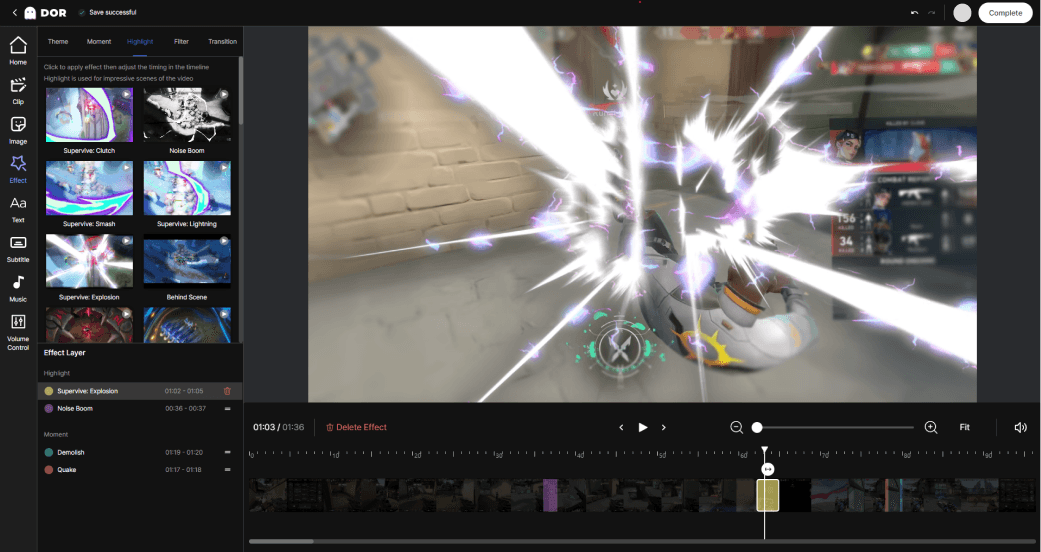
When you organize a guide or a highlight into a post with text, mp4 is a safe bet. The sound and flow come across in full, and it can hold longer scenes that need context. If you are just adding a short laugh, a GIF works well too. For example, if you want to emphasize only a specific moment in a Valorant round, a GIF is lighter.
When Posting to Social Media
For a social media feed, an mp4 with the sound and quality intact is usually the better fit. Since the screen is large, low quality looks smeared, so it is best to keep the format as mp4 and set the quality with some headroom.
Quality and File-Size Options
Once you have decided on a format, next comes quality. When you adjust the quality in DOR's export options, the file size changes along with it. Raising the quality makes the screen sharper but grows the file size, while lowering it makes the file lighter at the cost of fine details being less crisp.
- High quality: Prioritizes sharpness, large file size, suits social media or archiving
- Low quality: Prioritizes a light file size, suits Discord or quick sharing
- GIF: By its nature, its color and detail are simpler than mp4, so the shorter you keep it, the more natural it looks
Exporting a long scene at high quality can make the file quite large, so keeping only the segment you need during the editing step is the simplest way to reduce file size. For example, for a team fight in League of Legends, if you trim it down to just the decisive few seconds, the file will not get too heavy even if you raise the quality.
Wrap-Up
When exporting a clip in DOR, you only need to remember two things: format and quality. A scene with sound and length is an mp4; a short, looping single cut is a GIF. After that, set the quality to match where you will post it, and the file size follows naturally. Just picturing where you will use it first gets you halfway through the format decision.
 #Valorant