When you string together Valorant aces or League of Legends pentakill clips gathered with DOR into a video, the last thing that usually trips you up is the background music. You've probably had the experience of laying down a song you love, uploading it, and getting hit with "Content ID match, ad revenue goes to the rights holder." This article lays out how to find BGM for game videos without copyright worries, in order from terminology to actual sites to handling claims.
If you just want the gist first, see the summary at the top, and if you're in a hurry to know where to get music from, you can jump straight down to "Where Do You Actually Get BGM?" below.
"Free" and "Copyright-Free" Are Not the Same Thing
The most common misconception is "I got it for free, so I can use it however I want." Free only means you don't pay money; it doesn't mean the copyright is gone. Most free music comes with usage conditions (a license) that say "it's free if you use it this way," and breaking those conditions makes it copyright infringement even if it's free. So before you download, you need to be able to tell the license types apart.
You Only Need to Tell Four Licenses Apart
- CC0 (public domain): No attribution required and commercial use is free. It's the closest thing to "truly copyright-free music."
- CC BY (attribution): Free, but you must list the track title, artist, and source link in your video description. Leave the attribution out and it's infringement.
- CC BY-NC (attribution, non-commercial): On top of attribution, it's only free when "non-commercial." A YouTube video with monetization (AdSense) on is treated as commercial use, so you can't use it.
- Royalty-Free: This means that once you obtain rights, you don't pay an extra fee (royalty) each time you use it, not that it's free of charge. There's free royalty-free and paid, so always check separately whether it's "free."
Game highlights usually go on monetized YouTube or Shorts, so the safe choice is CC0, or tracks that allow commercial use and only require attribution. If you plan to grow your channel, it's easier on your mind to rule out CC BY-NC (non-commercial only) from the start.
The Top Choice Is the YouTube Studio Audio Library
If you're uploading to YouTube, the safest and fastest method is the Audio Library YouTube provides directly. Access it via YouTube Studio, then "Audio Library" in the left menu. Since YouTube vets these tracks itself, there's almost no risk of a copyright dispute as long as you upload to the same platform. You can filter by genre, mood, and length, making it easy to find a track that matches your game video's tone.
Yellow Icon = Attribution Required
The thing to watch in the Audio Library is the icon next to a track. If there's no mark, you can use it freely without attribution, but a track with a yellow person-shaped icon (attribution required) means you must put the specified attribution text into your video description exactly. Hover over the icon and it displays the attribution text to copy and paste, so just stick that at the top of your description.
Free Music Sites: Where Attribution Is Required and Where It Isn't
If you'll use music outside YouTube too, or need a wider variety of tracks, use free music sites. The key is to sort out in advance "sites that require attribution" from "sites that don't." Even within free, the rules differ.
Use Right Away Without Attribution: Pixabay, Mixkit
Pixabay and Mixkit run on their own licenses and can be used commercially without attribution. They're especially handy for content like game videos where managing a long description is a hassle. That said, "no attribution needed" doesn't mean "reselling or redistribution is allowed too," so just avoid uses like ripping out the track itself and selling it again. Each track comes with its license info, so make a habit of checking once when you download.
Attribution Required: NCS, Incompetech
NCS (NoCopyrightSounds) is so widely used in game videos that it's become almost synonymous with "copyright-free music," but in reality it requires attribution. Use an NCS track and you have to list the track title, the NCS link, and the artist's social handles in your description. Kevin MacLeod's Incompetech is likewise CC BY-based, so an attribution line in the form of "Music: [track] by Kevin MacLeod" is required. The most common trap is assuming that because the name says "No Copyright," you can use it without attribution.
- Attribution not required (commercial OK): Pixabay, Mixkit, Audio Library tracks with no icon
- Attribution required (commercial OK): NCS, Incompetech, Audio Library tracks with the yellow icon
- Every time you download: Copy the track page's license info and "required attribution text" as-is into a notepad to keep, and uploading goes faster.
How to Avoid and Handle Content ID Claims
Content ID is YouTube's system that automatically matches a video's audio and visuals against a rights-holder database. Even with legitimately obtained free music, an automatic claim can land if someone else registered the same track as their own. The important thing is that a claim doesn't equal a "violation." With license proof, you can clear it.
Prevention: Screenshot and Keep the License Screen
When you download a track, screenshot the screen showing the download page, license info, or attribution text, and save it in the same folder as the track file. In cases like NCS where a license confirmation email arrives on download, don't delete that email either, keep it. Later, when a claim comes, it serves as proof that "I legitimately obtained this under these conditions."
Handling: Disputing When a Claim Comes
Even if a Content ID claim lands, your channel doesn't immediately take a penalty (a copyright strike). Usually it's just that the video's revenue goes to the rights holder or it's blocked in some regions. If you followed the attribution and have proof, file a dispute under YouTube Studio, then Content, then that video's "Restrictions," and write out your license grounds (the site you got it from, the attribution text). A mistaken claim is usually lifted after review.
Trending Shorts Audio and Long-Form BGM Are Used Differently
Before you pick music, you first need to decide "whether this video is a Short or long-form." The two have different music rules. Adding an in-app "trending sound" on YouTube Shorts or Instagram Reels is a way of using, only within that app, a track for which the platform has secured the license. It's great for reach, but a Short made that way is hard to redownload elsewhere and re-upload, or convert into a monetized long-form video, with the trending sound on it.
Long-form highlight videos, on the other hand, should use the free BGM laid out above (CC0, attribution tracks, the Audio Library) from the start. That way you're safe posting the same file to YouTube, TikTok, and Instagram, and monetization is no problem. To sum up: if it's short and the goal is trend reach, use in-app trending audio; if you'll keep it around and post it in multiple places, clean-license free BGM is the right call.
Adding Music When Making Videos from DOR Clips
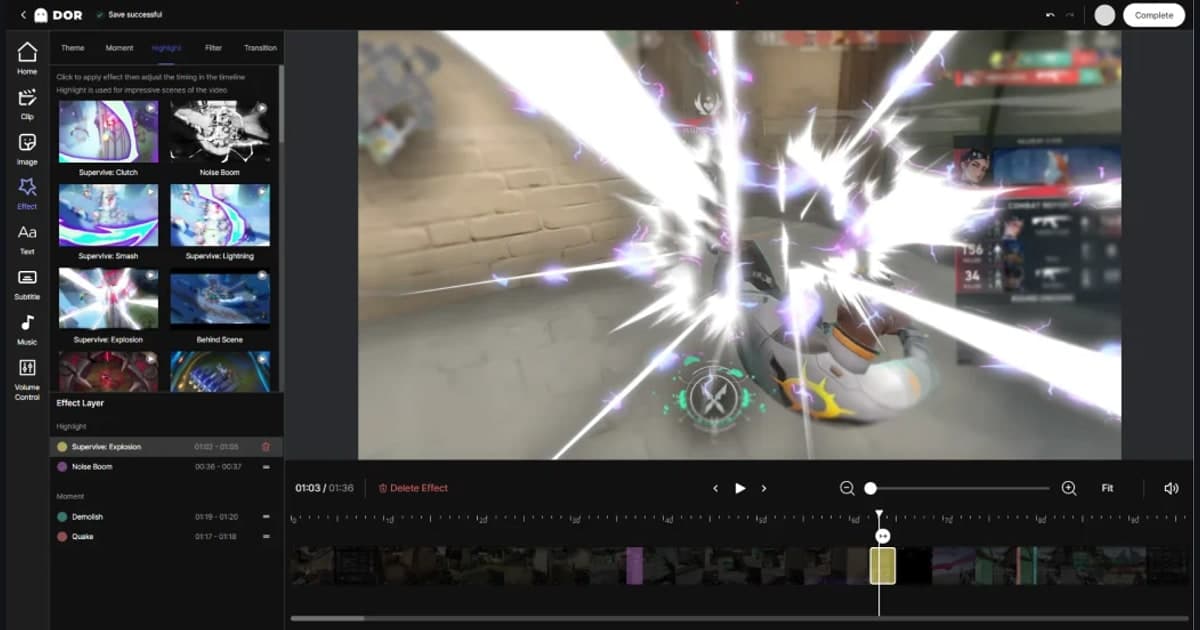
Just keep your game running and DOR automatically detects moments like kills, aces, pentakills, and chicken dinners in Valorant, League of Legends, and PUBG and gathers them into short clips. Since the step of finding and cutting highlights yourself is skipped, what's left in making a video shrinks to about "ordering the clips plus laying down BGM."
Here's the recommended flow. Pick the best of the clips DOR gathered, string them together, and get a track from the sites above to match the video's tone (a tense ace compilation or a light, funny moment compilation). For a monetized channel, use Pixabay or Mixkit (no attribution) or NCS and Audio Library tracks with attribution followed, and screenshot the license screen of the track you got and keep it in the same folder as the clips, so even if a claim comes later you can dispute it right away.