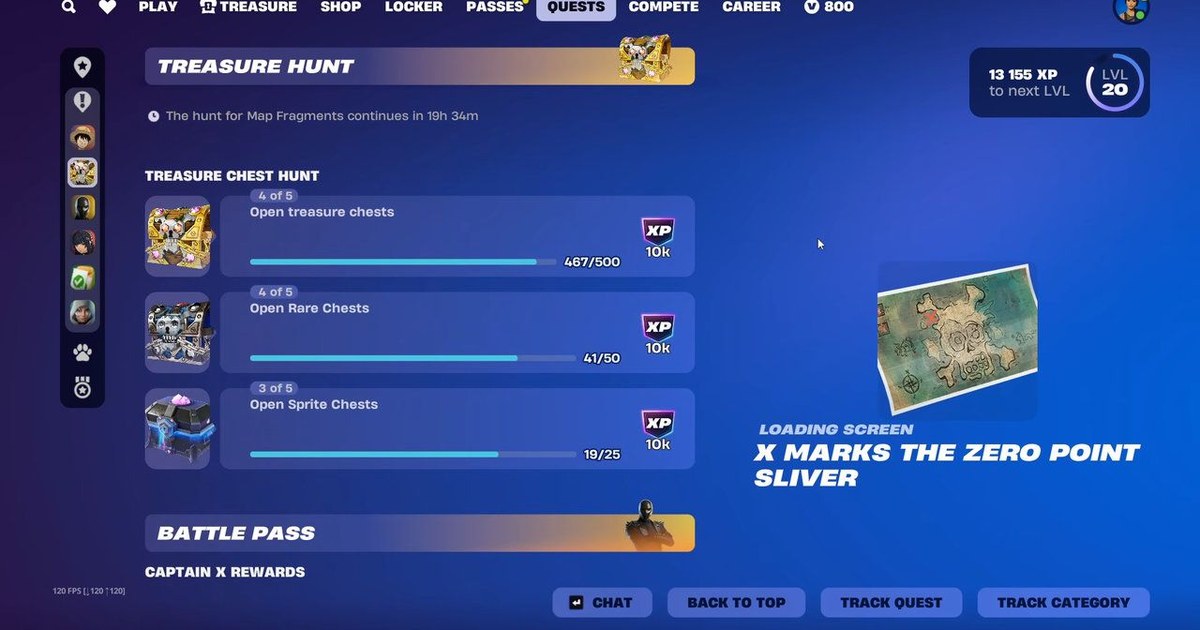
The short answer: open the Quests tab in the Battle Royale lobby, pick Treasure Hunt from the list on the left, and read the progress for each chest type. Regular Treasure Chests, Rare Chests, and Sprite Chests are counted separately.
As of 2026-11-24, that number is quest progress for the current Treasure Hunters mini season, and nobody has confirmed an in game screen showing your lifetime total since the account was created. This guide shows where to look first, then how to cover the gap if you need a bigger number. If you also want footage of your matches, see how to record Fortnite clips for the full setup.
The answer: Quests tab, Treasure Hunt, per chest type
Go to the lobby, open Quests, choose Treasure Hunt, and read the Treasure Chest Hunt section. The count goes up only for the player who opens the chest, so teammates do not add to your number.
Quests can change when a mini season ends, so write down any number you want to keep while it is still on screen. If you are opening chests to improve your game rather than to chase a counter, how to get better at Fortnite covers the next step.
How to check your opened chests
- 1Open the Quests tab in the lobbyDo it from the Battle Royale lobby, not mid match. The tab is in the same place on PC, console, and mobile.
- 2Pick Treasure Hunt from the left listThe mini season is called Treasure Hunters, but the category in the list is Treasure Hunt. Scroll down the list to find it.
- 3Read the progress for each chest typeIn the Treasure Chest Hunt section you will see regular, rare, and Sprite chest numbers. Add them up for your total this season.
- 4Start your own log if you need a totalQuest progress follows the season, so note any number you care about with the date. If you have match video, you can also recount the chest openings. Turning matches into video is covered in how to turn a Fortnite replay into a video.
- 5Ask teammates to check their ownProgress is credited only to the account that opens the chest. Each squad member should look at their own Quests tab.
What to check and where
| What you want | Where to look | Good to know |
|---|---|---|
| Regular Treasure Chests | Quests tab, Treasure Hunt, chest quest progress | Counted separately from other types |
| Rare (blue) Chests | Same Treasure Hunt screen | Not merged with the regular chest number |
| Sprite Chests | Same Treasure Hunt screen | Buried chests found through Wanted Posters are included |
| Total this season | Add the three progress numbers yourself | Mini season progress, not a lifetime total |
| Yours vs a teammate's | Your own Quests tab | Progress and XP go to the player who opens the chest |
| An exact overall total | Your own log or recorded matches | Write it down per type, or recount on video |
Before you check
- You are in the Battle Royale lobby, not in a match
- You found the Treasure Hunt category in the Quests list
- You read regular, rare, and Sprite chests separately
- You know the number covers the current mini season
- You wrote down the numbers you want to keep, with the date
Record the match and you can recount your chests
DOR is a free Windows app. Launch Fortnite and it records the whole match automatically, and kills and deaths are collected as automatic clips in My Clips.
With footage of the chest openings you can check whether the quest number is right, then trim the part you want into 16:9, 9:16, or 1:1 and send it to friends. Recordings and edited results carry no watermark. For sharing, see how to share Fortnite gameplay videos.