To get better at PUBG, review one match at a time: pick a single habit to change, repeat it in Training Mode, and check it in your next match. The game has official tools for this (Death Cam, Replays, 2D Replay, Training Mode), but none of them keeps a full video of your own screen and audio, so recording the match yourself fills that gap. For a step-by-step look at the scene after you are eliminated and at replays, see our PUBG replay guide; this article ties those tools into one loop. Everything here is PC-only and checked as of October 2, 2026.
The short answer: fix one thing at a time
Studying one match closely and changing one habit tells you more than playing many matches, because changing several things at once hides which change mattered. The yardstick is the choice you made in that moment, not your placement or kill count. Recording every match adds files quickly, so decide which matches to keep; our PUBG recording storage guide helps with that. This article does not promise a higher placement or win rate. It only uses practice and review tools confirmed in official documents plus general learning principles.
The six-step match review loop
- 1Record the whole match — Review from a record, not from memory. If every match is recorded automatically, a win and a loss can be studied by the same standard. Recording is all you do in this step; during the match, just play as usual.
- 2Pick one match to review — Choose one match, ideally a loss or one with a decisive fight, rather than everything you played today. Watching many matches at once piles up too many fixes and breaks the one-change rule. Arcade does not support replays, so for those matches a recording is the most dependable record.
- 3Answer three questions while watching — First, why did I start this fight, and could I have avoided it? Second, what did I hear and see just before it, and how did I judge my position from that? Third, how did my position relate to the Zone and to cover when the fight began? Answer by the choice you made in that moment, not by placement or kills; opening the 2D Replay alongside lets you see the Zone and fight locations from above.
- 4Write down one thing to change — From the three answers, keep only the clearest and write it as one action sentence, such as 'next match, check the Zone position once before engaging.' That sentence is only an example; the point is to use the answer that came from your own footage.
- 5Repeat only that thing in Training Mode — If the fix is about shooting, repeat Aim practice; if it is about judging sound, repeat Sound practice, and compare with earlier results through the Training Record button. To keep conditions identical you can use the Spawn Tool, Save/Load Gear Set, and the reload key to add ammo (Update 31.2, September 3, 2024; the ammo feature does not apply in 1v1 Arena). Decisions such as positioning cannot be practiced in Training Mode, so try them deliberately in your next match. This article does not recommend sensitivity or other setting values.
- 6Check the next match on video — Record the next match and look at the same single question again. The test is not win or loss but whether that choice actually changed. If it did, move on to the next single fix; if not, rewrite the step-four sentence as a more concrete action.
PUBG's official practice and review tools vs. recording your own match
| Tool | What it shows you | Limits |
|---|---|---|
| Death Cam | Shows the moments right after you are eliminated; afterwards you can return to spectating from the system menu or the match results screen (Update 25.1, August 2, 2023). | It is a right-after-death view. How long you can revisit it afterwards is not stated in the official documents I checked. |
| Replays (Career > Replays) | Open a past match from an in-game list and switch between Free Cam, Follow Cam and Spectator Cam. The support article lists F/C/V for the cameras, J for the timeline, P for pause and B to return to the recorded player. | Arcade does not support replays (Update 24.2, July 5, 2023). Retention time and the number of saved replays are not confirmed in official documents, and the Update 11.2 notes (April 19, 2021) record a case where a replay system update made older files unusable. That key article is marked as old, so check current keys under Settings > Key Bindings > Spectate and Replay. |
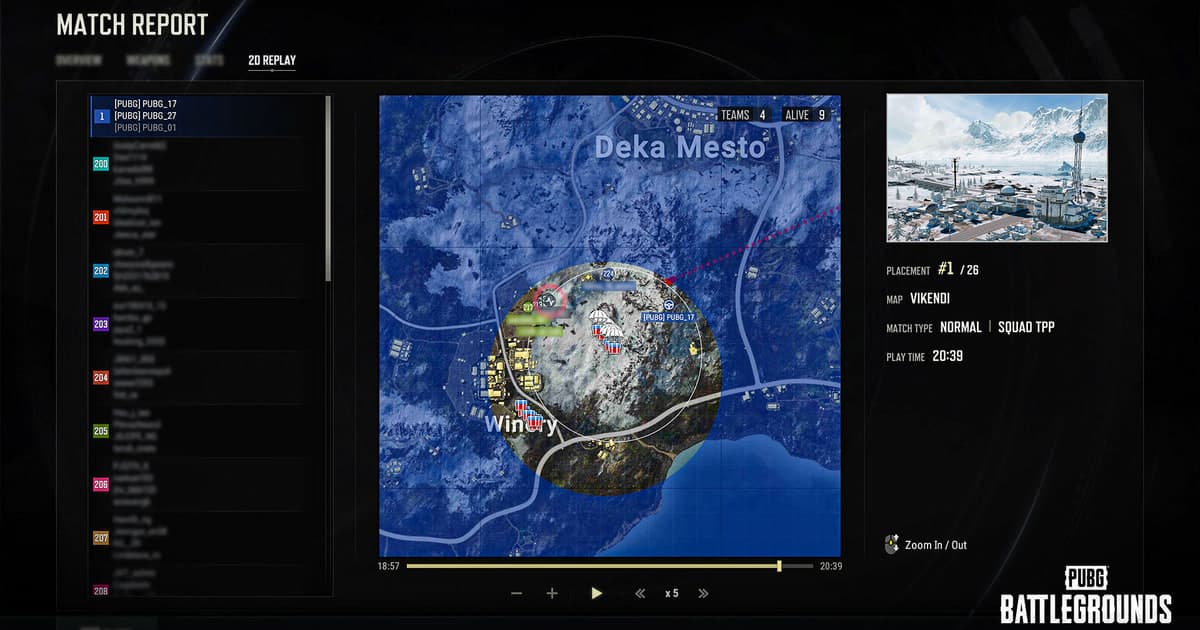
| 2D Replay, Match Report and PUBG Bridge | Career - Match History - Match Report - 2D Replay shows the map, players, fights, Zone and Care Packages in 2D at 1/2/5/10/20x on PC. With PUBG Bridge, the View in Browser button gives a QR code for watching on mobile or in a browser (Update 40.1, February 3, 2026). | It draws match data, not your view, so your aim, field of vision and sound are not visible. How many past matches stay available is not confirmed in official documents. |
| Aim/Sound Lab in Training Mode | Enter by interacting with a helipad in Training Mode. Aim practice reports headshots and total targets hit; Sound practice plays gunfire from a target with the weapon name and distance shown and scores 10 points for the exact target and 5 for each neighbor. The Training Record button compares aiming score, accuracy and hit distribution with recent and best results, with up to 100 records saved each for Aim and Sound. | It trains isolated skills such as shooting and listening. Decisions like positioning and rotation cannot be practiced there, and records older than the latest 100 are deleted. |
| Basic Training | Play → Training → Basic Training runs 17 chapters guided by an NPC partner over voice and radio, and a checklist result sets a Clear Rank of B, A, S or S+ (Update 42.2, July 14, 2026). | It is a roughly 10-minute course aimed at newcomers; for repeating one specific fix, the Aim/Sound Lab is the closer fit. |
| Your own match, recorded in full (DOR) | Keeps your screen, aim, game sound and microphone as one video (mp4) per match. | A recording shows what happened, not what to change; you decide that. Files also pile up with each match. |
Before you start reviewing
- I picked just one match to review.
- If it was an Arcade match, I checked that a recording exists, because Arcade does not support replays.
- I answered three questions about my choices (why the fight started, what I heard and saw, where I stood), not about placement.
- I wrote the fix as one action sentence beginning with 'next match, I will...'.
- I opened the Training Record button and am ready to compare with earlier results.
- I checked that I have enough free storage for the next match to be recorded.
Keeping the review footage with DOR
As the PUBG recording page shows, DOR is a free Windows app that automatically records full PUBG matches and also makes automatic clips of highlights such as kills. In a review loop the full-match video is your material, and the automatic clips can be a starting point for deciding which fight to watch first. A review video needs the sound you heard as well as the picture, and DOR records game sound and your microphone together, so the audio just before a fight and the calls you made can be checked in the same video. On an NVIDIA graphics card, encoding defaults to NVENC hardware encoding. In the app library you can set a start and end to cut and save only the part you want to study; our guide to trimming game clips shows how. DOR's role stops at keeping the match on video; deciding what to fix is up to you, using the questions above.
Official sources (checked October 2, 2026)
Feature descriptions here are PC-only and were checked against official PUBG update notes on October 2, 2026: 2D Replay (Update 30.2, July 9, 2024), Training Record and Arcade limits (Update 24.2, July 5, 2023), and the Replays list and Key Bindings tab (Update 42.3, August 11, 2026). Death Cam (25.1), PUBG Bridge (40.1), the Training Mode improvements (31.2) and Basic Training (42.2) come from their respective official PUBG update notes. The Aim/Sound practice details come from the practice-area update note on pubg.com (en-asia/news/1351), and the replay camera keys come from the replay hotkey article on support.pubg.com, which is marked as old. Screens and features can change with updates, so confirm in the game. The retention period and number of saved replays could not be confirmed in official documents, so no figures are given.