If someone harassed you, used exploits, or scammed you in Roblox, the first thing to do is report them through Roblox's own Report Abuse feature, right away. Roblox's help center, checked on October 16, 2026, calls Report Abuse the best way to tell Roblox about rule-breakers and bad content: each report goes straight to the moderators and helps Roblox keep track of repeat offenders. Before the how-to, here is what not to do. Do not post the player's username or profile on social media, YouTube or Discord to call them out, do not follow them around trying to dig up proof, and do not argue with or threaten them. Roblox's Community Standards treat revealing, or threatening to reveal, someone's personal information and singling a user out for ridicule or humiliation as harassment, so a public callout can put your own account at risk. In an August 2025 post, Roblox's Chief Safety Officer asked players to report immediately through the in-app reporting tools, which Roblox says are designed to capture key metadata and details that cannot be captured from an email or screenshot. If you are worried about real-world danger, such as threats or a child's safety, report it, tell a parent or another trusted adult, and contact local emergency services if anyone is in immediate danger. This guide walks through the in-experience report steps and how to pick a reason, which route to use when the player has already left the server, what to do if you got scammed, and how to keep a private record you can use with an experience's moderators or in an appeal against a ban you believe was wrong.
Is there a way to make a Roblox report actually work?
Short answer: there is no trick. Roblox decides whether to act, and how, based on its Community Standards. Roblox has also said that, for privacy reasons, it cannot tell reporters whether a report led to consequences, so not hearing back does not mean your report was ignored. What you can change is how accurate your report is. First, report on the spot, while you are still in the experience and the problem is on screen; Roblox says its reporting tools capture information that a screenshot or email cannot. According to a July 2026 Roblox newsroom post, opening a report automatically saves a screenshot of that moment and attaches it to the report, and Highlight Mode lets you mark the offending avatar or object. Second, report the specific chat, private message, experience or content rather than just the person. The official help article warns that if you only report a user from their profile page, moderators will not be able to see what they did wrong. Third, choose the reason that matches what actually happened. Do not pick a heavier reason to make it look worse, and do not organize mass reports with friends: the Community Standards list falsely reporting other users, or encouraging others to do so, as a violation. Fourth, use the short description for one or two plain sentences about when, what and how; insults and exaggeration do not help anyone review it. One more thing to know: rules a creator made for their own experience, such as no team-killing or no spawn-camping, are custom experience rules. Roblox says violations of those may not be reportable through Report Abuse, and creators run their own systems to handle them. In that case, follow the process the experience lists in its official group or Discord, such as a ticket channel. To check that a Discord server and its invite link are the real, safe ones, see how to find a safe, active Discord server, and for vetting Roblox communities, see how to find and join Roblox groups safely.
How to report someone on Roblox: in-experience steps and choosing a reason
- 1Open the Roblox menuWhile you are still in the experience where it happened, select the menu button in the top-left corner of the screen; it looks like the Roblox logo. On PC, the Esc key also opens the Roblox menu. You will pick the player from a list in a later step, so it is safest to report while they are still in the server.
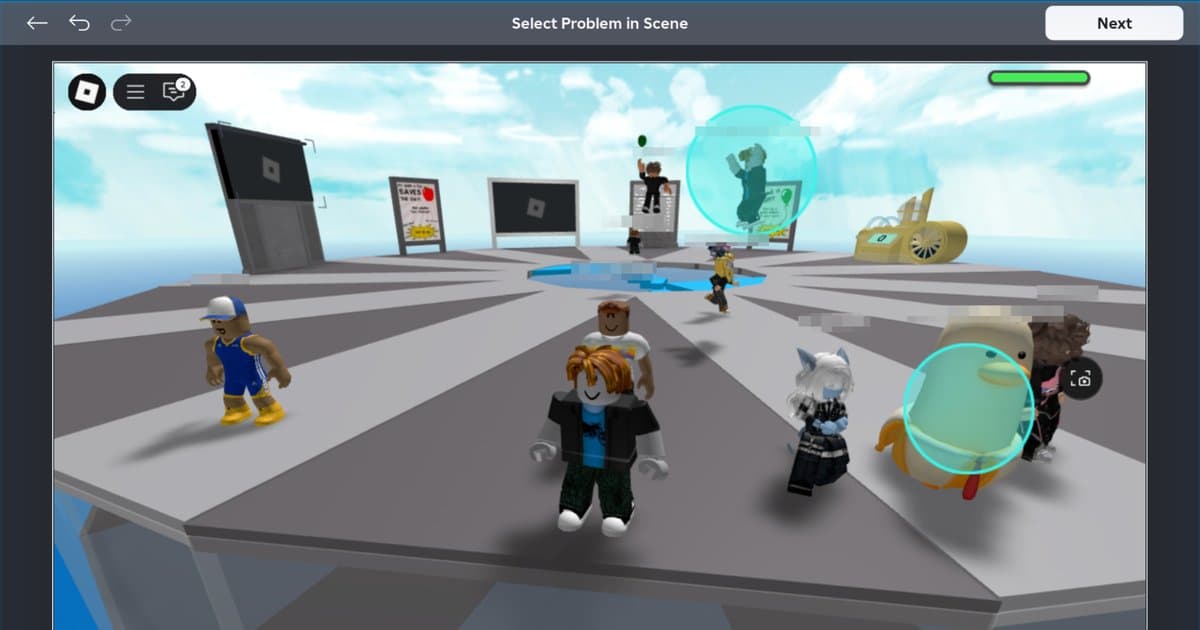
- 2Select the flag icon or the Report tabSelect the flag icon next to the player's name in the menu, or select the Report tab at the top of the menu. Roblox updates its interface from time to time, and one of its own safety pages describes this button as a shield icon, so look for whatever is labeled Report rather than a specific shape. If the report screen shows the scene and asks you to select the problem, click or tap the offending avatar or object to highlight it, then continue.
- 3Choose PersonUnder 'Experience or Person?', select Person. If the problem is the experience itself, for example inappropriate content built into the map, choose Experience instead and fill in the same form.
- 4Pick the right usernameOpen the 'Which Person?' drop-down and find the player. Display names can differ from usernames (the name that starts with @), so if several players have similar names, open the leaderboard with the Tab key and double-check. If the player is no longer in the list, use the 'already left' route in the table below.
- 5Choose the Reason for AbuseOpen the 'Reason for Abuse?' drop-down and choose the option closest to what actually happened: a cheating or exploiting reason for exploits, a scam reason for scams, a harassment reason for bullying, and so on. Option labels can change, so read the whole list before you pick. If several things happened, choose the most serious one that really happened and mention the rest in the description.
- 6Write a short, specific descriptionIn the Short Description box, write one or two sentences with the time, the place and the behavior, for example 'Around 8 pm in this experience, this player kept sending insults in chat for several rounds.' Do not include your password, your real name or any contact details, and leave out insults and exaggeration. If the same player did it repeatedly, saying how many times is useful information for the reviewer.
- 7Submit, then block or muteSelect Submit to finish. Then block the player so they cannot contact you again: in an experience, click their name on the leaderboard and choose Block, or find them under the People tab of the Esc menu. Roblox's help article says blocked users are not notified. For voice chat, Roblox's advice is to mute the person and submit an abuse report.
Player already left? Where to report each situation on Roblox (checked October 16, 2026)
| Situation | Where to report | Good to know |
|---|---|---|
| The player is still in your server | Roblox menu → Report tab → Person → Which Person? → Reason for Abuse → Short Description → Submit | The most precise route. Report right after it happens, while you are still there. |
| The player already left the server | Their profile → three-dot menu → Report. If they messaged you in app chat, report that chat instead | Roblox warns that a profile-only report does not show moderators what happened, so use the profile report's short description box to say when, in which experience and what they did. For custom rule breaks, contact the experience's moderators. |
| Harassment in app chat or private messages | Browser: gear icon at the top right of the chat window → three dots next to the name → Report. Mobile: (i) icon at the top right → select the user → Report Abuse | Report the messages first, then block. |
| Abuse in voice chat | Mute the player, then report through the Report menu in the experience | Roblox says it may record voice audio for safety and moderation, and deletes recordings after 7 days if no violation is reported or detected. |
| The experience itself is inappropriate | In the report form, choose Experience instead of Person, or use the red Report Abuse button at the lower right of the Description box on the experience's About page | Use this when the map or content is the problem rather than one player. |
| Breaking an experience's own rules (team-killing, spawn-camping and so on) | The process the creator lists, such as a ticket in the official group or Discord | Roblox says these may not be reportable through Report Abuse, and appeals for bans from that experience go directly to the creator. |
| Threats, child safety or other real-world danger | Report immediately, tell a parent or trusted adult, and contact local emergency services if needed | Some regions, including the EU, UK and Australia, have separate legal reporting forms linked at the bottom of Roblox's help article. |
What to do if you got scammed on Roblox
- Stop sending anything. Ignore offers like 'send a little more first and I will give it all back.'
- Report the scammer with Report Abuse. Roblox's trading-scam article says reporting is the best way to help stop it from happening again.
- If the deal happened outside the official Trade or Sell features, Roblox says it cannot enforce it or return your items or Robux, so keep future deals inside those features.
- If you shared your password or logged in through a suspicious link, change your password now and turn on 2-Step Verification; if a hacked account lost items or Robux, Roblox says you must contact support within 30 days to ask for help, and recovery is not guaranteed.
- Treat any offer of free Robux as a scam: Roblox says there is no such thing, whether the offer comes from a person, a video, a website or a game. Do not click the link; report the message.
- If you are a minor, tell a parent or guardian right away, and check any related payments together.
Keep a record: your own video for experience moderators and appeals
Roblox decides what happens with a report; a screenshot of the moment is attached automatically, but the in-experience report steps in the official help article do not include a step for attaching a video. So your own footage is useful in two places: when you tell an experience's creators or moderators about a custom rule break through whatever process they use, such as a Discord ticket, and as a personal record of what happened if you ever need to appeal a moderation action you believe was wrong. Roblox's built-in video capture records up to 30 seconds, does not record voice chat or other in-experience sounds, leaves the in-experience UI out of the video, and only starts when you tap the capture icon, so a moment that has already passed is not saved. DOR is a free Windows PC app. It detects the PC version of Roblox installed from roblox.com and records automatically from the moment you join an experience until you leave it; this is the Full Game Recording setting, on by default. While you are in an experience, press F8 to save the last 30 seconds as a separate clip, and change the length to 15, 30, 45 or 60 seconds in settings. Outside an experience, Blackbox Record (on by default) lets F8 save the moment that just happened as well. With default settings, PC sound including the game and your microphone are recorded together on one audio track. To share a moment, trim it in My Clips with Trim Section (requires signing in), use Export File, and send it the way the moderators ask. Send it only to the people who will review it, such as an experience's moderators or an appeals team, and never use it to call someone out publicly. Automatic file management (30 GB by default) removes older videos first when the limit is reached, so press Like on anything you need to keep. DOR does not detect the Microsoft Store version of Roblox or Roblox Studio automatically; use the screen recording hotkey (F7 by default, press it again to stop) for those, and trim or Like those recordings soon, because screen recordings are cleaned up oldest-first within a separate 5 GB allowance. For Studio specifically, see how to record Roblox Studio. For the same report-and-record approach in another game, see how to report cheaters in PUBG. DOR does not detect cheating or harassment in Roblox for you, and it has no effect on how Roblox handles a report.
 #Roblox