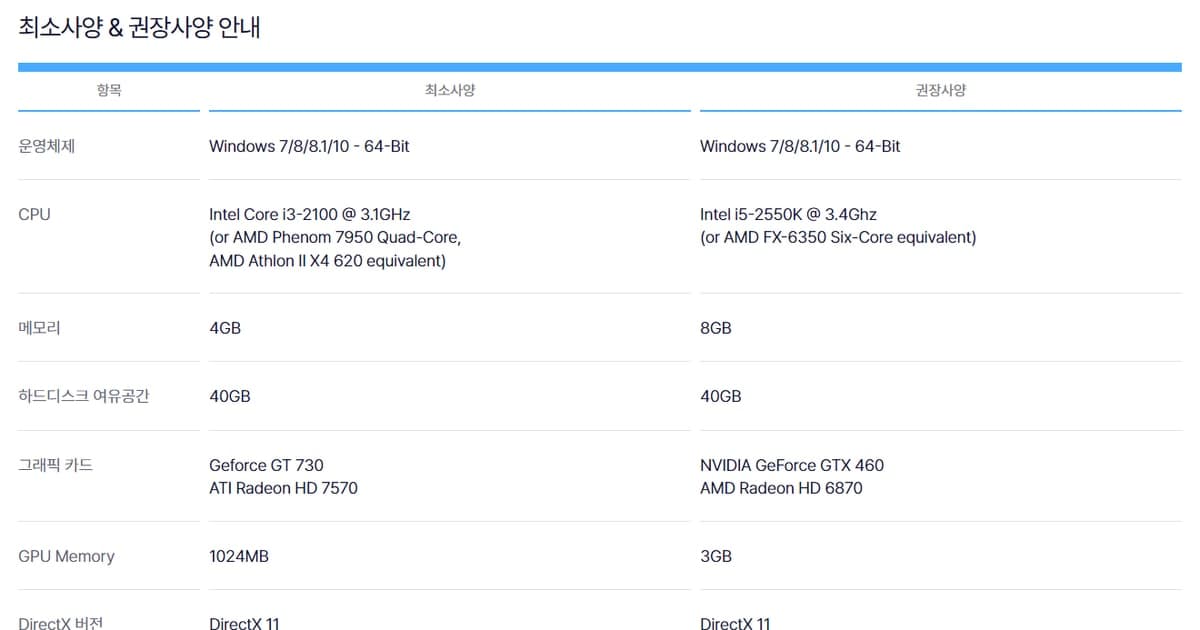
FC Online (EA SPORTS FC ONLINE) needs at least 40GB of free disk space: Nexon Korea's official download page states the storage requirement as “40GB or more of free space,” not as a fixed install size. The minimum specs are an Intel Core i3-2100, 4GB of RAM and a Geforce GT 730, and the recommended specs are an Intel i5-2550K, 8GB of RAM and an NVIDIA GeForce GTX 460 (checked September 28, 2026). Below you'll find the official table copied as written, what the 40GB figure really means, what to clean up first when your drive is short, and how to confirm your PC clears the bar. For the broader question of how much headroom you need to run a game and a recorder at the same time, see recommended specs for game recording.
FC Online Minimum and Recommended Specs (Official, Checked Sep 28, 2026)
| Component | Minimum | Recommended |
|---|---|---|
| Operating system | Windows 7/8/8.1/10 - 64-Bit | Windows 7/8/8.1/10 - 64-Bit |
| CPU | Intel Core i3-2100 @ 3.1GHz (or AMD Phenom 7950 Quad-Core, AMD Athlon II X4 620 equivalent) | Intel i5-2550K @ 3.4Ghz (or AMD FX-6350 Six-Core equivalent) |
| Memory (RAM) | 4GB | 8GB |
| Free hard disk space | 40GB | 40GB |
| Graphics card | Geforce GT 730 / ATI Radeon HD 7570 | NVIDIA GeForce GTX 460 / AMD Radeon HD 6870 |
| GPU memory | 1024MB | 3GB |
| DirectX version | DirectX 11 | DirectX 11 |
Bottom Line: 40GB Is a Free-Space Requirement, Not the Install Size
Translated from Korean, the official line reads “Required hard disk space: 40GB or more of free space is needed.” It tells you how much room the target drive needs before you start, not how big the installed game ends up. Nexon publishes no figure for the size on disk after installation, so this guide doesn't guess one. In the table, free disk space (40GB) and DirectX (DirectX 11) are identical for minimum and recommended, which means the two tiers only differ on CPU, RAM, graphics card and GPU memory. The operating system cell reads “Windows 7/8/8.1/10 - 64-Bit” for both tiers, and Windows 11 is not listed. Keep in mind that these numbers come from the Korean service operated by Nexon Korea. FC Online is run by different operators in other regions, so requirements there may differ; check your regional operator's official page. The official source is Korean-only, so the labels here are translated. Also, don't mix this up with the specs for other EA SPORTS FC titles on EA's site, which are separate games. If your PC sits near the minimum line and you still want to record matches, read how to record games on a low-end PC.
How to Free Up 40GB When Your Drive Is Short
- 1Check free space on the install drive — Open Settings > System > Storage and see how full the drive is. The bar to clear is not the size of the installer but whether 40GB or more is free. There's no official figure for how much updates add after installation, so leave some room beyond 40GB instead of cutting it close.
- 2Turn on Storage Sense — On the same Storage page, turning on Storage Sense automatically clears temporary files and the Recycle Bin. According to Microsoft, it only works on the system drive (C:), so if you plan to install the game on another drive such as D:, you'll need to clean that drive yourself.
- 3Review Cleanup recommendations — Even without Storage Sense, Cleanup recommendations lets you pick and remove temporary files, large or unused files, files synced to the cloud, and unused apps category by category. Scan the list once before deleting so nothing you still need gets removed.
- 4Budget separate space for recordings — If you plan to record matches, treat the game install and your recording storage as two separate budgets. Full-match recordings pile up with every game you play, so after freeing 40GB, keep extra room for videos and clear out old ones regularly.
- 5Restart the install from the official page — Once the space is free, download the client from the “PC client install (PC)” tab on the FC Online site's download/install page. Clicking download brings up a consent prompt for a high-speed download service, noting that your IP is shared with the solution provider for the service period, so read it before continuing.
Checklist: Does Your PC Meet the Requirements?
- Type dxdiag in the taskbar search box and select it to open the DirectX Diagnostic Tool.
- On the System tab, under System Information, confirm the DirectX version is DirectX 11 or later. Windows 10 and 11 already include the latest DirectX, and updates come through Windows Update.
- In the same System Information section, confirm your operating system is 64-bit and your memory meets 4GB (minimum) or 8GB (recommended).
- Compare your processor name with the Intel Core i3-2100 (minimum) and Intel i5-2550K (recommended) from the official table.
- On the Display tab, check your graphics card name against the Geforce GT 730 (minimum) and NVIDIA GeForce GTX 460 (recommended), and compare against the 1024MB and 3GB GPU memory lines.
- Make sure the drive you'll install to has 40GB or more of free space.
- If comparing by hand is a hassle, use the official page's check-my-PC-specs button: tick the consent box for spec collection, click the button, then run FCOSystemInfoCheck.exe from the warning bar at the bottom of your browser. The page states the collected data is used only to solve game launch and install problems.
- If your graphics driver is outdated, update it through the latest-driver links (DirectX, NVIDIA, AMD, INTEL) at the bottom of the same page.
If You Also Plan to Record Your Matches
FC Online is a supported game in DOR, a free Windows app that detects the game automatically, records the full match to mp4, and cuts your goals into automatic highlight clips. It uses NVIDIA NVENC hardware encoding by default and records game audio and your mic together. DOR hasn't published its own system requirements, so if you'll run the game and recording side by side, aim closer to the recommended specs than the minimum line, and set aside room for recordings separately from the install space. For how to keep and share goal clips, see how to record FC Online goals.
Sources and Verification Date
The spec table, the “40GB or more of free space” line and the operating system listing were checked on September 28, 2026 on the official FC Online download and install page by Nexon Korea, and spellings like “Geforce” and “Ghz” are kept exactly as published. Requirements can change with updates, so check the same page again before you install. The dxdiag steps follow Microsoft's guide to checking your DirectX version, and the Storage Sense steps follow Microsoft's Storage Sense guide.