“Convert .rofl to MP4” is a misleading shortcut. The replay contains data that a compatible League of Legends client uses to reconstruct the match, not a standard video stream, so a publishable file must be made by playing the replay and capturing its picture and audio.
Why playback capture is not file conversion
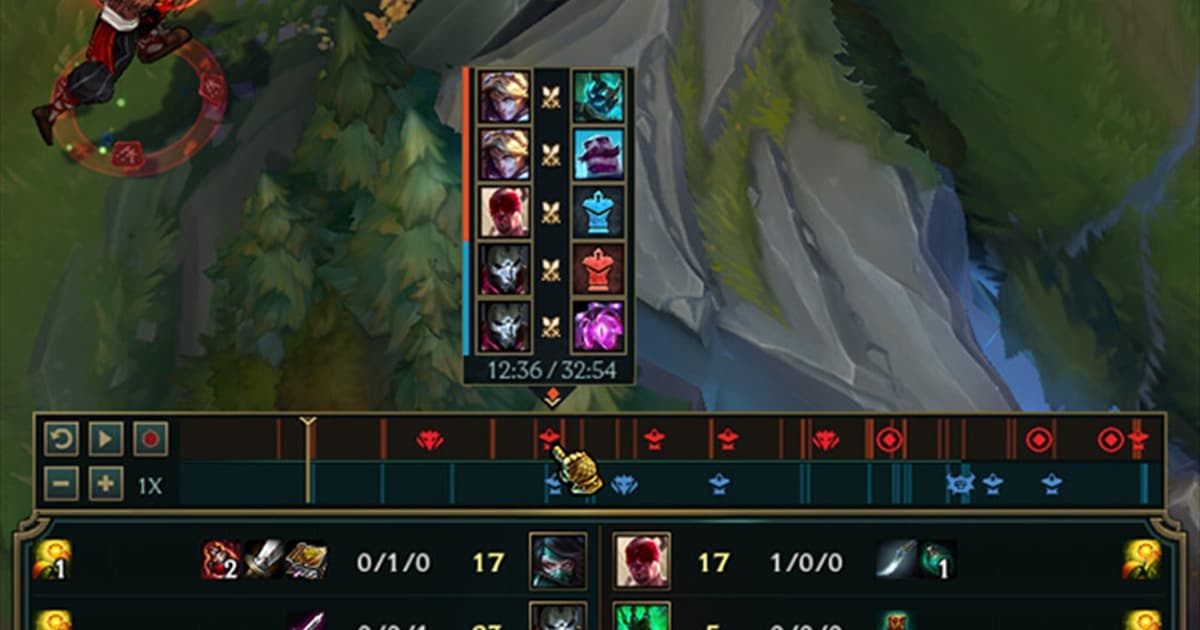
ROFL playback is particularly sensitive to the matching League patch. Keep replay data for camera changes and analysis, but capture the final scene at a stable setting such as 1080p60. Renaming the extension cannot recover a replay the official client no longer opens. For a ROFL archive, capture the Summoner’s Rift timeline, objective fights, and viewpoint changes in one pass before the patch changes. Make a clean share copy with spectator UI hidden and a separate review copy with the full timeline and vision controls, because the original replay may no longer open after a client update.
What each saving method produces
| Method | Output | Use it for |
|---|---|---|
| Keep replay data | A match the game client can reconstruct | Changing viewpoints and analysis |
| Record replay playback | A normal editable video | A selected moment from a past match |
| Record the next live match | Continuous video and audio from the start | Reliable archives and publishing |
| Rename the extension to MP4 | An unplayable file with a new name | Never |
Turn replay playback into a shareable clip
- 1Open the replay first — Verify the current game version plays it correctly. No recorder can capture a replay that does not open.
- 2Mark the shot list — Write down the round, time, camera view, and three to five seconds of padding around the action.
- 3Lock capture settings — Start with 1080p60 and make a twenty-second test of the game window, system audio, and optional microphone.
- 4Clean private UI — Hide friend lists, messages, notifications, and any identifiers that should not appear in the final upload.
- 5Capture and inspect — Play at normal speed, record the scene, then inspect frame pacing, audio sync, and the final seconds before editing.
Pre-capture checklist
- The replay plays to the end in the current client
- The capture source targets the correct game window
- Game and microphone meters move as intended
- The destination drive has enough free space
- Names, chat, and permission to publish were reviewed

What DOR can and cannot do here
DOR does not directly convert .rofl to MP4 or repair an incompatible replay. In a supported environment, you can record replay playback, or more reliably prepare DOR before future live sessions so the action is captured at play time. Compare the League of Legends hub, replay guide, game recording guide, free recorder comparison, and DOR automatic recording guide before choosing a workflow.
Use Riot’s current replay guidance
Riot’s official League of Legends replay documentation describes current replay features and limitations. Because replay usability can be tied to its patch, capture anything important while the matching client can still open it. Avoid uploading account data or replay files to unknown “converter” sites.