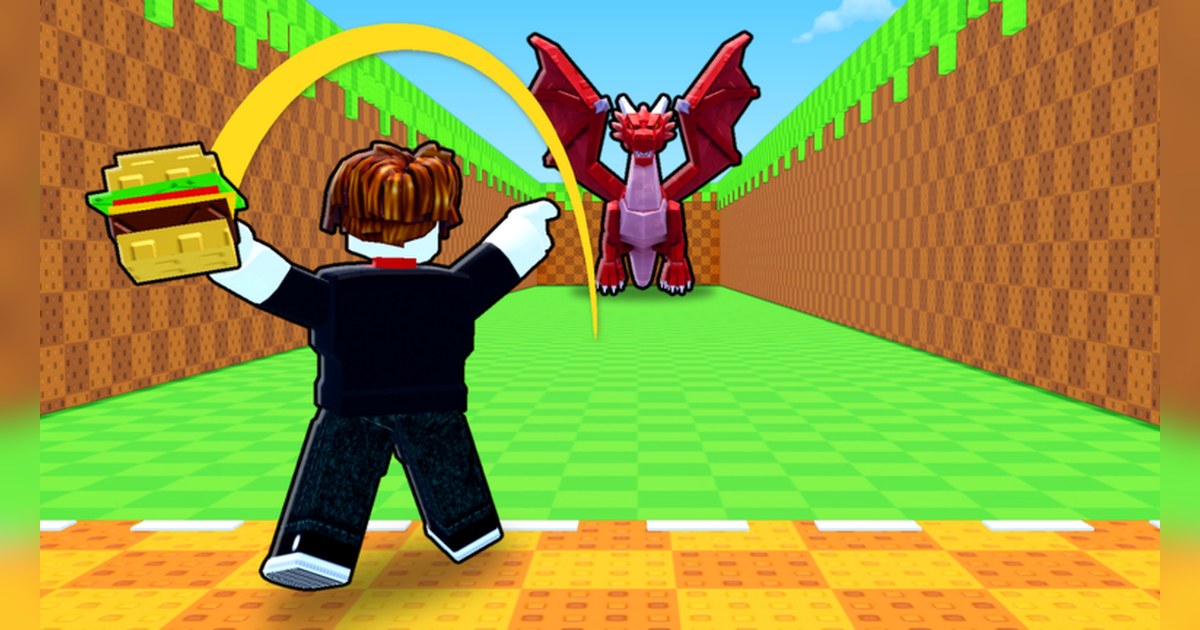
Throw Food For Animals does exactly what the name says. You throw food, and animals come for it.
The official How to Play list spells the game out in six lines: throw food as far as you can, attract and collect animals from different areas, earn money from your animals, buy better food to attract rarer animals, train on pull-up stands to gain Throw Power, and reach new areas with stronger and rarer animals.
One official thumbnail shows the idea in a single picture: a burger arcs over a row of stepped zones, grass, desert, lava and purple, and lands in front of a phoenix in the purple zone at the far end.
The experience is published by the Roblox group Goofy Chupacabra and was created on September 18, 2026. Its genre is listed as Simulation, Tycoon, and each server holds up to 5 players. We checked the official Roblox charts on PC around 12:15 UTC on November 3, 2026.
It had about 45.1 million visits, about 140,000 people playing at that moment, about 60,000 favorites and a like ratio of roughly 94 percent. It was third in worldwide Top Trending and seventh in Top Playing Now.
By country, it was first in Top Trending in Indonesia, second in South Korea and Germany, and 18th in the United States. The experience page shows it was last updated on November 3, the same day we checked.
The name currently starts with a pumpkin tag, [🎃], and tags like that can change between updates, so search for Throw Food For Animals and check the creator. This guide sticks to what the official description, the experience page and the game pass text confirm. Spawn odds for each animal, food price lists and code lists from unofficial sites are left out.
The short version: money buys better food, pull-ups buy distance, and both lead to rarer animals
Read the official description closely and you will see two separate roads to rarer animals. Knowing which one you are on at any moment saves a lot of wasted time. The first road is money.
The animals you collect earn money, and money buys better food, which the description says attracts rarer animals.
The x2 Cash game pass text, Double cash from every animal, confirms that income comes from each animal you own, so early on, every new animal you collect adds to the money for your next food. The second road is strength.
Training on pull-up stands builds Throw Power, and the x2 Training Power pass text, Double XP on every pull up, shows that every pull-up adds experience toward it. More Throw Power is what lets you reach new areas, and the description says new areas hold stronger and rarer animals.
The two roads push each other forward: better food brings better animals, better animals pay for the next food, and the pull-ups decide how far that food can fly. When your income stalls, check whether the food you can afford keeps attracting the same animals.
When new animals stop showing up, look at Throw Power and the next area instead. A long throw and a sudden rare arrival are also the moments you will want to watch back, so a smooth frame rate helps. If Roblox stutters on your PC, run through Roblox FPS boost settings once before a long session.
Starting Throw Food For Animals: a first session in this order
- 1Find the right experience by its creatorSearch Throw Food For Animals on Roblox. On November 3 the top result was the one made by Goofy Chupacabra, with a pumpkin tag [🎃] in front of the name. If your Roblox language is not English, the name may appear translated, so the creator name is the safer check.
- 2Join on PC and get your friends into one serverEach server holds up to 5 players. To play together, have friends join the server you are already in from their friends list. You can check whether private servers are available in the Servers tab on the experience page. If Roblox closes the moment you join, start with fixing Roblox crashes on PC.
- 3Throw as far as you can and collect what comesThe first How to Play line is throw food as far as you can. Throw, watch where the food lands, and collect the animals it attracts. Every animal you own earns money, so in your first session, growing the number of animals is what builds the budget for the next step.
- 4Spend your money on better foodUse the money your animals earn to buy better food. According to the description, better food attracts rarer animals. The first throw after you buy a new food is the moment nobody knows what will show up, which makes it worth keeping on video.
- 5Train on pull-up stands to reach new areasPull-ups build Throw Power, and the game pass text shows each pull-up earns experience. You need that power to reach new areas, which the description says hold stronger and rarer animals, so alternate between buying food and training to keep both roads moving.
What the official sources confirm, and what to keep on video
| Element | What the official sources confirm | When to keep it on video |
|---|---|---|
| Throwing food | The first How to Play line: throw food as far as you can. | Keep the whole arc in one cut, from the throw to where it lands. |
| Collecting animals | You attract and collect animals from different areas. | The first time a new animal walks up to your food. |
| Money | You earn money from your animals; the x2 Cash pass doubles cash from every animal. | Your income before and after a rare animal joins. |
| Better food | Buying better food attracts rarer animals. | The first throw with a food you just bought. |
| Throw Power | You gain it by training on pull-up stands; the x2 Training Power pass doubles XP on every pull up. | The throw that finally reaches a new area. |
| New areas | They hold stronger and rarer animals; one official thumbnail shows grass, desert, lava and purple zones in a row. | Your first look at a new area and what lives there. |
| Servers | Up to 5 players per server, genre Simulation (Tycoon). | Your friends reacting when someone pulls in a rare animal. |
Before you start a session
- You joined Throw Food For Animals made by Goofy Chupacabra.
- Your friends are joining the same server, up to 5 people.
- You decided whether this session goes into buying food or pull-up training.
- You checked the Updated date on the experience page for new content.
- You will ask friends before posting clips that include their voices.
Keep the first rare animal on video with DOR
Install DOR, a free Windows PC app, and recording starts automatically when you launch Roblox and join Throw Food For Animals.
When you leave the experience, everything since you joined lands in My Clips as one video, so the long stretch of throwing and training, the first rare animal walking up and the reaction that followed are all in one file.
Game audio and your microphone are captured together on one track, so your friends shouting when something rare appears stays in. Open My Clips, find the moment, trim that section and choose 16:9, 9:16 or 1:1.
Moments from several sessions can be joined into one video in DOR Studio (dor.gg/studio), where you add effect templates such as Shake Zoom and Punch Zoom, a Glitch transition, text, background music and volume, then export an mp4 or share a dor.gg link that friends can play straight in a phone browser.
Simulator sessions tend to run long, and older videos are cleared only when the full gameplay storage share (5GB by default) is exceeded, while your latest recordings and liked videos stay. The steps for sending a link are in how to share Roblox gameplay videos.