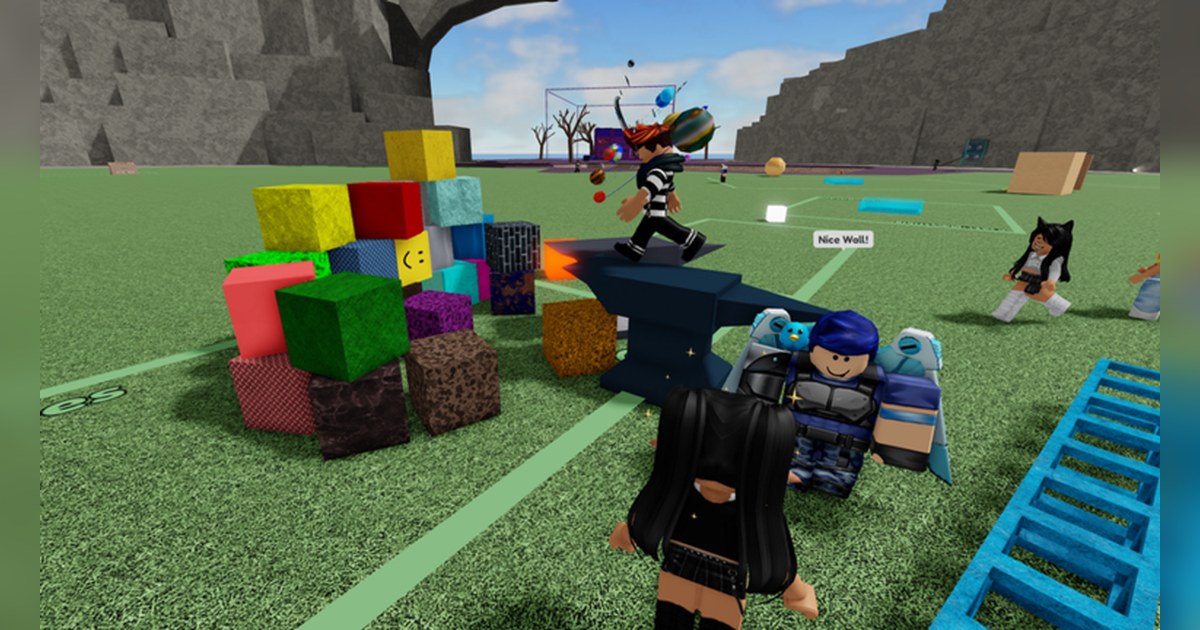
Fling Things and People comes with a very short description on Roblox: a place where you can play with or fling various objects and players. That line is the whole pitch. You walk into a big shared map, grab whatever is close, a block, a toy, a friend, and send it flying.
It plays more like a hangout than a match, which makes it an easy pick when a group of friends just wants to mess around together. The experience is made by the Roblox user Horomori and was created on June 16, 2021.
Its genre is listed as Simulation, Physics Sim, and each server holds up to 25 players. We checked the official Roblox API and the PC charts at 12:36 UTC on November 3, 2026.
It had about 3.7 billion visits, about 43,000 people playing at that moment, about 2.6 million favorites and a like ratio of roughly 80 percent. It ranked 22nd in Top Playing Now, 12th worldwide in the Fun with Friends chart and 16th in that chart in the United States.
Because the description says so little, this guide leans on the creator's own game pass texts, which spell out how far a grab reaches, how long it takes to break free, the toy limit, houses and coins.
Everything below comes from the official page and those pass texts, and the numbers move quickly, so read them as a snapshot from that moment.
The short version: grab, fling, and pick friends who are in on the joke
Everything in Fling Things and People starts with a grab. The Farther Reach pass text says a normal grab reaches objects and players up to 20 studs away, 30 with the pass, and that the pass also changes the look of your Grab Line.
The Multi-Color Line pass makes that Grab Line nine colors at once instead of one. Once you hold something, you can play with it or fling it.
Players get the same treatment as objects, which is the whole joke, but the person being held has a way out too: the Escape Faster pass text says breaking free from someone's grasp takes 12 seconds or less normally and 4 seconds or less with the pass.
Beyond flinging, the pass texts mention three more systems. Toys: your personal Toys Limit is 100, or 200 with a pass. Houses: you can claim a house, other players can be on a house's list or become a Requester, a house has its own limit of 600 toys, and there are house save files.
Coins: Coin Machines give you coins every time you use one. The best sessions mix all of it: friends in one server, a house to come back to, and plenty of flinging in between. Physics looks best at a steady frame rate, so if Roblox stutters on your PC, run through Roblox FPS boost settings before a long session.
Your first session in Fling Things and People, in this order
- 1Find the right experience by its creatorSearch Fling Things and People on Roblox and check that the creator is Horomori. If your Roblox language is not English, the title may show as a translation, so the creator name is the safer check.
- 2Get your friends into one serverServers hold up to 25 players, and you can check whether private servers are available in the Servers tab on the experience page. One person joins first, then the others join that friend from their friends list while the server still has room, so everyone lands in the same server. If Roblox closes as soon as you join, start with fixing Roblox crashes on PC.
- 3Practice grabbing on objects firstStand near a few objects and practice grabbing and letting go. A normal grab reaches 20 studs, so if nothing happens, step a little closer. Fling a toy across the map a few times to learn the timing before you try it on a friend who is moving.
- 4Fling friends who are in on itAgree on the rules before you start: who is fair game and when to stop. A held player can break free within 12 seconds, so the struggle itself is often the funniest part. If a stranger keeps grabbing you, switch servers or use the Roblox block feature instead of firing back.
- 5Set up a base with a house and coinsClaim a house so your group has a place to meet. Houses can be saved, and Coin Machines pay out coins every time you use one. Put toys out during quiet moments, up to 100 by default, and they are ready for the next round of chaos.
What the official texts confirm, and the moment worth keeping
| Element | What the official texts confirm | Moment worth keeping |
|---|---|---|
| Grabbing | Grab objects and players from up to 20 studs away; the Farther Reach pass raises it to 30. | A long range grab that snatches a friend mid run. |
| Flinging | The description: a place where you can play with or fling various objects and players. | The full arc of a fling, from release to landing. |
| Breaking free | A held player escapes in 12 seconds or less; 4 seconds or less with Escape Faster. | Your friend wriggling free right before the throw. |
| Grab Line | Farther Reach changes how it looks; the Multi-Color Line pass makes it nine colors at once instead of one. | A group shot with everyone's lines in different colors. |
| Toys | Personal Toys Limit of 100, raised to 200 with Raised Toys Limit. | A pile of toys coming down all at once. |
| Houses | Houses can be claimed, keep a list of players and Requesters, hold up to 600 toys and have save files. | The first tour of the house your group set up. |
| Servers | Up to 25 players, avatars converted to R6. | The whole server reacting to one huge fling. |
Before you start recording
- You joined Fling Things and People made by Horomori.
- Your friends are in the same server, up to 25 people.
- Everyone agreed on who can be flung and when to stop.
- In DOR settings you picked 1080p at 60fps for smoother fling arcs; both are on the free plan.
- You will ask friends before posting clips that include their voices or names.
Keep the funniest fling with DOR
Install DOR, a free Windows PC app, and recording starts automatically when you launch Roblox and join Fling Things and People. When you leave the experience, everything since you joined lands in My Clips as one video, so you never have to guess when the funny moment is coming.
Game audio and your microphone are captured together on one track, so your own reactions stay in the clip along with the game sound. Open My Clips, find the moment, trim that section and choose 16:9, 9:16 or 1:1. For a vertical cut, follow making a 9:16 game video for Shorts.
Flings from several sessions can be joined into one video in DOR Studio (dor.gg/studio), where you add effect templates such as Shake Zoom and Punch Zoom, a Glitch transition, text, background music and volume, then export an mp4 or share a dor.gg link that friends can play straight in a phone browser.
Older videos are cleared only when the full gameplay storage share (5GB by default) is exceeded, and your latest recordings and liked videos stay. Sending the link is covered in how to share Roblox gameplay videos.