To get better at Rainbow Six Siege, pick one thing to fix, review your own match to find the cause, drill only that one thing in an official practice mode, and check it in your next match. This guide covers PC only, is verified as of October 2, 2026, and does not promise a higher rank or win rate. The official tools are Match Replay, Shooting Range, Field Training and Map Training, and if you want a replay as a video file, start with how to turn an R6 replay into a video.
The short answer: one fix, one proof
The order matters more than any single tool. Choose one fix from the match you just played, practice it somewhere you can repeat the same situation, then look for it in your next match. Judge a fight by the choices you made, not by whether you won it. When the moment you want to revisit sits inside a long match, trim only that section so it is quick to rewatch. The table below separates what each official tool shows from what it cannot show.
A six-step feedback loop
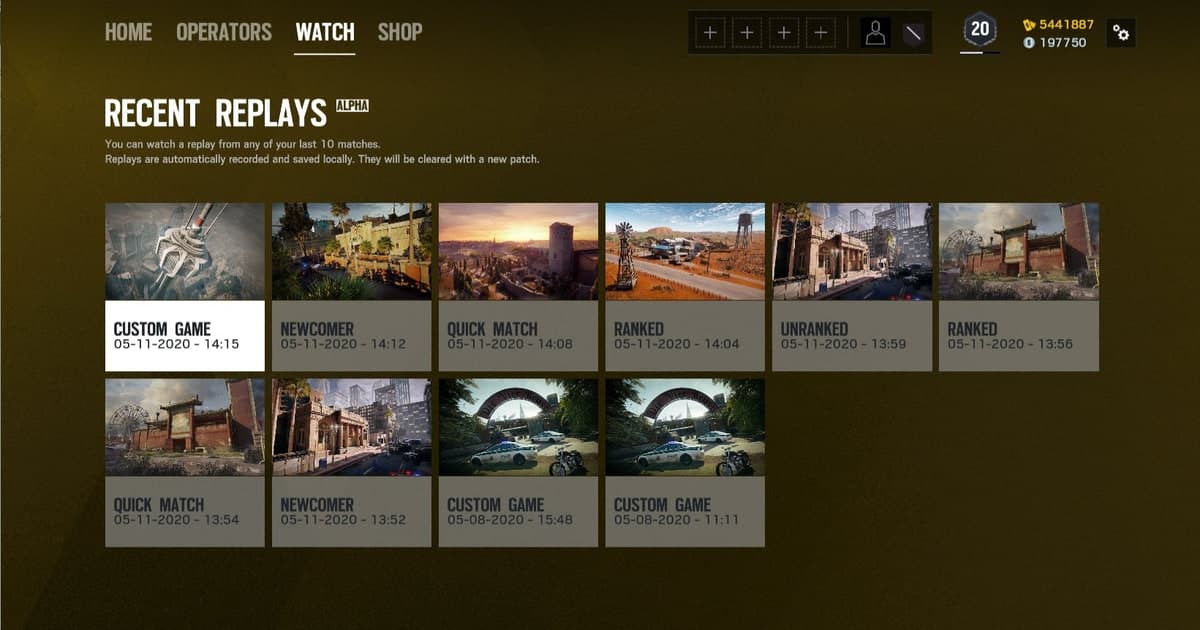
- 1Record the match — Review only starts if the match still exists. Match Replay is on by default but has a storage limit and overwrites the oldest matches first, so keep a full-match recording of any match you plan to review. To tell matches apart, note the Match ID shown at the top left of the screen when you start a replay from Watch.
- 2Pick one match to review — Watching several matches at once scatters what you find. Choose the one loss that bothered you most, or the one fight you feel decided the round. You do not need to watch the whole match, just the stretch around that fight.
- 3Watch with three questions — Use the game's own terms. First, which Operator and gadget did I use in this fight, and which utility did I use or skip? Second, where was I standing and looking just before the fight, and how far was I from my team? Third, was there a way to avoid the fight instead of taking it? Look at the choice, not the result.
- 4Choose one thing to fix — Pick just one of those answers and write it as a single sentence you can check in your next match through your actions, such as 'I did not use my utility before the fight'. Changing sensitivity or aim numbers is outside the scope of this guide.
- 5Repeat it in an official practice mode — Match the tool to the fix. Use Shooting Range with the Recoil, Damage and Aiming lanes for weapon behavior, Map Training for room positions and routes, Operator Guides for how an ability works, and Field Training for a light warm-up. A Versus AI playlist has been introduced in season notices, but check the current list in game. The goal is to repeat the same situation many times.
- 6Check it in your next match — In the next match, keep only that one fix in mind, then review the same scene afterward the same way. If it improved, move on to the next single fix; if not, change the practice tool or split the question into something smaller. Do not judge it from one or two results.
What each official practice and feedback tool covers, and where it stops
| Tool | What it gives you | Limits to check |
|---|---|---|
| Match Replay | Records PvP matches automatically so you can watch past matches from Watch on the main screen. A May 2020 developer blog describes viewing from first-person or top-down and from any player and angle. Viewer controls are listed in Customise Controls under Spectator Cameras & Match Replay. | Saved on PC only, with no console access. The help article says up to 12 matches while the June 2026 Y11S2 notice says 30 on PC, so check in game; the oldest matches are overwritten first. Official documents do not describe exporting a replay as a video file. |
| Shooting Range | The Recoil lane measures weapon recoil spread and the Damage lane shows per-bullet damage by body part. The Aiming Lane, added in Y8, uses moving targets to test how recoil and damage carry over to real situations, and every Operator is available whether or not you have unlocked them. | It teaches weapon behavior, not which fight you chose or where you were standing. The Learn Area entry in the Play Menu comes from the Y6 notice, so check the current menu in game. |
| Field Training | The Y11S3 (Operation Split Fire, September 2026) notice introduces it as a playlist for practice and warm-up in a lower-stress environment. | Check the maps and Operators currently on offer in game. It is a practice space, not a tool that shows the mistakes in your own match. |
| Map Training | Introduced in Y8S4, Landmark Drill teaches the position of key rooms and how to move between them, and Target Drill teaches common routes to a bombsite and common enemy positions. Landmark Drill also appears in the March 2026 Y11S1 notice. | It builds map knowledge, but you still have to find the moments in your own match where you did not use it. Check the current setup in game. |
| Operator Guides | Short tutorials explaining each Operator's ability, gadget and attack or defense utility, available from the Operators menu or the Start menu during a match. The accessibility help says the Tutorial can be replayed from the Training tab of the Playlists tile. | They explain how an ability works, not when you should have used it. The entry path is described as of the Y6 season, so confirm it in game. |
| Career > Statistics | The Statistics tile on the Career tab shows play history such as matches won and your most-played Operator. | It is a result summary, so it cannot show the choice you made in one fight, and Ubisoft says it cannot reset your statistics. |
| Recording your own match (DOR full-match recording) | The whole match is kept as an mp4 so you can rewatch your fights, your position and the timing of calls with the same picture and sound. | R6S has no automatic highlight clips, so you have to find the moment to review yourself. Videos use disk space, so clear matches you have finished reviewing. |
Pre-review checklist
- Check that Match Replay is on. The help article points to Settings > Options > General, but the Options menu was redesigned in Y11S3, so the location may differ.
- Keep the match you want to review in at least one place, as a full-match recording or in Match Replay.
- Choose only one match to review at a time.
- Write the fix as one sentence you can check through your actions in the next match.
- Pick one official practice tool that fits the fix and repeat the same situation.
- Clear finished videos and keep only the short sections you will keep rewatching.
Keep your matches as video with DOR
DOR is a free Windows app that automatically records a full Rainbow Six Siege match and saves it as an mp4. Use Match Replay as the official viewer for changing viewpoints, and use a DOR video to keep a match before the oldest saved ones are overwritten. R6S supports full-match auto recording only and does not create automatic highlight clips such as kills, so you find the fight to review in the app library, set a start and end to trim it, and save it in 16:9, 9:16 or 1:1. A trimmed section can be shared with teammates through a dor.gg link, which makes it easy to talk about the same scene. DOR records your game sound and your microphone together, so you can hear when a call happened alongside what you said, and on an NVIDIA graphics card it records with NVENC hardware encoding. Check supported features on the Rainbow Six Siege hub, and for saving a clutch moment see how to record R6 Siege clips.
Official sources and verification date
Verified as of October 2, 2026. For how Match Replay saves and plays back, see the Ubisoft help article on using Match Replay; for the changed storage count, the Y11S2 Operation System Override season notice; and for Field Training and the Options menu redesign, the Y11S3 Operation Split Fire season notice. The Shooting Range, Map Training and Operator Guides descriptions come from the Vector Glare, Dread Factor, Deep Freeze and Silent Hunt season notices, and the current setup may differ from those notices, so check the current list in game. The two official sources give different Match Replay storage counts.