Huss Valley is one of the fastest growing Roblox experiences of fall 2026. It is made by the Huss Valley Official group and was created on August 31, passing about 160 million visits in under two months. On October 20 it showed about 278,000 favorites and roughly 59,000 people playing at that moment, with about 181,000 likes against about 25,000 dislikes for roughly 88 percent positive votes. A server holds up to 30 players and the last update was on October 18. That day it was 17th in Top Playing Now in all 15 chart settings we checked, and it appeared on the Fun with Friends lists for Taiwan, Germany, Japan, the US, Korea and more. The country breakdown is in popular Roblox games right now. What stands out is the description. The whole text on the experience page is RUN!!, and there are no official badges yet. So this guide uses only what the official page actually shows, namely the genre, server size, the game pass list, the event schedule and the official thumbnail, to explain what the experience is. Rule write ups from fan wikis and stories about where the meme came from are left out because they cannot be confirmed.
The short version: there is little official text, so record your first match and learn the running and chasing yourself
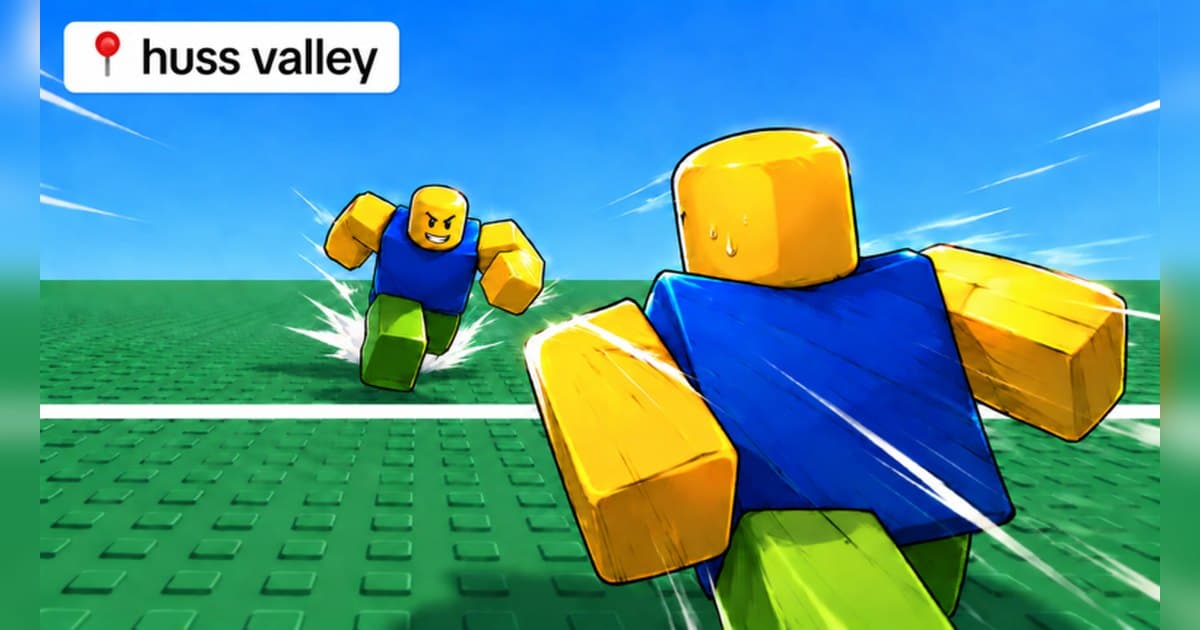
Put the facts on the official page together and the shape of the experience appears. First, the description is one word, RUN!!, which reads as running away being the core. Second, Roblox classifies it as action, under battlegrounds and fighting. Third, the game pass list. Next to VIP, a Halloween Premium Pass, a Premium Pass and double XP, it lines up weapon cosmetics such as a Selfie Stick Knife, a Football Knife, a Ghost Scythe, a Clone Dagger and a Spoon Dagger. Since the cosmetics are mostly knives and daggers, it looks like a chase where the armed side hunts and the other side runs, and the double XP pass suggests you level up as you play more rounds. Fourth, the official thumbnail shows one character sprinting across a wide green field with another chasing close behind. Fifth, the event schedule: a mid week admin event on October 6, the Halloween event starting October 17, then Part 2 on October 20 and Part 3 on October 24. Taken together, Huss Valley looks like an experience where up to 30 players repeat short rounds of chasing and running while earning XP. The detailed rules are not written on the official page, though, so the most accurate way to learn them is your own first match, and nothing teaches the rules faster than rewatching a recording of it. If you have not recorded Roblox before, start with how to record Roblox gameplay.
Starting Huss Valley: do it in this order
- 1Join with the PC version of RobloxOpen the experience in the PC version of Roblox from roblox.com. With DOR installed, recording starts with nothing to press, so even your first, rule free match is on video.
- 2Follow the on screen prompts in your first matchThe description has no rules, so in your first match watch the on screen prompts and how other players move, and see how the chaser and the runners are decided.
- 3Rewatch your first matchAfter the round, open the recording and look at when the chase started and where you lasted longest. Rounds are short and repeat, so a few rewatches are enough to get the feel.
- 4Play with friends on the same serverWith 30 players per server it is easy to bring a group. If your usual group is offline, try the Roblox group finder.
- 5Come back on the Halloween update datesPart 2 is scheduled for October 20 and Part 3 for October 24. Sign up for the event notification on the experience page and you can join the moment it opens.
Huss Valley moments worth keeping, and what officially backs them
| Moment | What the official sources confirm | How to keep it |
|---|---|---|
| Your first match while learning the rules | The description is only RUN!!, so you learn the rules by playing. | Record the whole first match and rewatch it to learn the flow. |
| A round where you outran everyone | The description puts running front and center. | Use a 60 second clip so it covers the chase from start to finish. |
| Catching someone as the chaser | Game passes include knife, dagger and scythe cosmetics. | Press the clip hotkey right after the catch to keep the chase before it. |
| Your first match in Halloween Part 2 or 3 | Part 2 is set for October 20 and Part 3 for October 24. | Keeping the first match on update day makes comparisons easy. |
| A chase with friends on the same server | Servers hold 30 and it appears on Fun with Friends lists. | Keep your friends' voices on the same track for every scream. |
Before you join Huss Valley
- You are using the PC version of Roblox from roblox.com.
- You checked the event list on the experience page for the next Halloween update.
- The description has no rules, so you treat your first match as a learning match.
- You know how your friends will join the same server.
- You will ask before posting videos with other players' voices.
Keep every Huss Valley chase with sound using DOR
All you do is launch Roblox. There is no button to press and nothing to set up: DOR, a free Windows PC app, recognizes the PC version of Roblox and starts AI auto recording the moment you join Huss Valley. When you leave to the home screen, that session lands in your library as one mp4. Game audio and your microphone are recorded together on one track, so the screaming while you chase and get chased stays in the file, and AI voice notes log what was said with timestamps so you can jump back to the loudest moments. To keep the chase you just escaped on its own, press the clip hotkey and the last 30 seconds are saved as a clip, with 15, 30, 45 or 60 seconds to choose from. Recording defaults to 1080p at 30fps, with 60fps available. Pick the clips you saved and press Create highlight, and the AI highlight joins them into one video; trim any part to 16:9, 9:16 or 1:1 and share it with a single dor.gg link. DOR Studio opens right in your browser for text, background music and effect templates. If you want duels decided by aim, see the Murderers VS Sheriffs guide.
 #Roblox