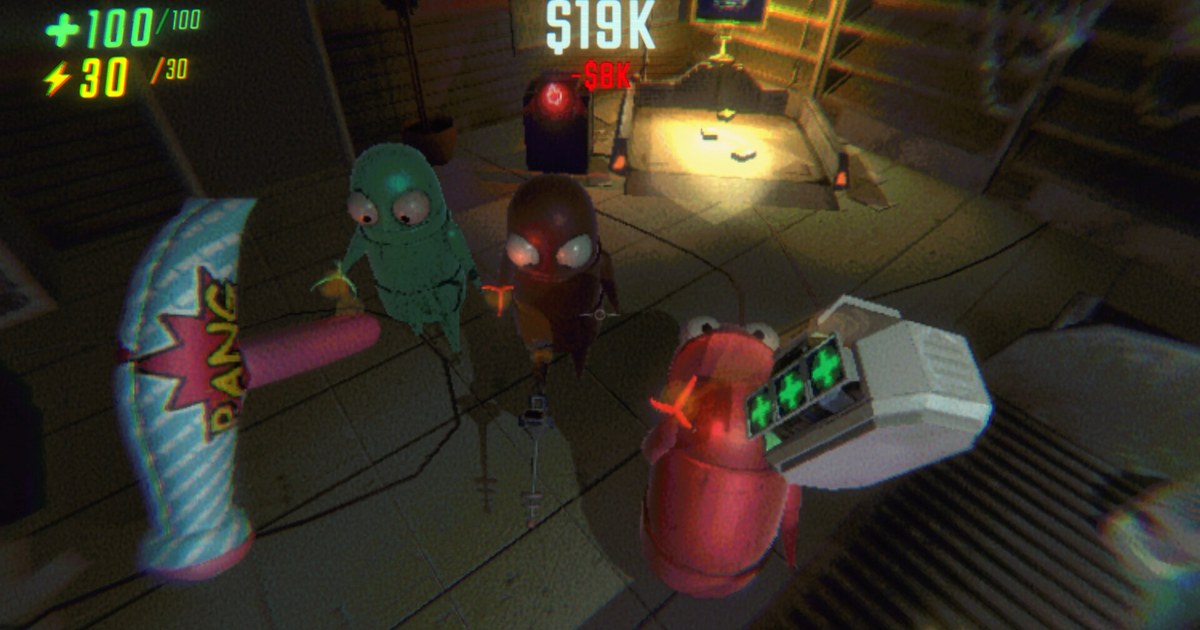
R.E.P.O., semiwork's online co-op horror game for up to six players, got its fourth major content update on October 29, 2026.
Version 0.5.0, The Sunstone Update, is built around four headline changes: a brand new map called Sunstone Valley Resort, a new enemy called the Pony, gamepad support, and localization in 21 languages. A week later, on November 5, the v0.5.1 patch followed with controller and translation fixes.
This guide walks through both sets of official patch notes, explains which changes actually affect how your group plays, and lists what to check before your first run on the new map.
As of November 10, 2026, R.E.P.O. costs US$9.99 on the US Steam store with no discount running, and there is no DLC: owners get 0.5.0 and 0.5.1 as regular Steam updates. It is Windows only, and the store spec sheet lists 1 GB of storage.
R.E.P.O. is still in Steam Early Access, so details can shift with later patches; everything below is accurate as of November 10, 2026. For how the game gets recorded and what DOR does with it, see the R.E.P.O. game page.
What The Sunstone Update and v0.5.1 changed (as of November 10, 2026)
| Area | What changed | What it means in a run |
|---|---|---|
| New map: Sunstone Valley Resort | Added in v0.5.0 as a whole new map. | Nobody in your crew knows the room layout or the extraction spots yet, so treat the first few runs as scouting trips. |
| New enemy: Pony | Added in v0.5.0. In v0.5.1 the developers adjusted its riding position and stopped the Pony from colliding with its rider. | The notes give no behavior details, so you learn it by meeting it. Recording that first encounter lets the group break it down afterward. |
| Gamepad | Support added in v0.5.0. v0.5.1 added gamepad binds for chat, push to talk and toggle mute, gamepad text input for chat, a rotation sensitivity setting and a higher maximum aim sensitivity. | Steam lists full controller support plus DualShock and DualSense support, and you can tune object rotation separately from aim. |
| Localization | Localization in 21 languages arrived in v0.5.0. v0.5.1 filled in missing translations and fixed custom translations that only applied when the game was set to English. | Steam now lists 21 languages including English, among them French, German, Spanish, Japanese, Korean, Thai and both Chinese scripts, with full audio in English only. |
| New rooms in older levels | Headman Manor gets 5, Swiftbroom Academy 4, Museum of Human Art 4 and McJannek Station 5, for 18 in total, plus one new Museum music track. | Familiar maps can still surprise you, so do not sprint ahead alone on an old route. |
| New items | Human Gun, Human Adventure Cable and Recharge Orb. | When one shows up in the shop, agree on who buys it so the team does not double up. |
| Shop | A mirror now sits next to the Cosmetic Machine, holding an item up to the Shopkeeper can earn a discount or get it destroyed, and the map shows what is waiting at the extraction point while you shop. | The discount is a gamble, so try it with items you can afford to lose. |
| Quality of life | An expression wheel with previews, adjustable Grab Lead for grabbing and melee, 10 new cosmetics, and microphone input that stays live between levels. | Your voice no longer cuts out during level loads, so the chatter carries straight into the next stage. |
Three things to settle before the first run: language, controls, route
Language comes first if anyone in your group would rather not play in English. You can now switch the game to one of 21 languages, but this guide uses the English names from the patch notes, which is also what you will see if you stay on English and what most guides and videos will use.
Controls come next. If you play on a pad, bind push to talk and mute before you load in, because v0.5.1 is the first version that lets you do that from the controller.
If you play on mouse and keyboard and melee felt like it was swinging ahead of your aim after v0.5.0, this may be why: the v0.5.1 notes list a fix for melee Grab Lead being accidentally switched on by default for mouse and keyboard. Then there is the route.
Sunstone Valley Resort is new to everyone, and the older levels picked up 18 new rooms between them. Two changes make scouting less punishing.
If there are not enough valuables left in a level to finish an extraction, smaller valuables now spawn a short distance away from players, a change aimed at runs that used to stall short of the quota.
And a dead player possessing their death head can now discover valuables, which gives whoever went down first something useful to do.
How to get set up for The Sunstone Update
- 1Get everyone on the same versionCheck in your Steam library that R.E.P.O. has finished updating, and make sure everyone you play with has pulled v0.5.1 from November 5. The new buttons at the lower right of the main menu open the latest news and the official Discord and YouTube channels.
- 2Pick your languageOpen the settings and switch languages if you prefer something other than English. If you saw English mixed into menus on v0.5.0, look again after v0.5.1, which added missing translations.
- 3Bind pad buttons and tune sensitivityConnect your controller, then map chat, push to talk and mute to pad buttons. Set aim and rotation sensitivity separately, and adjust Grab Lead for grabbing and melee one at a time. Since v0.5.1 you can also unbind chat, expression and voice keys you never use.
- 4Walk Sunstone Valley togetherOn the first run, keep the group together while you learn the rooms and extraction points instead of splitting up. If the Pony shows up, back off and watch how it moves before anyone tries to deal with it.
- 5Pull the moments out of your recordingAfter the run, find the first Pony encounter or the moment someone opened a new room, and trim it. To get your friends' voices into the same file, see recording game sound and mic together; for trimming and sending, see sharing R.E.P.O. funny moments.
Post update checklist
- Everyone in the lobby is on v0.5.1, the November 5 patch
- Your language is set, and shop and item names read the way you expect
- Pad players have push to talk and mute on controller buttons
- Mouse players have checked that melee Grab Lead is set the way they want after the v0.5.1 default fix
- If you record, you said a few words before the first run and confirmed your voice is in the file
Record your first trip to Sunstone Valley with DOR
DOR is a free Windows app for recording games. When you launch R.E.P.O., DOR detects it and records the full session from launch to exit, and the recording lands in My Clips. Game sound and your mic go onto one track, so your friends' screams over proximity chat and your own voice end up in the same video.
Reactions from the first week of an update, like getting lost on a new map, running into the Pony for the first time or watching the Shopkeeper destroy the item you held up, will not happen the same way twice, so keep DOR running when you load in.
In My Clips, trim the part you want and save it as 16:9, 9:16 or 1:1. In DOR Studio (dor.gg/studio) you can merge several moments, add an effect template such as Shake Zoom and some text, then export an MP4 or share a dor.gg link. The sharing flow is covered in sharing R.E.P.O. funny moments, and everything DOR does for this game is on the R.E.P.O. game page.