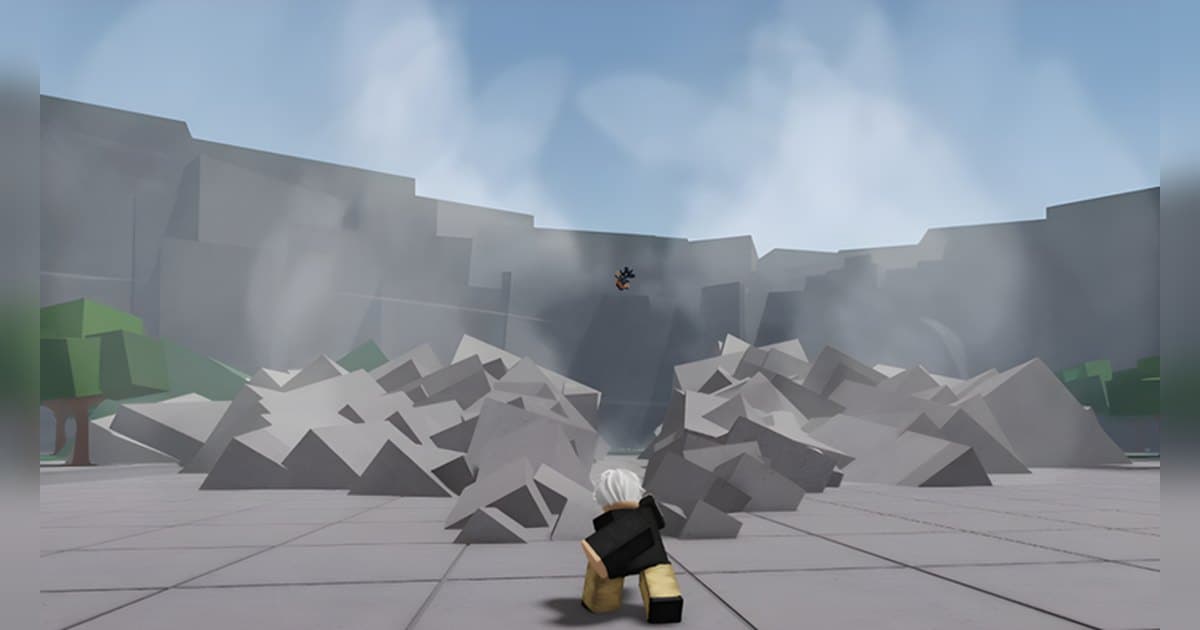
The Strongest Battlegrounds is a Roblox fighting experience made by Yielding Arts and created in August 2022. The official description sums the whole thing up in one line: you train and fight others to be the strongest. That is why play runs continuously in an open arena rather than breaking into rounds. Servers hold up to 15 players, and as of October 19, 2026 it had roughly 32,000 concurrent players, about 19.4 billion lifetime visits and around 7.7 million favorites. The description says you can play on console, PC or mobile, and it lays out seven controls: left click to punch, F to block, Q to dash, Q while ragdolled for a ragdoll cancel that doubles as an evasive, double-tap W to run, G for ultimate mode, and B for the emote wheel. The entry on that list you will find in few other fighting experiences is the ragdoll one. Recovering your stance while you are being flung across the arena is an official control here, which means exchanges in this experience flow as a trade between the player landing the combo and the player cancelling out of it. This guide skips codes and character rankings. It walks through getting those seven controls into your hands in order, then covers which moments are worth keeping and how to keep them on PC with sound. If recording Roblox at all is new to you, read How to Record Roblox Gameplay first. The experience details were checked on October 19, 2026, and with the latest update on October 17 the skill lineup can change.
Bottom line: the seven official controls first, then the badge ladder, then your recording setup
A combo here is not a secret input, it is a punch string you keep unbroken and extend with skills. Since the official description carries every control, the natural order is left click, F block and Q dash into your hands first, with the ragdoll cancel and G ultimate mode layered on after. That skill sets differ by character is confirmed by the experience's game passes: 'Early Access' is described as granting early access to all current and future work-in-progress character skill sets, and 'Awakening Outfit' as changing your avatar to a saved outfit when you awaken. How you get through a block also depends on the skill set, so read the skill descriptions for the character you picked inside the experience to see what shakes a blocking opponent loose. The badge list spells out your goals. Total-kill badges exist at 1, 10, 100, 1,000, 10,000, 100,000 and 1,000,000 kills, and as of the checked date 798 players hold the 100,000-kill badge and a single player holds the 1,000,000-kill one. There is also a badge for achieving a kill streak without dying, a critical hit badge described as a perfect hit requiring a precision of 0.000001 second, and a badge for killing someone with a trashcan. In other words, the footage worth keeping here splits three ways: the precise single hit, the streak, and the kill you finished in an absurd way. The experience also provides places to practise. Alongside the start place there is a registered place called Duel Queue, and the 'Private Servers+' pass is described as letting you change core game parts in your private server, accessed via settings. Check how to get into each one from the in-experience settings and prompts. To compare the input structure with another fighting experience, see Jujutsu Shenanigans Combos, and for a format where one timing window decides everything, the Blade Ball Parry Guide. Roblox's built-in Captures saves video of up to 30 seconds from the in-experience Captures menu and holds it in the Roblox app's storage until you export. Since fights run back to back in the arena, running a recorder on PC is the option when you want a whole session with audio.
Getting the seven official controls into your hands
- 1Separate your recording key from the control keysPlay here carries on in the open arena instead of pausing between rounds, which makes it awkward to take your hands off the keyboard to change a setting. Finish all of that in one go before you join. The controls occupy six places: left click plus Q, F, G, W and B, and DOR's clip hotkey defaults to F8, which sits far away from all of them and can be moved in settings. Quality defaults to 1080p at 30 fps with 60 fps available, and 60 fps is the easier option to read back if you plan to review ragdoll cancels, which turn on a single beat. Set resolution, frame rate and clip length before recording begins.
- 2Check the creator and the place layout firstSearch Roblox for The Strongest Battlegrounds and confirm the creator is Yielding Arts before joining. Many experiences use close variations of the name, so matching on the creator is the reliable route. Alongside the start place there is a registered place called Duel Queue, which separates fighting in the open arena from taking someone one-on-one. Follow the in-experience prompts for how to enter and how the queue works. If you plan to record on PC, launch Roblox from the PC version downloaded from roblox.com.
- 3Build range first with left-click punches and the double-tap W runStep one is the feel of consecutive punches and your spacing. Left click punches, double-tapping W runs, and Q dashes. Opponents never stop moving in the arena, so knowing the distance at which a punch connects matters more than any combo. For your first rounds, hold someone with punches alone and use no skills. Once you know the spacing where punches start whiffing, you know the gap you need to close with a dash.
- 4Learn the receiving side with the F blockF is block. Holding block and watching for the moment an opponent's string breaks is half of combo practice. Once you can see which move someone uses to get through your block, you can use that same move in the same spot on your turn. What shakes a block loose depends on the character's skill set, so read the skill descriptions for your pick inside the experience. When you can flow from holding block into a counter, your one-on-ones get much steadier.
- 5Make Q during a ragdoll a reflexThe single most important line in the official control list is that Q while ragdolled is a ragdoll cancel and evasive. Pressing Q while you are being flung gives you room to recover your stance, so it needs to be in your hands rather than something you remember too late. Spend a few rounds deliberately getting hit to find the timing that breaks the string. This window is hard to judge by eye, so recording it and scrubbing back is what makes the right moment obvious.
- 6Pick a character skill set and keep G for the endSkill sets differ by character. The 'Early Access' pass registered for the experience is described as covering current and future work-in-progress character skill sets, which makes the in-experience skill descriptions the accurate place to read range and cooldown. A stable combo shape is to hold with punches, extend with skills and keep G ultimate mode for last. Since a separate pass exists just to change your awakened outfit, ultimate mode is a showpiece stretch, so hold it until the fight is at its largest.
- 7Use the badge ladder as the goal and collect footage along the wayGoals get clear when you set them by badge. Total-kill badges run through seven tiers from 1 kill to 1,000,000, and there is a badge for a kill streak without dying, a critical hit badge described as a perfect hit requiring a precision of 0.000001 second, and one for a trashcan kill. With the session recording, you can collect these moments and cut them later instead of saving each one as it happens. Export 9:16 for vertical shorts or 16:9 for a standard upload, and ask before you post clips with a friend's voice in them.
Moments worth keeping in The Strongest Battlegrounds and how to capture them
| Moment | Official basis and why it is worth keeping | How to keep it |
|---|---|---|
| Getting up with Q out of a ragdoll and hitting back | The official controls list Q while ragdolled as a ragdoll cancel and evasive, which is specific to this experience. The player who was losing taking over reads instantly, even in a few seconds. | Press F8 right after the counter lands and the stretch where you were being hit comes with it. For a long trade, raise the length to 45 seconds. |
| A one-on-one combo that runs punch into skill | In an arena holding up to 15 players a clean one-on-one rarely survives, which is exactly why a Duel Queue place is registered for the experience. | A one-on-one has a clear start and finish, so set the clip length to match your string before you go in and tidy the edges in your library after. |
| Turning a group fight around with G ultimate mode | There is a pass purely for your awakened outfit, which tells you ultimate mode is meant to be watched. Switching it on while surrounded is the biggest visual shift in the experience. | You hold the timing on ultimate mode. Glance at the recording state first, then take the clip once the mode has dropped, and the whole entry and exit sit inside it. |
| A kill finished with a trashcan | A badge for killing someone with a trashcan sits in the official list. Kills that use arena props are shorter than combos and get a bigger reaction. | It is over fast, so dropping the clip length to 15 or 30 seconds leaves you less to trim afterwards. |
| The moment a total-kill badge ticks over | Seven badge tiers run from 1 kill to 1,000,000. With 798 holders at 100,000 and one at 1,000,000 on the checked date, each tier up is more of a record. | Badge notifications arrive without warning, so you need the full-session recording. Find the time the notification appeared and cut around it. |
| The breather after a B emote wheel finish | The emote wheel is in the official controls and there is even a pass that doubles your emote slots. An emote straight after a kill is a common way to close a video. | To get the kill and the emote in one clip, press F8 after the emote finishes. The feature records backwards, so both are inside it. |
Check before you record The Strongest Battlegrounds
- You launched Roblox from the roblox.com PC build and checked once that DOR picks the experience up.
- You moved the clip hotkey somewhere it will not collide with left click, Q, F, G, W or B.
- You raised recording quality to 60 fps because you intend to scrub back through ragdoll cancels, which come down to a single beat.
- You cleared 30 GB or more of space, since arena fights run on without a break between them.
- You have two clip lengths in mind: 15 seconds for something quick like a trashcan kill, 45 for a long trade.
- You decided whether the mic stays on, and you told the people you play with when their reactions go into the footage.
Keep a whole arena session with DOR
DOR is a free app you run on Windows PC. Launch Roblox from the roblox.com build and it finds it on its own, starting a recording the moment you step into an experience and stopping when you leave it or close Roblox. That behaviour is on from the start and you switch it in settings under Full Game Recording. It takes any genre and any creator, so The Strongest Battlegrounds is captured as it is, and everything between joining and leaving goes into your library as a single mp4. Head out into the arena about 20 seconds after you join and the opening of the video comes out clean. The audio arrives as one track with game sound and your mic mixed together. The mic is on from the start with noise suppression applied, so hit sounds and your own voice stay aligned. Once a ragdoll cancel has turned into a counter, or once the emote after a kill has played out, press F8 and the previous 30 seconds come away as their own clip. Set the saved length to 15, 30, 45 or 60 seconds, move the hotkey to another key if you like, and it works for as long as a recording is running inside an experience. Because this experience occupies left click plus Q, F, G, W and B, keep that hotkey off all six. Quality starts at 1080p and 30 fps, with 60 fps available. Switch to 60 fps before you join if you mean to check ragdoll cancels frame by frame, and settle resolution, frame rate and clip length before recording begins. With 30 GB or more free, even a session where you hold the arena for a long time is kept to the end. When you are done, trim in the library so only the fight remains, then export in landscape 16:9, vertical 9:16 or square 1:1 (1:1 is where text goes on). The export hands over as a dor.gg link, and DOR Studio, which opens in a browser with nothing to install, lets you string several kills together and lay text, background music and effect templates over them before downloading the mp4. Collecting streaks into one video works the same way elsewhere, so have a look at the Arsenal Weapons Guide too. For finding people or a clan to fight alongside, see How to Find Roblox Groups.
 #Roblox