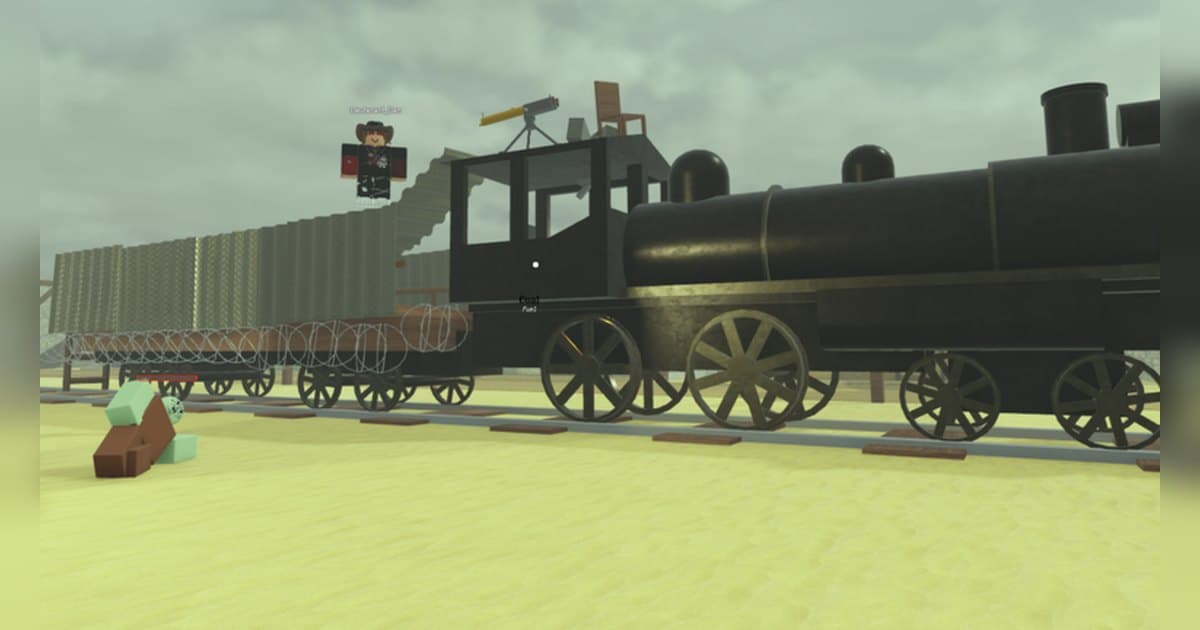
Dead Rails went live on January 1, 2025 and is made by RCM Games, a group with a verified badge. The official description sets the scene: in 1899 a mysterious virus swept the American continent, people dubbed it the Zombie Plague, and a cure was discovered in Mexico. So the job of a run is to gather your friends, board your train and fight through the zombie-infested desert. Checked on October 19, 2026, the experience had around 6.6 billion visits, roughly 6.14 million favorites and about 9,000 players in at once, with its most recent update on October 17, 2026. Those numbers are a snapshot from that date and shift with events and updates. Servers hold up to 16 players, so a run is several people on one train splitting the work. This guide lays out how a run flows within what the official description and badge list confirm, then how to keep the moments that only pass once, on PC, with the sound intact. Recording basics live in How to Record Roblox Gameplay; the rest here is specific to Dead Rails. The length of a run is what makes recording this experience different. The events between departure and the end of the tracks only mean something in sequence, so keeping the whole run and choosing afterwards suits it better than collecting moments one at a time.
Bottom line: map the run with the distance badges, then pick the events out of the full recording
If you want to know how far a run goes, the badges answer it. Distance badges exist for every 10 km from 10 up to 70, each described as having travelled that far in the train, and then the 80 km badge changes wording: it is awarded to those who made it to the end of the tracks. So a run is a journey of 80 km along the line, and the distance badges are its mile markers. The events along the way are in the badge list too. There is 'Unlocked the Supply Depot' for those who found the key and unlocked it, 'The Bridge' for those who lowered the bridge, 'Struck by Lightning!' for those who got struck by lightning, and 'Defeat Tesla' for those who defeated Nikola Tesla. Alongside those sit discovery badges: 'Vampire Knife' for finding the vampire knife, 'Tame a Unicorn' for taming the unicorn, and 'The Hatch' for finding the super secret egg. The badge list also records limited modes that have run before: four badges from The Takeover event, 'Frost Bite!' for completing the Christmas mode, and a badge for taking part in a promotional event. Whether any of those is live right now is something to check in the experience's own announcements. Finding people to ride with is part of the strategy, since servers hold up to 16 players and the official description itself tells you to gather friends; for that, see How to Find Roblox Groups. As an experience where several players take separate jobs toward one goal, it shares its tension with the Dandy's World Survival Guide, and the way you choose which moments to keep is much the same.
Running Dead Rails and turning it into a video
- 1Set up for a long run before you leaveGoing all the way to the end of the tracks makes for a long run, so sort out the recording side before departure. If you plan to record on PC, launch Roblox from the PC version downloaded from roblox.com and settle quality and clip length in advance. The default is 1080p at 30 fps with 60 fps available, and clip length comes from 15, 30, 45 or 60 seconds. Leave yourself generous disk space. Roblox's own Captures option in the in-experience menu stores up to 30 seconds per capture, and saving one exports it to the Videos folder on desktop.
- 2Find the experience and joinSearch Roblox for Dead Rails and check that the creator is RCM Games before you join; the group carries a verified badge, which makes it easy to pick out of a list. It has been updated steadily since its January 2025 launch, with the most recent update at the time of checking on October 17, 2026, so read the in-experience announcements as well. Full-run recording starts when you enter the experience, so launch Roblox and wait a moment before joining to keep the pre-departure preparations too.
- 3Gather on the train and split the jobsServers hold up to 16 players and the official description tells you to gather friends and board your train. Deciding before departure who drives, who covers the outside and who gets off to look for supplies keeps people from doubling up when events hit. With your mic on, that planning conversation is recorded as it happened, so a video cut from the run explains itself without added commentary.
- 4Use the distance badges as mile markersAs you roll, distance badges stack up every 10 km. The run from 10 to 70 km is described as travelling that far in the train, and the 80 km badge goes to those who made it to the end of the tracks, which makes the badges the simplest way to judge how much track is left. Confirmed events are threaded in between, such as finding the key to the supply depot or getting struck by lightning. The finer conditions of driving and resupply change with updates, so treat the in-experience information as the reference.
- 5Handle the big set pieces like the bridge and TeslaThe events that change the mood of a run are in the badge list too: 'The Bridge' for those who lowered the bridge and 'Defeat Tesla' for those who defeated Nikola Tesla. Both need several players moving at once, so raise your clip length and re-confirm roles before you commit. There are discovery targets as well, like the vampire knife, the unicorn and the hidden egg, and it is easier to pick one goal per run than to chase all of them in a single trip.
- 6Build one video after the arrivalWhen you reach the end of the tracks, the library holds that run's mp4 plus whatever you saved with F8. Trim sections in order, departure, supply depot, bridge, Tesla, arrival, then export at 9:16 for a vertical post or at 1:1 when you want distance or context written on the frame. Merge those sections in order in DOR Studio in your browser, add background music and an effect template, and the 80 km journey becomes one video.
What to keep, section by section of the Dead Rails run
| Section of the run | What happens there | How to keep it |
|---|---|---|
| Departure and the first 10 km | This is where the train gets moving and you sort out who does what. Your first zombie encounter usually lands here too. | Leave recording running from the moment you enter, then trim a short departure section out of the library afterwards to open the video with. |
| Finding the key and unlocking the supply depot | The badge is described as finding the key and unlocking the supply depot, so it is a visible achievement in a run, and the mood on the train changes right after. | The door opening is brief, so press F8 once it is open and the last 30 seconds are kept. Set 45 seconds and the hunt for the key comes with it. |
| Lowering the bridge | This is the moment behind 'The Bridge' badge, and because it has to be done before the train rolls through, it is one of the tensest stretches. | You can see it coming, so raise the clip length to 60 seconds on approach and hold the shot until the bridge is down and the train is across. |
| The fight with Nikola Tesla | 'Defeat Tesla' is a badge in its own right, and it makes for the longest fight in a run, with several players committing at once. | The fight runs minutes, so cut it out of the full recording as one piece from start to finish and shorten it down to the usable part. |
| Turning up something hidden | The vampire knife, taming the unicorn and the super secret egg are only confirmed by their badges. The find itself is quick and arrives without warning. | Save it with F8 straight after the find, then export at 1:1 so you can write the circumstances on the frame for when you come back to it. |
| Reaching the end of the tracks at 80 km | The badge is described as making it to the end of the tracks: it is the ending of a run, and it only lands if the journey before it is visible. | You need the full-run recording to put the arrival and the earlier events into one video. Check you have space for a long recording first. |
Check before departure
- You launched Roblox from the PC version downloaded from roblox.com.
- You freed up disk space for a long run; 30 GB or more leaves plenty of room.
- You settled resolution and frame rate before departure.
- You raised the clip length to 45 or 60 seconds so the lead-in to an event is included.
- You put F8 on a key you leave free from train controls and movement.
- Your mic is on, so the role planning and the shouting during fights are recorded with it.
- You told the people riding with you that their voices are being recorded.
Keep a whole Dead Rails run with DOR
DOR is a free Windows PC app that detects Roblox automatically when you run the PC version downloaded from roblox.com. Recording starts by itself when you enter an experience and ends when you leave it for the home screen or close Roblox. It is on by default and managed with the Full Game Recording setting. Each experience becomes one mp4 in your library, so a run from departure to the end of the tracks at 80 km is kept as a single file. Having the long run in one piece is what lets you put the moment the depot opened and the arrival into the same video, which pays off in an experience like Dead Rails where events build on each other. Game audio and your mic (with noise suppression) are captured together on one track, so sixteen players sorting out jobs and shouting through a fight stay in the recording alongside the action. After a set piece, press F8 and the last 30 seconds are saved as a separate clip; the length is chosen from 15, 30, 45 or 60 seconds, and 60 is the one for scenes where you want the lead-in, such as lowering the bridge. The hotkey works while you are inside an experience with recording running. Quality defaults to 1080p at 30 fps with 60 fps available, and resolution, frame rate and clip length apply as set when you choose them before departure. The app flags free space once it drops below 30 GB, so clear room on a day you are going for the full distance. Afterwards, the library's trim tool exports at 16:9, 9:16 or 1:1 and shares as a dor.gg link, with text available on the 1:1 output, and DOR Studio in your browser merges the sections in order and adds text, background music and effect templates before you download the mp4. In the library, find a run by the time it was recorded. For another experience where a run is long and the events arrive in sequence, the DOORS Entities Guide follows the same routine.
 #Roblox