Where does OBS save recordings? On Windows the default is the Videos folder of the signed-in account, and File > Show Recordings opens whatever folder OBS is using right now, so check that before searching every drive. A different profile or portable install can point elsewhere, and an MKV may still survive even if recording ended unexpectedly.
Verify the newest file instead of memorizing a default
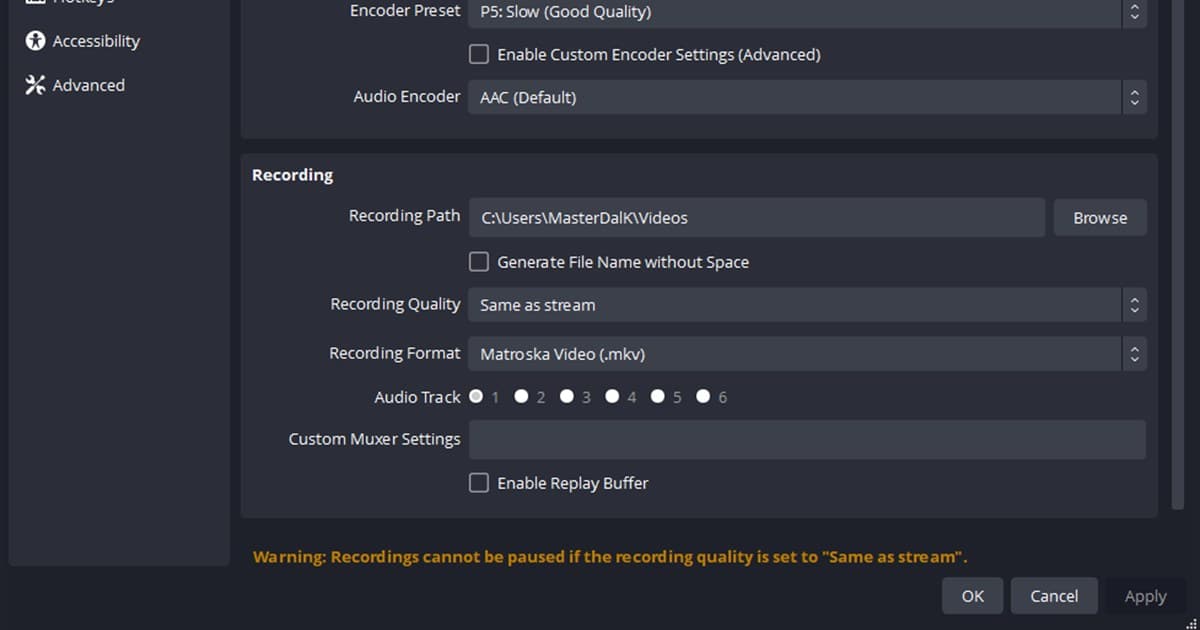
Unless someone changed it, OBS writes to the Videos folder of the Windows account you are signed in with (C: > Users > your name > Videos). That default follows the Windows Videos folder, so if the folder was relocated to another drive the recordings land there, and a portable copy keeps its own profiles and can point somewhere else. To change the folder, open Settings > Output > Recording and read Recording Path, then stop recording before using Browse to choose a writable local folder. Cloud-synced, network, and slow removable destinations need a short load test because the folder can exist while sustained writes still fail.
Where to look when the file is missing
| Situation | Check first | Proof of a fix |
|---|---|---|
| Not in the usual folder | Recording Path | File > Show Recordings opens the folder OBS uses right now |
| Path never changed (standard install) | Videos folder of the signed-in Windows account | The file sits under C: > Users > your name > Videos |
| MKV exists; MP4 needed | File > Remux Recordings | Remux, never rename; the original MKV stays |
| Portable mode (portable_mode.txt in the OBS folder) | Recording Path inside that copy; its profiles live in the OBS folder | New files appear at the path shown there |
Find and change the location safely
- 1Open File > Show Recordings — It opens the folder OBS is writing to right now. Compare it with Recording Path under Settings > Output > Recording, and copy that path into the File Explorer address bar if you need it later.
- 2Sort by modification time — Match the latest filename to the moment you started and stopped recording.
- 3Prepare a local folder — Choose a writable SSD location with enough space; avoid sync and network folders for the first test.
- 4Stop, then change the path — Use Browse, apply the change, reopen OBS, and confirm the value persisted.
- 5Record and remux a test — Play a five-second MKV, preserve it, and use File > Remux Recordings when MP4 is required.
Location-change checklist
- The full Recording Path was recorded
- Recording was stopped before changing the path
- The folder is writable and has enough space
- A five-second MKV plays normally
- Any MP4 was remuxed while preserving the original
File management when considering DOR
DOR does not change the OBS Recording Path or locate old OBS files. It is an alternative library workflow for future supported-game recordings. Compare change recording location, OBS game recording settings, the free recorder guide, and DOR automatic recording. For a real game use case, continue to the VALORANT game hub. To see clips organized automatically in a library, check PUBG clip saving.
Official OBS Studio recording guidance
The OBS Standard Recording Output Guide documents Recording Path, resilient MKV recording, File > Remux Recordings, and automatic remux. If a crash or shutdown is possible, recording MKV and remuxing later is safer than relying on an unfinished MP4.