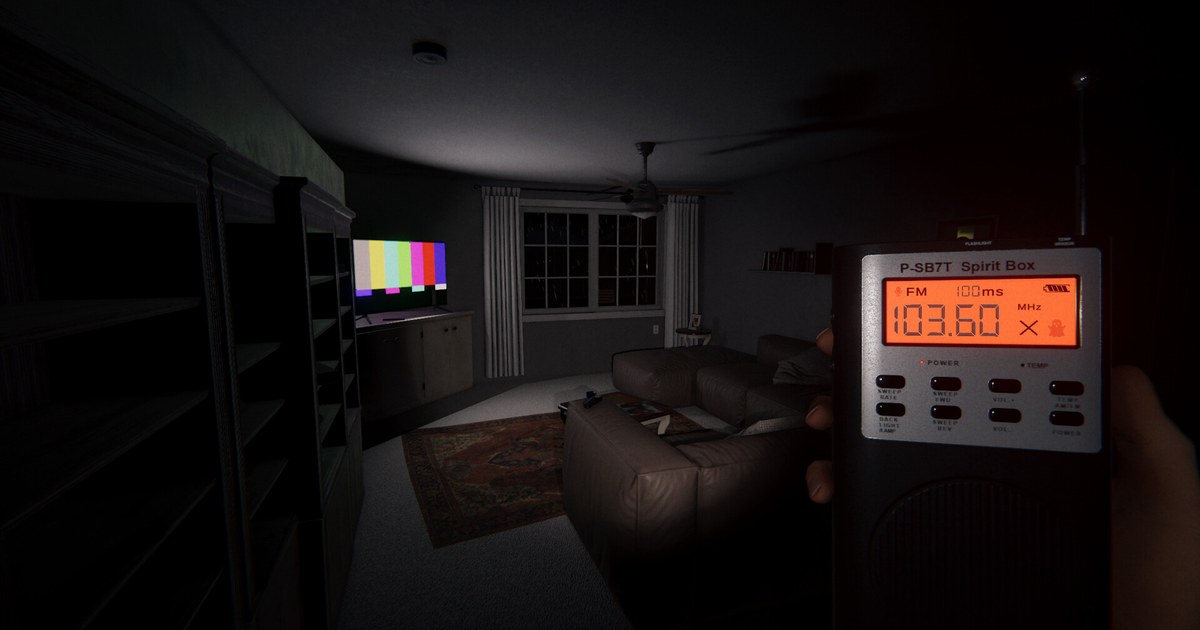
The short answer: say 'Give us a sign' or 'Are you friendly?' clearly, in English, while holding the Spirit Box or standing at a cursed possession. Those are the two example phrases the developer, Kinetic Games, names in its own voice recognition notes. Voice commands matter in three places.
You can talk to the ghost through the Spirit Box, you can ask questions at cursed possessions such as the Ouija Board and the Monkey Paw, and you can say the ghost's name or other recognized words nearby to briefly raise its activity.
Many guides promise a full list of every phrase, but the only things that agree across sources are that the Spirit Box and the Ouija Board each understand roughly two dozen questions and that exact lists differ from site to site.
This guide sticks to the examples we could verify, the order to try them in, and the settings to check when nothing happens. Phrases can change with updates, so everything here is current as of November 24, 2026.
Verdict: short English lines, the right spot, silence during hunts
Think of ghost voice commands as three groups, based on where you speak. First is the Spirit Box: ask 'Are you friendly?' or request 'Give us a sign' and a response may come through.
Second are cursed possessions: the Ouija Board and the Monkey Paw let you interact with the ghost by voice, and at the Ouija Board you select the board with the mouse and then ask your question into the microphone.
Third is general ghost activity: saying the ghost's name or another recognized phrase close to it gives a chance of a short activity boost. Every reaction is a chance, not a guarantee.
Once a hunt starts, guides say the ghost can hear your voice and follow it, so mute both your microphone and voice chat. If the game does not hear you at all, rule out input problems first with what to check when your mic is not picked up.
How to talk to the ghost, in order
- 1Turn voice recognition on firstIn the journal's game options, set Voice Recognition Mode to Voice. The old name was Vosk, and System Voice is the old Windows Voice. If one engine hears you poorly, switch to the other; players repeat this fix often. Prefer not to speak? Text mode takes the same requests by typing.
- 2Speak while holding the Spirit Box or at the boardUse a short English line, clearly. 'Are you friendly?' and 'Give us a sign' come straight from the developer notes. Guides also often suggest 'Are you here?' and 'Where are you?' as first tries.
- 3Try general requests in the ghost roomIn the room you suspect, ask the ghost to touch a door or switch, throw something, or show a sign. If nothing happens, wait a moment and ask again instead of repeating the same line nonstop.
- 4Use the ghost name carefullySaying it can raise activity, but it is also a way to anger the ghost. Many players avoid it until the evidence is collected.
- 5Mute the moment a hunt startsDo not use push to talk or voice chat during a hunt. Guides say the ghost can hear you, which can give away your hiding spot.
- 6Keep the reaction on videoA Spirit Box answer or a sudden door slam is hard to recreate. Recording the whole session lets you find that moment later.
Voice command cheat table by situation
| Situation | Example to say | What you can expect |
|---|---|---|
| At the Spirit Box | Are you friendly? / Give us a sign (developer examples) | A response may come through the box |
| At the Ouija Board | Select the board with the mouse, then ask aloud | Interaction through the cursed possession |
| Monkey Paw | Cursed possession used by voice | Named next to the Ouija Board in developer notes |
| General request in a room | A sign request such as Give us a sign | A chance of ghost activity |
| Ask for doors or switches | A request to interact with nearby doors (per games.gg) | Door or switch interaction possible |
| Ask to throw an object | A request to throw something (per games.gg) | An object may move |
| Saying the ghost name | The ghost's name or a recognized phrase, close by | Brief activity boost, may also anger it |
| During a hunt | Say nothing at all | Lowers the risk of the ghost following your voice |
Check before you speak
- Voice Recognition Mode is Voice or System Voice
- Your microphone is selected in game and not muted
- You are holding the Spirit Box or standing at the Ouija Board
- You said a short, clear English line
- Your mic and voice chat are off during hunts
Record the ghost's reaction with DOR and share it
DOR is a free Windows recording app. Launch a supported game and it detects it automatically and records the whole session from launch to exit, and the recordings collect in My Clips in the app.
Audio is captured as one track with the game sound and your microphone, so your question, the Spirit Box answer, and your friend's scream end up in the same video. For audio setup, read how to record game sound and mic together. You can trim the reaction in the app, export an mp4 from DOR Studio, or share a dor.gg link, with no watermark. The sharing flow for this game is in how to share Phasmophobia hunt videos, and trimming is covered in how to trim game clips.