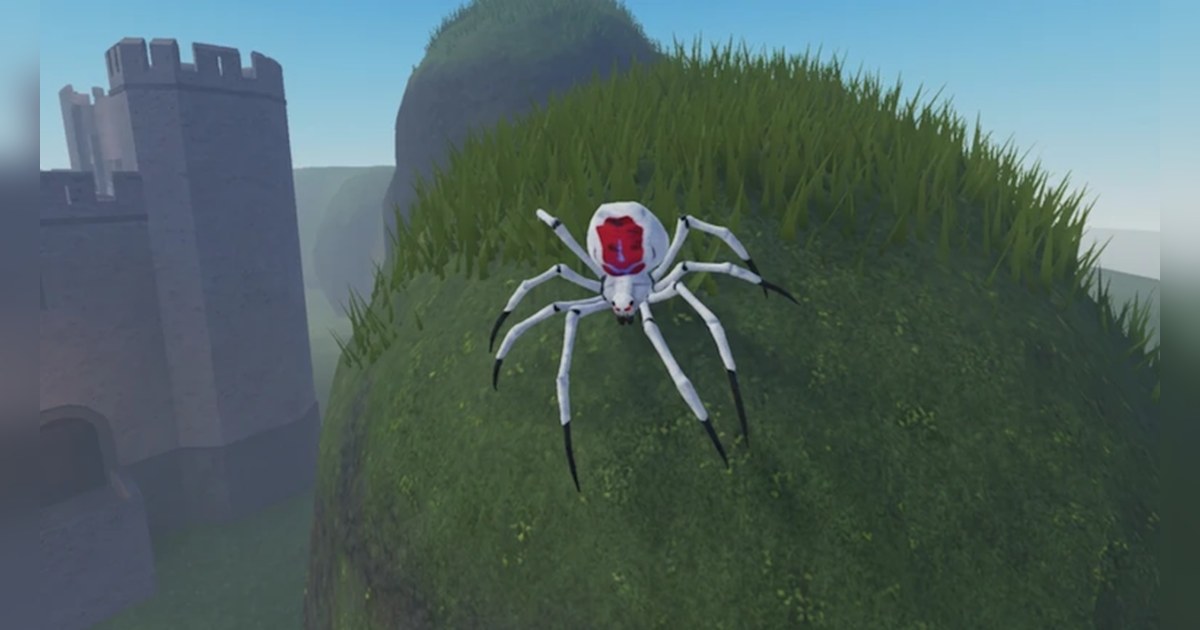
Bug Evolution starts you as a tiny spider fresh out of its egg. According to the official description on the experience page, you eat food to grow bigger and stronger, then evolve into new insects and spiders on what the game calls the Bug Tree.
There are more than 30 insects to become, and the description name checks flies, moths, grasshoppers, tarantulas and giant prehistoric beasts. You can team up with friends and hunt together, and the stated goal is to become the King of the server.
The experience comes from the Roblox group Corgi Crew, which has about 1.4 million members and also made Obby With Friends! and A Digging Game. It was created in the early hours of October 9, 2026 (ET), Roblox files it under the Survival genre, and each server holds up to 15 players.
We checked Roblox's official data and charts on PC on the morning of November 3, 2026 (ET). It had about 14.57 million visits, about 29,000 people playing at that moment, about 65,000 favorites and a like ratio of roughly 79 percent.
It ranked fifth in worldwide Top Trending and third in worldwide Up-and-Coming, and with the chart country set to the United States it was sixth in Top Trending and fifth in Up-and-Coming.
The latest update went live on the evening of November 2 (ET), and the description promises new insects with every update, so the roster you see may already be longer than the one described here.
If your Roblox language is set to Spanish or Portuguese, the name may show up translated, as Evolución de insectos or Evolução de Insetos. This guide covers only what the official description and Roblox's own data confirm. The full Bug Tree layout and the stats of each insect have not been published, so they are left out.
The short version: eat early, read the Bug Tree before you evolve, and grow with friends
Three ideas from the official description carry the whole game. First, food is the engine. You hatch as a tiny spider, and the only growth route the description names is eating food to get bigger and stronger.
So in your first minutes, focus on finding food and eating steadily to grow. Second, evolution happens on the Bug Tree. The description says you evolve into new insects and spiders there.
The roster runs from flies and moths to tarantulas and giant prehistoric beasts, and the order of the tree has not been published, so before you pick your next form, check the Bug Tree in game to see which insects and spiders you can become next. Third, the game is built for groups.
Teaming up with friends to hunt together is one of the five lines in the description, and becoming King of the server is the goal it sets. How the King is decided is not spelled out in the description, so check the in game prompts when you get there.
Roblox lists Bug Evolution as a Survival game, and each server holds up to 15 players. If the game stutters and your frame rate dips once the server fills up, go through Roblox FPS boost settings on PC first.
Starting Bug Evolution: do it in this order
- 1Find the right experience by name and creatorSearch Roblox for Bug Evolution. The one you want shows a spider emoji in brackets after the name and is made by the group Corgi Crew. Searching bug evolution also brings up similar names, such as +1 Ant Evolution, which is a separate experience, so check the creator before you join.
- 2Hatch as a tiny spider and eat right awayEvery run starts with you hatching as a tiny spider. The official description says eating food is how you grow bigger and stronger, so spend your first minutes finding food and eating steadily to grow.
- 3Check the Bug Tree before you evolveBefore you evolve, look at the Bug Tree in game to see which insects and spiders follow your current form. The roster runs from flies, moths and grasshoppers up to tarantulas and giant prehistoric beasts, and the full order has not been published, so pick the form on the tree that fits how you want to play, and check what comes after it too.
- 4Join a friend and hunt as a teamServers hold up to 15 players, and you can check whether private servers are available in the Servers tab on the experience page. To play together, open the profile of a friend who is already in and use Join Experience to land in the same server. Per Roblox Help, the button shows up when your friend's settings allow others to join them.
- 5Push for King of the server and keep recordingThe description sets becoming King of the server as the goal. Keep eating and evolving with your team, and keep the recording running the whole time, so the moment you become King, the one your friends will want to watch again, is never missed.
What the official sources confirm in Bug Evolution, and what to keep on video
| Element | What the official sources confirm | When you keep it on video |
|---|---|---|
| Start | You hatch as a tiny spider. | Your first seconds as a tiny spider are the before shot for any evolution video, so keep them. |
| Growth | Eating food makes you bigger and stronger. | Trim a short clip at each visible size jump so the growth can sit side by side later. |
| Bug Tree | You evolve into new insects and spiders on the Bug Tree. | Start the cut a few seconds before you evolve so the change itself is in frame. |
| Roster | 30+ insects, including flies, moths, grasshoppers, tarantulas and giant prehistoric beasts. | Each first evolution into a new form adds one page to your evolution diary. |
| Friends | Team up with friends and hunt together. | Keep the whole hunt; picking the best part later is easier than guessing it live. |
| Goal | Become the King of the server. | The moment you become King is the natural ending for a 9:16 Short. |
| Servers and updates | Up to 15 players per server, new insects with every update. | Record your first session after an update to catch new insects the day they arrive. |
Before you join Bug Evolution
- You joined the Bug Evolution made by Corgi Crew, with the spider emoji after the name.
- You plan to eat steadily and grow while you are still a tiny spider.
- You will check the next forms on the Bug Tree before every evolution.
- You agreed on a server with friends, up to 15 per server, and their settings allow you to join them.
- If Roblox closes as soon as you join, you went through fixing Roblox crashes on PC first.
Keep every evolution in Bug Evolution with DOR
Install DOR, a free Windows PC app, and recording starts automatically the moment you launch Roblox and join Bug Evolution. When you leave the experience, everything since you joined lands in My Clips as one video.
You do not need to press anything, so the first time you evolve, the hunt you pulled off with friends and the moment you became King of the server are all in the file. Game audio and your microphone are captured together on one track, so your own reactions stay in too.
Afterwards, open My Clips, pick the moment you want, trim it and choose 16:9, 9:16 or 1:1. The steps for turning it into a vertical video are in how to make a 9:16 game video.
To build an evolution diary out of many sessions, merge the clips in DOR Studio (dor.gg/studio) following how to merge game clips into one highlight video, drop an effect template such as Punch Zoom on each evolution (see adding a zoom effect to game clips), adjust text, background music and volume, then export an mp4 or share a dor.gg link that friends can play straight in a phone browser.
Sending that link is covered step by step in how to share Roblox gameplay videos. The free plan records at 720p or 1080p and 30 or 60fps, with 1080p 30fps as the default.
As recordings pile up, older videos are cleared only when the full gameplay storage share (5GB by default) is exceeded, and your latest recordings and liked videos stay.