

Verdict: buy it for the sound, the bundle and the warranty. ★★★½☆ 3.5
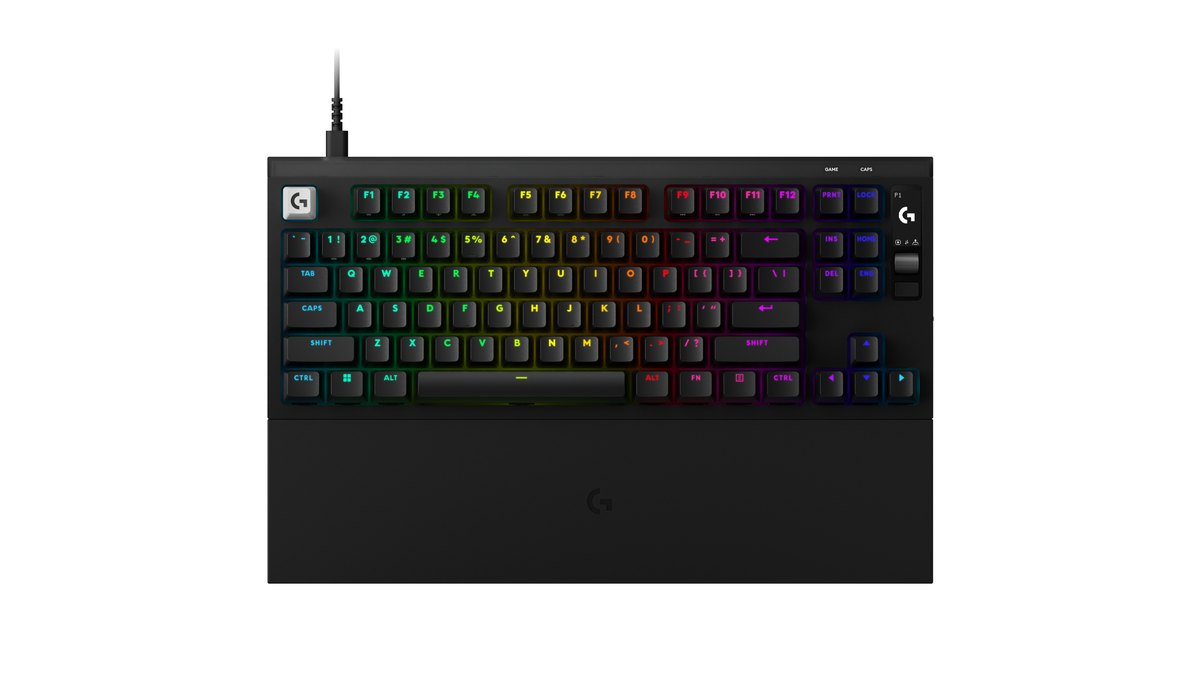
Short version: if you want a finished, ready to use Hall effect tenkeyless with excellent sound, an onboard OLED menu, a wrist rest included and a 2 year limited hardware warranty, the Logitech G PRO X2 RAPID is an easy keyboard to recommend.
It checks every box a top tier magnetic keyboard needs in 2026: 8K scan and polling, actuation from 0.1 to 4 mm in 0.05 mm steps, rapid trigger on every key and five KEY PRIORITY (SOCD) modes. Its real differentiator is that you can change all of that on the keyboard itself, no software required.
If you live in your configurator and want separate press and release sensitivity for rapid trigger, or a browser based tool, the Wooting 80HE+ is the better match. If you want the widest feature set plus a dial and media controls, look at the Razer Huntsman V3 Pro TKL 8KHz.
| Category | Score | Why |
|---|---|---|
| Performance (35%) | ★★★★☆ 4.0 | Spec sheet matches the best: 8K, 0.05 mm actuation steps, rapid trigger on all keys, five SOCD modes. No independent lab measurements yet, and the hands on review found tuning depth narrower than rivals |
| Value (25%) | ★★★½☆ 3.5 | Sits in the middle to upper part of its flagship class. Wrist rest, OLED and spare keycaps included; no spare switches |
| User reputation (20%) | ★★★½☆ 3.5 | The hands on review rates the sound and feel among the best from a major brand. Owner feedback is still thin, and some buyers question the brand premium |
| Popularity (10%) | ★★★☆☆ 3.0 | About one month on sale. 0.94% of pros in a public gear tracker (23 of 2,447), top 10 in a large Japanese rapid trigger keyboard popularity ranking. Not a mainstream pick yet |
| Durability and support (10%) | ★★★★☆ 4.0 | 2 year limited hardware warranty, switches rated for 50 million keystrokes, official retail in major markets |
| Overall | ★★★½☆ 3.5 | Weighted average 3.675, rounded to the nearest half star |
The performance score stops at 4.0 not because the spec sheet is lacking, but because there is no independent latency data yet and the hands on review found its rapid trigger options simpler than the competition. Sound and bundle are where this board is strongest.
If you are still deciding what matters most in a keyboard, actuation, polling, layout or switches, our gaming keyboard buying guide walks through each criterion.
Specs at a glance: 8K polling, 0.1 to 4 mm actuation, 84 key wired TKL
| Spec | PRO X2 RAPID |
|---|---|
| Announced and launch | Announced September 23, 2026; in stock on the US Logitech G store as of November 10 |
| Switches | Factory lubed KS-20 POM magnetic analog linear, developed with Gateron |
| Force and travel | 30 g ±10 g, 4 mm ±0.2 mm total travel, rated for 50 million keystrokes |
| Actuation | Every key 0.1 to 4 mm in 0.05 mm steps |
| Rapid trigger | All keys, applied by group, per key or to the whole board |
| KEY PRIORITY | Five modes per key pair: deeper press, last input, neutral, key 1 first, key 2 first |
| Scan and polling | 8K scan rate, report rate selectable from 1K to 8K |
| Onboard controls | OLED screen, clickable roller, menu button, 3 onboard profiles, game mode switch |
| Connection | Wired only, USB-C on the board, 1.8 m USB-A to USB-C cable, N key rollover |
| Size and weight | 363 x 143 x 38 mm, 1,075 g; wrist rest 363 x 90 x 22.25 mm, 535 g |
| In the box | Silicone XL wrist rest, spare Esc, Pause, PgUp and PgDn keycaps, switch and keycap puller |
| Colors and layouts | Black, White, Magenta; US English plus eight European layouts |
| Warranty and OS | 2 Year Limited Hardware Warranty; Windows 10 or later, macOS 12 or later |
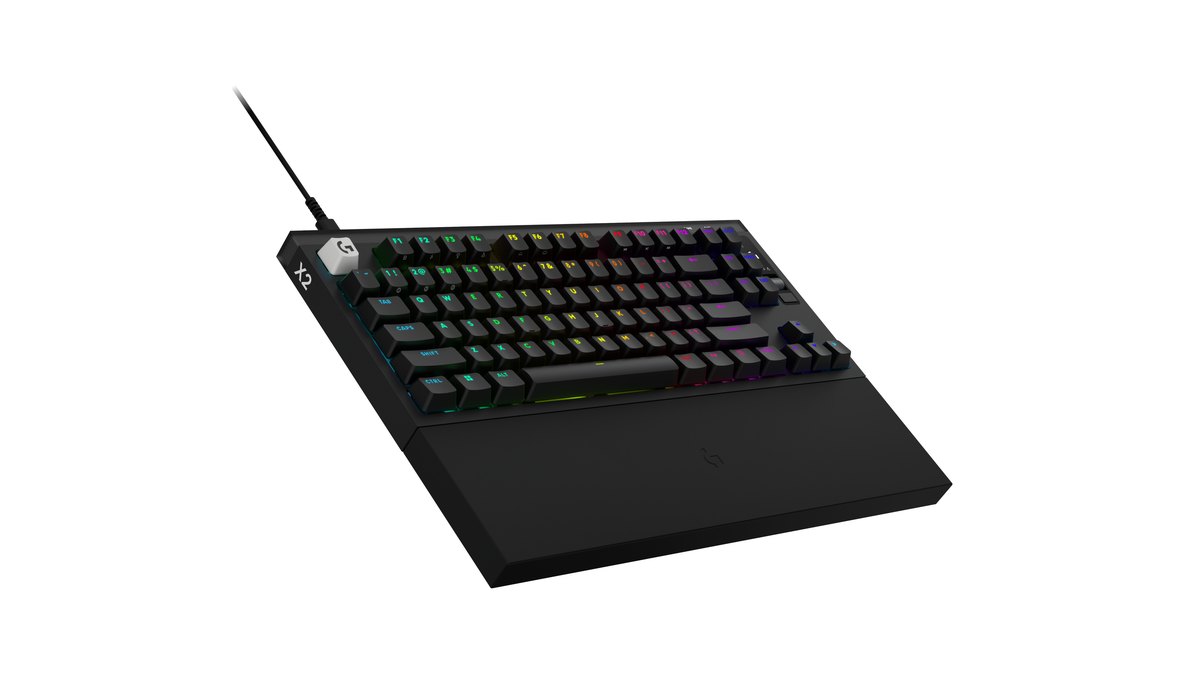
The layout is not a standard 87 key TKL. With 84 keys, the navigation cluster has only six keys (PrtSc, ScrLk, Ins, Home, Del, End), and the space to their right is taken by the OLED screen, the roller and a menu button. There are no dedicated PgUp, PgDn or Pause keys.
Instead, Logitech ships spare keycaps so you can put those functions on keys of your choice. If you scroll documents with PgUp and PgDn all day, check this before you buy.
Logitech says the board was shaped by feedback from roughly 100 esports players between April 2025 and May 2026, and that the OLED exists because tournament PCs sometimes cannot run configuration software.
What changed from the PRO X TKL RAPID
| Spec | PRO X TKL RAPID (previous) | PRO X2 RAPID |
|---|---|---|
| Report rate | 1,000 Hz | Up to 8K scan and polling |
| Actuation force | 35 g | 30 g ±10 g |
| Actuation step | Not listed on the official spec sheet | 0.1 to 4 mm in 0.05 mm steps |
| OLED and roller | No | Yes, with 3 onboard profiles |
| KEY PRIORITY | Not listed | Five modes |
| Wrist rest | Not included | Silicone XL wrist rest included |
| Dimensions | 357 x 150 x 38 mm | 363 x 143 x 38 mm |
This is not Logitech's first Hall effect keyboard. The PRO X2 RAPID follows the PRO X TKL RAPID, which is still sold alongside it. The headline upgrades are 8K polling, an OLED menu that works without software, KEY PRIORITY for overlapping opposite keys, and a wrist rest in the box.
Actuation force also drops to 30 g. One caution about data: the previous model scored very well in independent latency testing, but as of November 10, 2026 there are no published lab measurements for the PRO X2 RAPID. Do not assume the old numbers carry over.
If latency figures decide your purchase, waiting for measured reviews is reasonable. If you already own the PRO X TKL RAPID, upgrade only if 8K, on board settings and SOCD actually matter to you.
Rapid trigger, actuation and KEY PRIORITY: what you get and where to be careful

Hall effect switches read how far each key is pressed with a magnetic sensor, which is why actuation can be set per key. On the PRO X2 RAPID you can make any key fire at a feather light 0.1 mm or only at the full 4 mm, in 0.05 mm increments.
Rapid trigger resets a key as soon as it rises slightly and fires again the moment it goes back down, which makes counter strafing and stopping feel snappier. You can apply it to a group such as WASD, to individual keys, or to everything.
Logitech does not publish the minimum and maximum reset sensitivity, and the hands on review missed separate press and release sensitivity and a continuous rapid trigger toggle. KEY PRIORITY is a different feature.
When two opposite keys like A and D are held together, it decides what gets sent for each pair: the deeper press, the last input, nothing at all, or a fixed key. Recommended values per game are in our rapid trigger settings guide.
OLED menu and onboard profiles: tune it on the keyboard, no G HUB needed
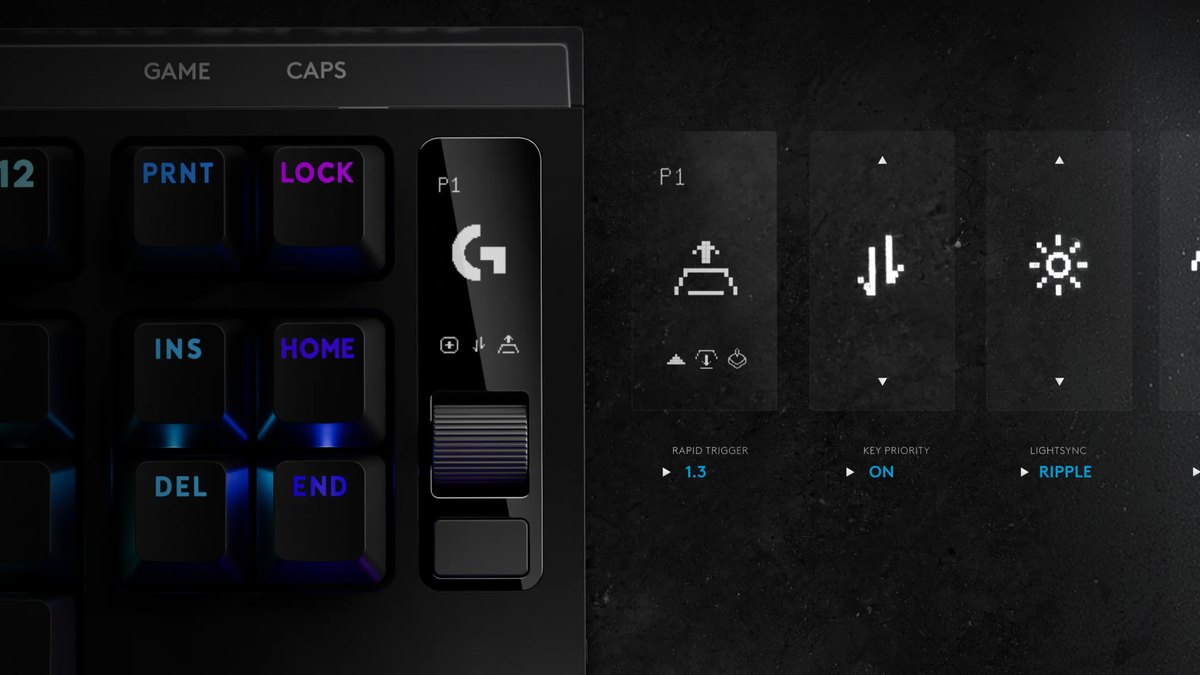
- 1Open the menuPress the menu button in the top right corner. The OLED shows settings for actuation, rapid trigger, KEY PRIORITY, lighting, game mode and report rate.
- 2Pick a settingScroll the roller to the item you want, then press the roller to enter it.
- 3Adjust the valueFor numeric settings such as actuation, scroll to the value, then choose whether it applies to a group, individual keys or all keys.
- 4Confirm and back outPress the roller to confirm and use the menu button to step back. Changes apply to the onboard profile that is currently active.
- 5Switch profilesHold the menu button or press FN+1, FN+2 or FN+3. Each of the three profiles ships with different actuation and rapid trigger values, which makes quick comparisons easy.
Flip the game mode switch on the right side and the Windows and menu keys are blocked by default. You can add more keys to block from the OLED or in G HUB. Deeper tasks such as remapping, macros and per key RGB live in G HUB, which is a desktop app.
There is no browser based configurator, so at LAN events or on shared PCs the OLED menu and three profiles are your real settings tools. That is exactly the scenario Logitech designed for.
At home, the hands on review found G HUB a bit clunky for fine tuning, for example around automatic profile switching.
Sound, feel and layout: where the review rates it highest
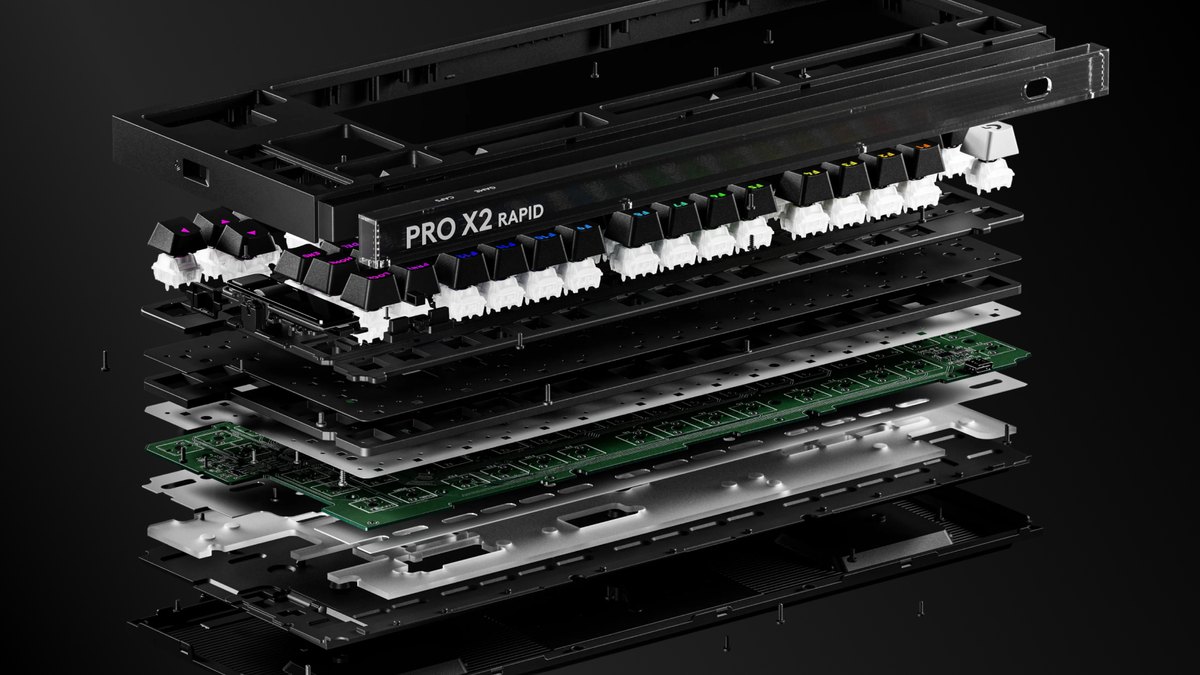
Logitech highlights a six layer sound dampening stack, an aluminum key plate, a patent pending dual screw in stabilizer design and double shot PBT keycaps. The case itself is plastic (PCR ABS), so this is not an aluminum bodied keyboard.
The review said it sounds clearly better than most gaming keyboards from big brands, landing between creamy and thocky with no case ping and well tuned stabilizers. The 30 g switches are described as light without feeling twitchy. On the downside, the same review noted uneven backlighting through some keycaps and slight stem wobble.
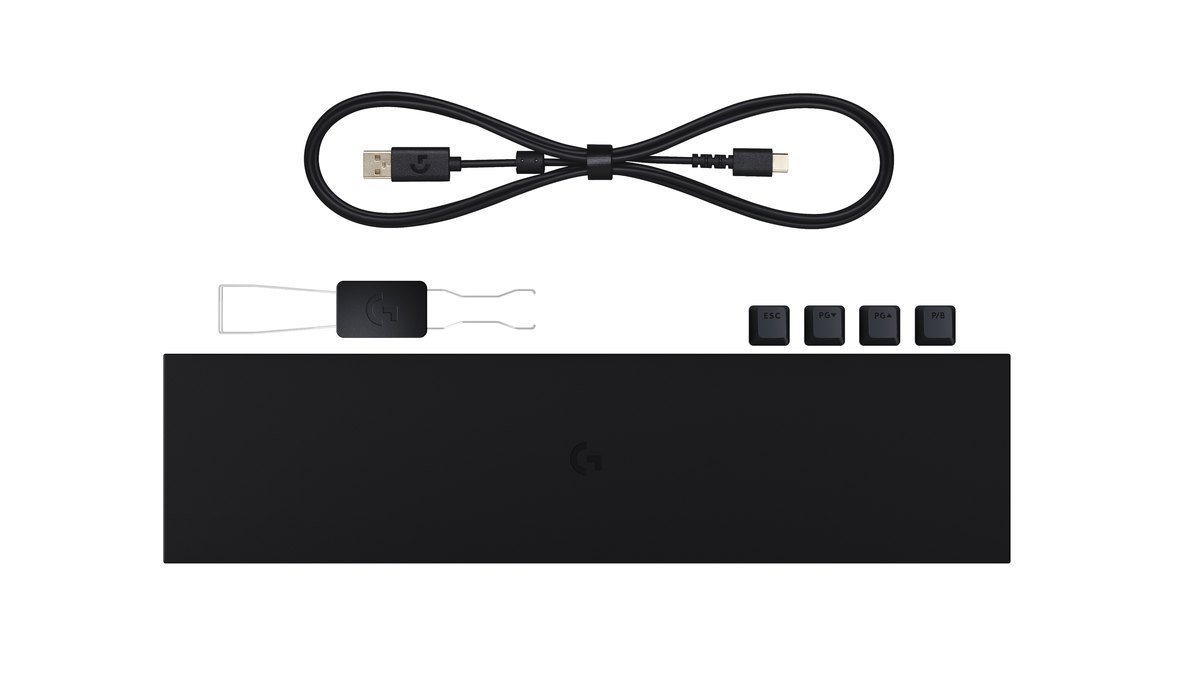
The bundle is generous: a silicone XL wrist rest sized to the board, a 1.8 m cable, spare Esc, Pause, PgUp and PgDn keycaps, and a switch and keycap puller. Treat the wrist rest as essential.
The board is 38 mm tall with squared off edges, and the review warned it can be uncomfortable for long sessions without it. At 1,075 g it is a desk keyboard, not a travel one.
Spare switches are not included, so when you pull a switch use the bundled tool and pull straight up to avoid bending the pins.
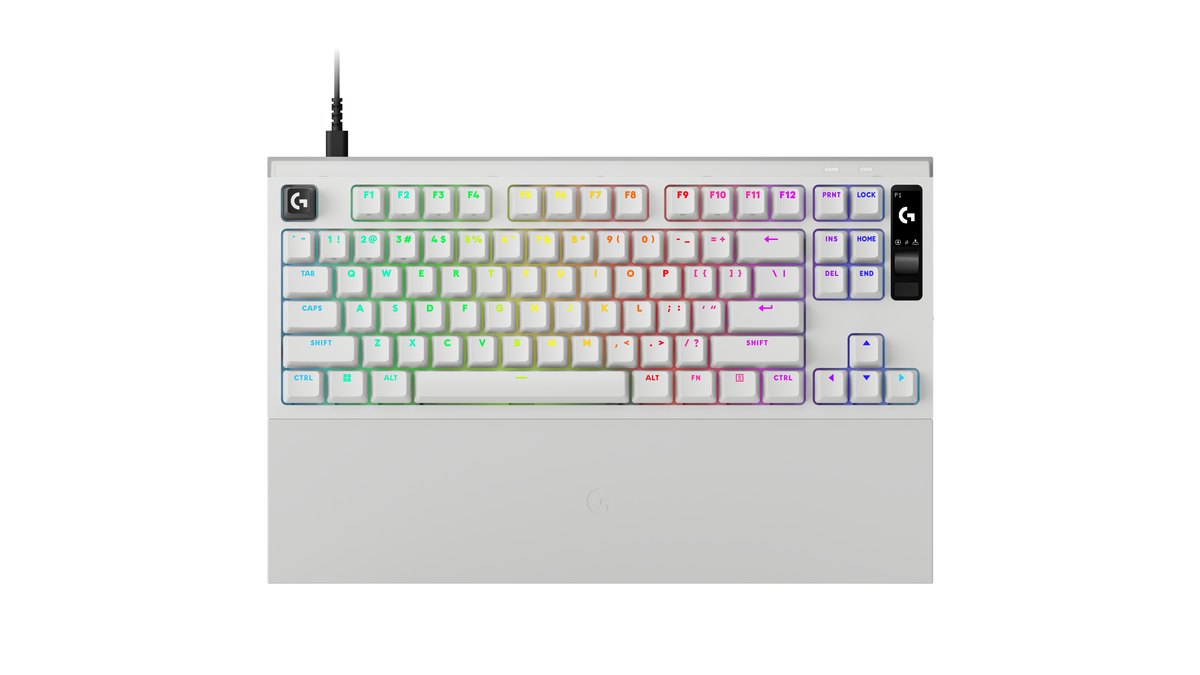
You can choose Black, White or Magenta. In the US the board ships with a US English layout, while Europe gets eight local layouts and Japan gets a JIS version. The US Logitech G store offers 30 day free returns, which is a useful safety net if you cannot try the keyboard in person first. Height adjusts in two steps, and the detachable USB-C cable makes replacement easy.
Pros and cons
- Pro: 8K scan and polling, 0.05 mm actuation steps and rapid trigger on every key put the spec sheet at the top of its class
- Pro: five KEY PRIORITY modes let you choose how overlapping opposite keys behave for each key pair
- Pro: change settings on the board with the OLED and roller, and store three profiles without G HUB
- Pro: the hands on review ranks its sound and feel among the best from a major brand, and the wrist rest and spare keycaps come in the box
- Con (review note): no split press and release rapid trigger, no continuous rapid trigger toggle, no web configurator
- Con (review note): the tall, boxy case can be uncomfortable without the wrist rest
- Con (fact): 84 keys with no dedicated PgUp, PgDn or Pause, 1,075 g, wired only, no spare switches
- Con (community): some buyers feel the Logitech brand premium is hard to justify
How it compares: Wooting 80HE+ and Huntsman V3 Pro TKL 8KHz
| Spec | PRO X2 RAPID | Wooting 80HE+ | Huntsman V3 Pro TKL 8KHz |
|---|---|---|---|
| Actuation | 0.1 to 4 mm, 0.05 mm steps | 0.1 to 4.0 mm, 0.1 mm steps | 0.1 to 4.0 mm |
| Polling | 8K | 8K | Up to 8,000 Hz |
| SOCD feature | KEY PRIORITY, five modes | Snappy Tappy, Rappy Snappy | Snap Tap |
| On board controls | OLED and roller, 3 profiles | Knob and LED bar | Dial, buttons and display |
| Software | G HUB (desktop app) | Wootility (web and desktop) | Synapse |
| Switch swapping | Puller included, hot swap per reviews and launch coverage | Hot swappable | Not hot swappable |
| Wrist rest | Silicone XL included | Sold separately | Included |
| Warranty | 2 years | 4 years (LEDs 2 years) | Up to 2 years |
| Review verdict | Wins on sound and feel | Wins on tuning depth | Wins on tuning depth |
On paper all three boards sit at roughly the same performance tier, so the real differences are tuning depth, sound, bundle and warranty. The review's take is clear: Wooting and Razer give you more knobs to turn, while the PRO X2 RAPID sounds and feels better.
In the US the Logitech is toward the pricier end of the three, so its case rests on the included wrist rest, the OLED workflow and that acoustic tuning rather than on price. Wooting's longer 4 year warranty is also worth weighing. For the head to head between the two rivals, read Wooting 80HE+ vs Huntsman V3 Pro TKL, and for options at other budgets see our best gaming keyboard picks.
Price (as of November 10, 2026)
| Product | List price (MSRP) | Street price range |
|---|---|---|
| PRO X2 RAPID | US$229.99 | US$229.99 at the official store, all three colors in stock |
| Wooting 80HE+ | US$199.99 (ABS), US$289.99 (zinc) | Sold direct by Wooting at list price |
| Huntsman V3 Pro TKL 8KHz | US$219.99 | From US$179.99 at the official store |
Prices move often and differ by retailer, so confirm the final checkout price with the seller before you buy; coupon and member prices are not included here. On these numbers the PRO X2 RAPID is the priciest of the three in the US, which is why its value score rests on the included wrist rest, OLED workflow and sound rather than on price.
What buyers are saying: sound wins praise, value gets debated
The board has only been on sale for about a month, so owner feedback is still limited, and most of what we could find comes from early adopters on Korean enthusiast forums. Apart from the price debate, the points below are individual posts rather than a broad trend.
On the positive side, some early buyers like that Logitech moved to a Gateron based magnetic switch instead of a proprietary design, say the stabilizers sound improved, report being very happy after purchase, and mention that turning rapid trigger on makes a noticeable difference in shooters.
On the hesitant side, the point raised in several threads is the brand premium: for the same money there are plenty of alternatives.
Individual owners also mentioned a space bar that feels too light and slightly wobbly, and people coming from full aluminum custom boards may find the feel less premium than expected. Retailer reviews were still sparse as of our cutoff date, so checking back in a few weeks is a good idea.
Who it is for, who should skip it, and what to check before buying
Buy it if you value sound, feel and a complete bundle, if you play on shared or tournament PCs where you cannot install software and want to change actuation and profiles on the board, or if you want a major brand warranty and easy returns.
Skip it if you want to fine tune rapid trigger with separate press and release values or prefer a web configurator, if you want a compact 75% board or something lighter, if you need dedicated PgUp and PgDn keys, or if you need wireless.
Before you order, check three things: that the listing is the layout you want, that your color is in stock, and the final checkout price. Pricing varies across retailers right after launch, so confirm the current price with the retailer rather than relying on older listings.
Record before and after switching keyboards with DOR
Whether new actuation and rapid trigger settings actually changed your play is easier to judge on video than by feel. DOR is a free Windows recording app that detects supported games when you launch them and records the full match automatically, collecting everything in My Clips.
In VALORANT it also creates automatic kill highlight clips with Ace and Clutch tags. Play a few matches of the same mode before and after the switch, then compare the moment you stop and shoot and the timing of your first bullet side by side.
Record the same way each time you change actuation, and you can also spot whether accidental inputs went up. To show your key presses on screen, see how to show key inputs in gameplay videos. For a step by step comparison routine, read record before and after a gear upgrade, and for movement key layouts check VALORANT keybinds.