Keyboard Escape on Roblox is a simple idea with a harsh catch: walking makes you faster, and a single mistake sends you back to the start. The full name is +1 Speed Keyboard Escape | Candy & Chocolate, and it is published by the Roblox group SecretVerse Studio.
The experience was created on January 18, 2026 (UTC) and sits in the Simulation genre as an Incremental Simulator. Its official description is short. Every step adds +1 speed.
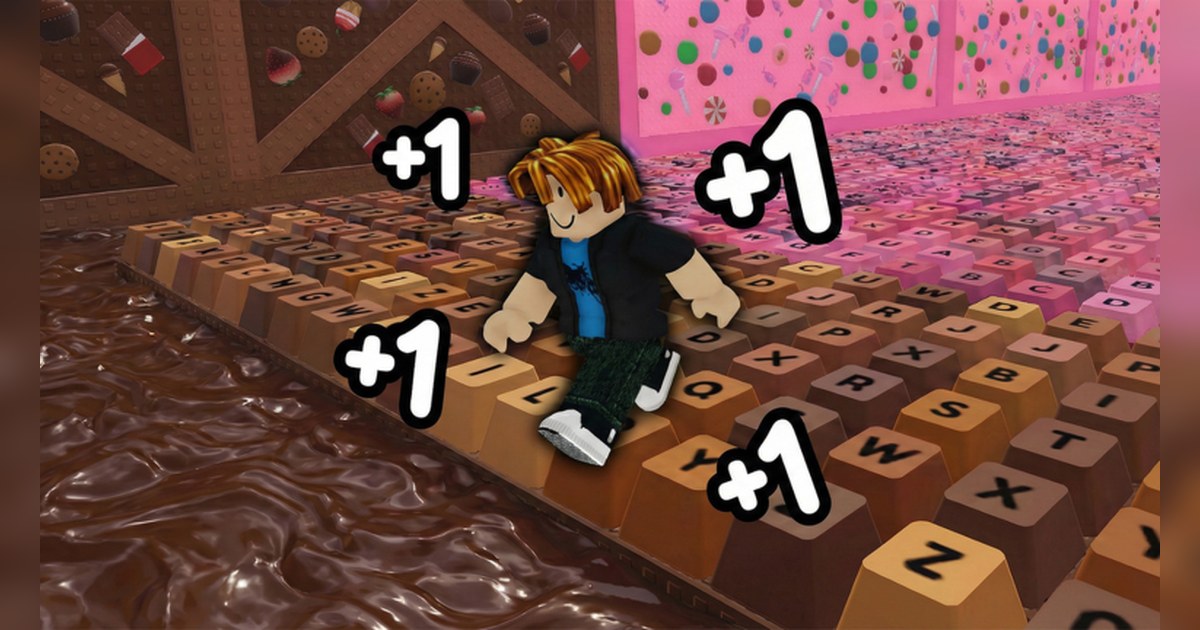
You run, jump and escape across a world made of candy and chocolate keyboard keys. You train your speed to unlock powerful multipliers, race friends and other players, and try to become the fastest on the server.
The description also promises ASMR vibes, naming smooth movement, satisfying keyboard clicks and relaxing candy sounds. We checked the official Roblox data on PC around 08:30 UTC on November 4, 2026.
The game had about 6.65 billion visits, around 16,000 people playing at that moment, about 7.25 million favorites and a like ratio of roughly 97 percent. On the worldwide charts it was around 48th of 97 in Top Playing Now, 40th of 96 in Most Popular and 39th of 100 in Top Rated.
At that point the last update was on November 2 (UTC). Candy & Chocolate is the theme in the name as of November 4 and may change, so if the title looks different later, look for SecretVerse Studio as the creator.
This guide covers only what the official experience page and official Roblox data confirm. Section walkthroughs, codes and event times are left out.
The short version: build speed by moving, look before you jump, and keep the run that works
Three things matter when you are new. First, speed comes from moving. The official line is that every step equals +1 speed, so walking along the keyboard path is already progress and you do not need a plan to begin.
Second, raw speed will not get you out on its own. The same description says speed is everything, then warns that one wrong move puts you back at the start.
The official thumbnails show paths of keyboard keys with chocolate colored or purple liquid beside them, and keyboard shaped platforms floating in the air. The description does not define a wrong move, so take your first attempt slowly and learn what sends you back.
Third, the progression systems are confirmed by name only. The description says training unlocks multipliers. The badge list includes Rebirth Badge, and the game pass list includes Candy, Diamond, Gold and ADMIN Treadmill, Speed Multiplier Tier 1 to 12 and Wins Multiplier x2.
Rebirth Badge has no description, and the Treadmill and Wins Multiplier x2 passes have empty descriptions, so nothing official says what they change or by how much. The Speed Multiplier tiers were not on sale as of November 4. Go by the prompts inside the game for actual numbers.
One figure does stand out. Rebirth Badge had been awarded about 149 million times by November 4, more than 40 percent of the roughly 353 million Welcome badges. Plenty of players have earned it, although how to earn it is not published.
Jump timing also suffers when the frame rate drops, so if Roblox feels choppy, run through Roblox FPS boost settings before a long session.
How to start Keyboard Escape on Roblox
- 1Find the game by SecretVerse StudioSearch Roblox for Speed Keyboard Escape. As of November 4 the full name is +1 Speed Keyboard Escape | Candy & Chocolate. The theme at the end can change, so check that the creator is SecretVerse Studio before you join.
- 2Read the group gift noteThe first line of the official description says that joining the SecretVerse Studio group unlocks a free gift in game. It does not say what the gift is, so if you want it, join the group and check inside the game.
- 3Walk to build speed and read the training promptsUse the default Roblox PC controls, WASD to move and Space to jump. Every step adds +1 speed, so early on just keep moving along the keyboard path. The description tells you to train your speed to unlock multipliers, so read any training or multiplier prompts the game shows you.
- 4Run and jump for the escapeCross the world of candy and chocolate keys by running and jumping. One wrong move sends you back to the start, so look at the next key before you commit. When you do get sent back, note where it happened and take that spot more carefully on the next try.
- 5Race friends on the same serverAs of November 4 a server holds up to 22 players, and the Servers tab on the experience page shows whether private servers are available. To play together, have one friend join first, then use Join Experience on their profile to land on the same server (the friend has to allow others to join for the option to appear). Then race for the escape, or for the top speed on the server.
What official sources confirm, and what to keep on video
| Element | What official sources confirm | What to keep on video |
|---|---|---|
| +1 speed | Every step adds +1 speed. | Your first steps next to a run after your speed has climbed. |
| Escape | You run and jump to escape across a world of candy and chocolate keyboard keys. | From a few seconds before the escape to the moment it lands. |
| Back to the start | One wrong move puts you back at the start. | From a few seconds before the mistake until you are standing at the start again. |
| Multipliers | Training speed unlocks multipliers. The pass list shows Speed Multiplier Tier 1 to 12 (not on sale as of November 4) and Wins Multiplier x2. | Your first run right after a multiplier unlocks. |
| Treadmills | The pass list shows Candy, Diamond, Gold and ADMIN Treadmill, with empty descriptions. | Any stretch where a Treadmill shows up in game. |
| Rebirth | Rebirth Badge exists with no description; about 149 million awarded as of November 4. | The moment the Rebirth Badge pops. |
| Servers | Up to 22 players as of November 4. Race friends and other players to be the fastest on the server. | Passing a friend, or the moment you become the fastest on the server. |
| Sound | The description promotes ASMR vibes with smooth movement, keyboard clicks and candy sounds. | A run where the clicks come through clearly. |
Check these before you start
- The experience you joined lists SecretVerse Studio as its creator.
- You read the group gift note in the official description.
- You used your first attempt to learn what sends you back to the start.
- Your friends are joining the same server (22 players at most).
- If Roblox closes as soon as you join, you went through the Roblox crash fixes first.
Keep your escape and your races with DOR
Install DOR, a free Windows app, and on a Windows PC recording starts automatically the moment you launch Roblox and join +1 Speed Keyboard Escape. When you leave the experience, everything since you joined lands in My Clips as one video.
However many times you went back to the start, those attempts and the escape itself sit in the same file. Game audio and your microphone are captured together on one track, so the keyboard clicks the description highlights and your own voice at the moment you make it are both in there.
Open My Clips, pick the moment you want, trim it and choose 16:9, 9:16 or 1:1. The steps for a vertical version are in how to make a 9:16 game video. The default is 1080p at 30fps, and for smoother fast running you can switch to 60fps on the free plan, with more background in 60fps game recording settings.
To turn several attempts into one video, merge them in DOR Studio (dor.gg/studio), add effect templates such as Shake Zoom or Punch Zoom, adjust text, background music and volume, then export an mp4 or share a dor.gg link. Sending that link is covered step by step in how to share Roblox gameplay videos.
As recordings pile up, older videos are cleared only when the full gameplay storage share (5GB by default) is exceeded, and your latest recordings and liked videos stay.