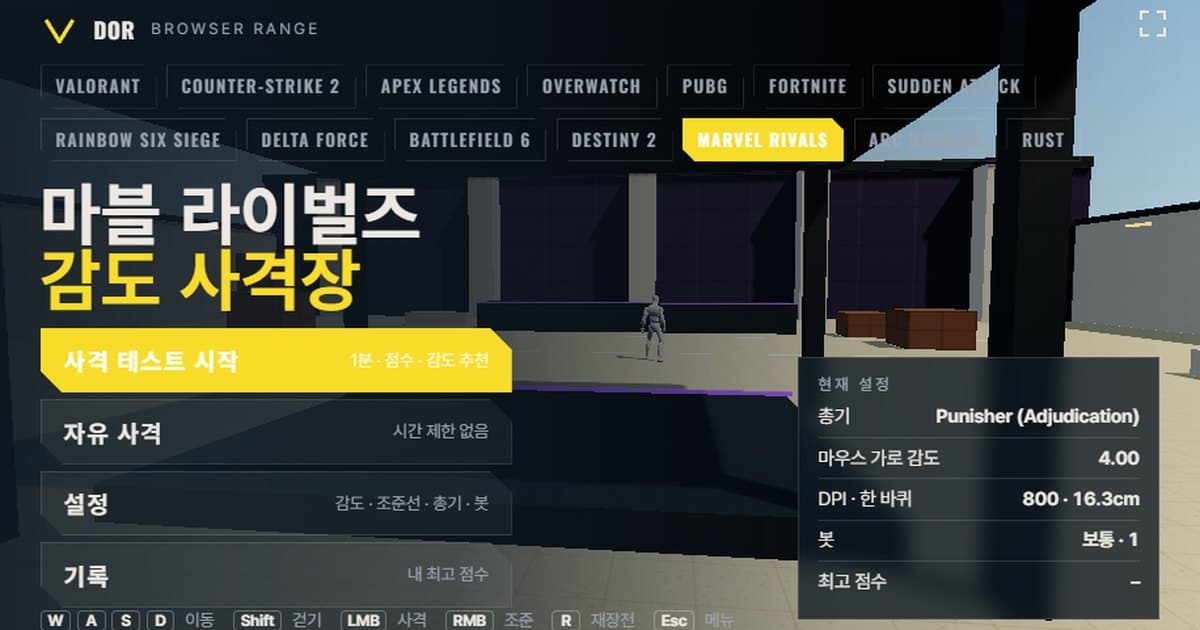
Marvel Rivals sensitivity is set under Settings > Keyboard > Combat as Mouse Horizontal Sensitivity and Mouse Vertical Sensitivity, with a 0.01–40.00 range (two decimals, per PCGamingWiki) and a community-reported default of 4.00, which works out to 16.3 cm/360 at 800 DPI. Values can be saved per hero, so the next section starts with where each option sits and how to convert it to cm/360. The range at the top of this page is a browser practice area that moves with the same turn rate (0.0175° per count at sensitivity 1.00, a community-converter figure) and 90° horizontal field of view as Marvel Rivals. Enter the mouse horizontal sensitivity and DPI you use in the game, finish the 1-minute shooting test, and you get a score, accuracy, headshot rate and the average time from target spawn to kill. It also counts whether your crosshair overshot or stopped short of targets and suggests a sensitivity 10% lower or higher. It needs mouse lock and WebGL2, so it opens only on PC Chrome and Edge, with no install or login. Ranges for other games are collected in the browser sensitivity range overview.
Marvel Rivals sensitivity settings and cm/360 conversion
Sensitivity is split into Mouse Horizontal Sensitivity and Mouse Vertical Sensitivity under Settings > Keyboard > Combat. The hero selector at the top left defaults to All Heroes; change a value with a specific hero selected and it is saved for that hero only. The input range is 0.01–40.00 with two decimal places (per PCGamingWiki). The default of 4.00 is what community guides and converter sites report, not a value confirmed in-game. The same Combat section gained Mouse Smoothing and Mouse Acceleration toggles in the January 10, 2025 patch, both off by default. A raw input option is recorded as added in the March 2025 patch, also off by default. With both toggles off, movement is linear with no acceleration curve.
| Setting | Where | Range / default | Suggested |
|---|---|---|---|
| Mouse Horizontal Sensitivity | Settings > Keyboard > Combat | 0.01–40.00, default 4.00 (community-reported) | Narrow it down with the range within 1.7–2.6 at 800 DPI (community-compiled pro range) |
| Mouse Vertical Sensitivity | Same Combat section | Saved separately from horizontal | Start at the same value as horizontal |
| Per-hero sensitivity | Hero selector at the top left of Combat | Default: All Heroes | Tune only your main heroes and keep a shared value for the rest |
| ADS / Ultimate sensitivity | Appears when Black Widow is selected | Multiplier 1.0 (community figure) | 0.80 is often quoted for an Overwatch-like scoped feel (community) |
| Mouse Smoothing / Acceleration | Same Combat section | Off by default (added in the January 2025 patch) | Keep off |
| Raw input | Settings menu (recorded as added in March 2025) | Off by default | Turn on to avoid Windows pointer acceleration |
| Field of view (FOV) | No option | Fixed third-person, estimated at about 90° horizontal | Not adjustable; match with sensitivity only |
The 0.0175°/count turn coefficient is the value three converter sites share, and back-calculating the Overwatch 2 and VALORANT sensitivity pairs that pro players have posted lands within ±2% of it. No reproducible 360° measurement has ever been published, though, so treat it as a community-converter figure. Some converters use 0.022 or 0.0066, which look like borrowed CS2 and Overwatch 2 values, so the range does not use them.
DPI times mouse horizontal sensitivity gives eDPI; multiply that by the 0.0175 turn coefficient and you get the degrees turned per inch of mouse travel. Divide 360 by that value and multiply by 2.54 for the mouse distance in cm needed for one full turn.
| Sensitivity (800 DPI) | eDPI | cm/360 | Notes |
|---|---|---|---|
| 4.00 | 3,200 | 16.3 cm | Community-reported default, very fast |
| 2.60 | 2,080 | 25.1 cm | Top of the published pro range |
| 1.70 | 1,360 | 38.4 cm | Bottom of the published pro range |
Aim sensitivity works as a per-hero multiplier, not per scope. Select Black Widow in the Combat settings and extra entries appear for ADS horizontal/vertical sensitivity and Ultimate horizontal/vertical sensitivity. Those entry names are based on community guides and a mention in the December 2024 patch notes, and the 1.0 default is likewise not confirmed by official documentation. Since the Season 9 rework on July 10, 2026, a magnified scope exists only during Black Widow's ultimate, and its magnification has not been published. Punisher, Hela, Winter Soldier, Star-Lord and Hawkeye have no magnified aim. So all six weapons in the range use an aim multiplier of 1, right-click does not zoom the view, and the Scoped sensitivity multiplier in the General tab has no effect on results in the Marvel Rivals profile.
What matches Marvel Rivals' settings and what doesn't
Marvel Rivals is third-person and this range is first-person. Still, the camera turns through the same angle for the same mouse distance, so the mouse travel needed for a full turn (cm/360) and your flick distances carry over unchanged. What the range does not reproduce: the parallax between crosshair and muzzle created by the over-the-shoulder camera, each hero's projectile speed, and camera changes during abilities.
| Item | Marvel Rivals | This range |
|---|---|---|
| Turn rate | 0.0175° per count at sensitivity 1.00 (three converter sites and back-calculated pro sens agree; not in official docs) | Same 0.0175°/count × sensitivity |
| Field of view | Not adjustable, fixed third-person. Estimated 90° horizontal (per PCGamingWiki, axis unspecified) | First-person 90° horizontal at 16:9 |
| Move speed | One speed per hero, 6 m/s (official pages for Punisher, Hela, Star-Lord, Winter Soldier); no walk state | Run 6 m/s, walk 3.3 m/s (range's own values) |
| Bot HP / armor | Varies by hero: 250 for most Duelists and Strategists, Punisher 300, Black Widow 275; no armor system | 250 by default, 300 with heavy armor |
| Weapon list | Hero-specific weapons; Hawkeye has unlimited arrows | Six weapons: two for Punisher, plus Hela, Black Widow, Winter Soldier and Star-Lord; Hawkeye excluded |
Unlike the turn rate, how each hero shoots is simplified. Winter Soldier's pistol is actually a 180 m/s projectile while Black Widow and Punisher are hitscan, but the range treats all of them as hitscan. Hawkeye has unlimited arrows and damage that scales with draw time, so shots per kill and reload metrics do not apply and he was left out. To compare with another hero shooter's range, see the Overwatch 2 range.
How to run the 1-minute shooting test
The menu has four buttons: Start test, Free fire, Settings and Records. If you only want to settle on a sensitivity, the test is all you need; Free fire is a no-timer mode for getting used to the weapons. Settings is split into five tabs (General, Crosshair, Weapons, Bots, Audio & Video) and is saved in this browser.
- 1Enter sensitivity and DPIIn Settings > General, enter your mouse horizontal sensitivity and mouse DPI exactly as in the game. DPI does not change turning; it is only used to calculate and display eDPI and cm/360. The input range is 0.1–20 with two decimal places.
- 2Pick a weaponIn the Weapons tab, choose the hero weapon you want to practice. To begin with, a single-shot weapon like Hela's makes overshoot and undershoot easiest to read. Automatic weapons mix spray error into the data and blur the sensitivity verdict.
- 3Press Start testBack in the menu, press Start test: the mouse locks and targets appear after a countdown. Turn on the Fullscreen button at the top right of the menu to hide the browser tab and address bar so the screen size is closer to the game.
- 4Shoot until the timer endsWhen a target appears, aim for the head. Pressing ESC pauses the round and returns the cursor; press Resume to continue. You can open Settings from the pause screen to change the crosshair or bot speed.
- 5Read the resultWhen the minute is up, the Round result window appears. Before the score, look at the Overshoot / undershoot numbers and the recommendation line below them. Your best score for the same setup and whether this is a new best are shown as well.
- 6Repeat 2–3 times the same dayUse Retry with suggested sens or Retry same setup to go straight into 2–3 more rounds. When the recommendation keeps pointing the same way, enter that value in the game's Combat settings. Measuring once a day and changing right away makes it easy to mistake a difference in form for a difference in sensitivity.
How to read the result window
- Accuracy: the share of fired shots that hit a target. A weapon that fires 2,400 rounds per minute like Star-Lord's will naturally score low, so compare only within the same weapon.
- Headshot rate: the share of all hits that registered on the head. Marvel Rivals is generally understood to deal 2× damage on head hits (no official rule text; estimated from public numbers), so this rate changes time to kill a lot.
- Spawn → kill avg: the average time from a target appearing to taking it down. It is the first metric to move when you change sensitivity, which makes it a good baseline for comparing rounds.
- Spawn → first shot avg: your reaction time from seeing a target to firing the first shot. It reflects focus and form more than sensitivity, so on days when this swings far from your usual, postpone the sensitivity verdict.
- Shots per kill: the rounds spent on each target. With Winter Soldier's three-round magazine, this ties directly to how often you reload.
- Overshoot / undershoot: counted from the horizontal error time series while tracking a target, whether the crosshair went past the target (overshoot) or stopped short (undershoot). If one side exceeds 60%, the range suggests a sensitivity 10% lower or higher; with fewer than 5 kills the sample is too small and no suggestion is given.
Weapons in the range
| Name | Fire rate (rpm) | Mag | Reload (s) | Head · body damage | Aim multiplier |
|---|---|---|---|---|---|
| Punisher (Adjudication) | 600 | 40 | 2.0 | 38 · 19 | 1× |
| Punisher (Deliverance) | 86 | 8 | 2.5 | 304 · 152 | 1× |
| Hela | 120 | 10 | 1.5 | 160 · 80 | 1× |
| Black Widow | 240 | 20 | 1.5 | 90 · 45 | 1× |
| Winter Soldier | 150 | 3 | 1.0 | 160 · 80 | 1× |
| Star-Lord | 2,400 | 50 | 1.0 | 13 · 7 | 1× |
Choosing a weapon per drill
For one-tap practice, where each shot has to land, Hela and Winter Soldier fit best. Both deal 80 body and 160 head, so a 250 HP bot goes down to two headshots (320), while one headshot plus one body shot (240) leaves it standing and needs one more shot, and Winter Soldier's three-round magazine also trains the rhythm of finishing three targets before a reload. For spray tracking, the 600 rpm Adjudication is the baseline, while Star-Lord's 2,400 rpm with wide spread is for checking how well you keep the crosshair glued to the target. For flicks, the right picks are Deliverance, which ends a close fight in one shot when every pellet hits the head (304; 152 on the body), and Black Widow, whose 240 rpm automatic fire means stringing two or three shots together after the flick.
Limits of a browser range and how to work around them
- Raw input: if the browser cannot provide raw input under pointer lock, Windows pointer acceleration gets mixed in. The range shows a notice in the menu when raw input is unavailable; turning off Enhance pointer precision in Windows matches the game's conditions.
- Input timing: browsers batch mouse events to the display refresh rate, so even an 8000 Hz mouse is not sampled as finely as in the game. It barely affects the sensitivity verdict, but treat small stutters as a limit of the range.
- No recoil pattern: spread and recoil are simplified. How far the crosshair opens during Adjudication spray differs from the game, so judge spray sensitivity on the first few shots.
- Movement hit error: there is no per-hero moving-fire correction and no camera shake during double jumps or dashes. Turning on the Movement & firing error option in the General tab only mimics how much the crosshair blooms while moving or spraying.
- Field of view: it runs only at 90° horizontal on 16:9. On a 21:9 monitor, the game's ultrawide handling is not documented, so it is safer to keep the window at 16:9 while measuring.
The workaround is simple. Use the range only to decide the direction of your sensitivity (up or down) and your cm/360; then check each hero's recoil and projectile feel in the game's practice range at the same sensitivity for about ten minutes. If you share a sensitivity with a first-person game like VALORANT, measuring once more at the same cm/360 in the VALORANT range lets the two results validate each other.
After settling on a sensitivity, check it in real matches: DOR
A range score only tells you whether a sensitivity fits your hand. Whether your flicks overshoot in real matches, or your aim wobbles during an ultimate, is better checked on match footage. When DOR detects Marvel Rivals it records your matches automatically, and one hotkey saves a clip of any moment you want. Trim clips in the browser editor and share them with a dor.gg link. Free, Windows. Supported scope and setup are covered on the Marvel Rivals recording page.
 #Marvel Rivals