
Genshin Impact AI Game Recording & Highlights
Winning the 50/50 on the banner you saved for, three starring Spiral Abyss with a vaporize team. DOR records your Genshin Impact travels across Teyvat.

About the game: Genshin Impact

- Developer
- miHoYo
- Publisher
- miHoYo, COGNOSPHERE, NIJIGEN GAMES
- Released
- 2020
Recording, editing and sharing Genshin Impact, just leave DOR on


Recording anywhere in Teyvat
Launch Genshin and DOR records wherever you roam, from Mondstadt to Natlan. When the golden meteor shows up on a wish, clip it before the character reveal ends.
More on game recording →- One minute install, no sign up
- No record button, no settings
- Light enough for low end PCs
Install once, DOR handles the rest
Setup takes about a minute and you can start without an account. Launch Genshin Impact and recording just runs, quietly in the background so it never gets in the way of your game.

AI Voice Notes
AI Voice Notes turns co-op chatter and your wish day commentary into text on the recording timeline. Your pity count and your reaction will be on record together.
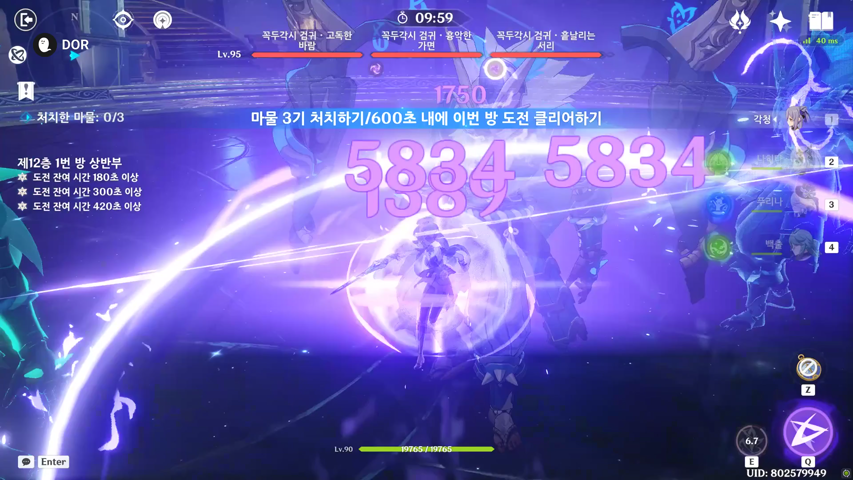
This version's journey in one video
Check your wish results, Abyss clears and new region exploring, hit AI Highlight, and a whole version update of play becomes one video.
How highlight clips work →Punch zoom on the burst
In DOR Studio, right in your browser, punch zoom the frame where the Elemental Burst cut in plays and shake zoom when the big number pops. Put your team comp on screen as text, export 9:16, and it's a Short.
How to trim game clips →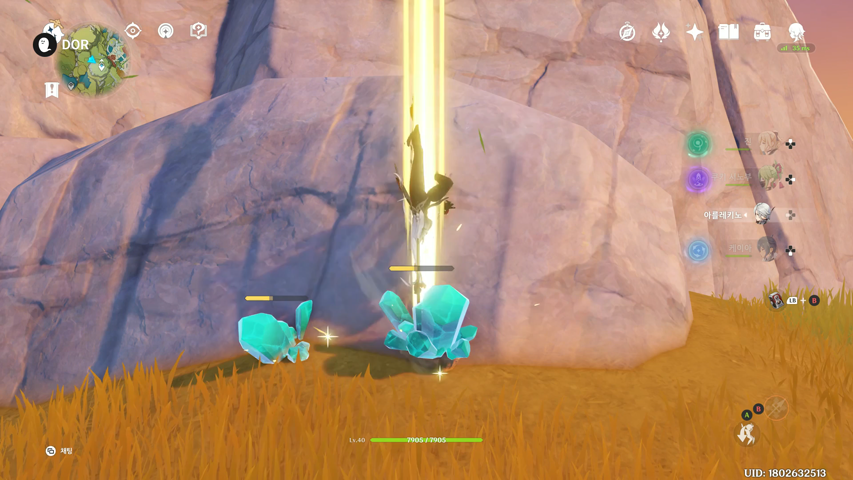
Pull results, posted by link
Post your wishes or Abyss clear to Discord, TikTok, YouTube or Instagram with one link. No watermark over the character animations, and long exploration sessions are kept with no recording time limit.
Genshin Impact clips from DOR players
Real posts from DOR. Tap one to open it on dor.gg.
Your next Genshin Impact session records itself
Installs in a minute, no sign up needed.
Genshin Impact guides
How to record Genshin Impact
Install DOR for free
Setup takes a minute. No sign-up required to start.
Play Genshin Impact
DOR detects the game and records the whole session in the background.
Save the moments you want to keep
Save a clip right after a highlight and the previous 30 seconds are kept. Pick any save key you like in settings.
DOR is a free game recorder optimized for Genshin Impact. It records your whole session automatically from launch to exit and saves the previous 30 seconds of Genshin Impact as a clip whenever you want to keep a moment, with high-quality, low-overhead background capture. No OBS-style setup, just install and launch the game.
Recording more than Genshin Impact? See every supported game and how recording works on the free game recorder for PC page.
Keep these moments as clips
Genshin Impact recording specs, settings and troubleshooting
Genshin Impact recording features
Clip the moments you want to keep
Save a clip right after a great play and the previous 30 seconds are kept for you.
Full gameplay recording
Record your whole Genshin Impact session from launch to exit and trim out what you need.
Lag-free background capture
GPU hardware encoding keeps the hit to in-game FPS minimal, stable even on low-spec PCs.
Genshin Impact recording: minimum & recommended specs
| Component | Minimum | Recommended |
|---|---|---|
| OS | Windows 10 (64bit) | Windows 11 (64bit) |
| CPU | Intel Core i5-8400 (8th-gen) / AMD Ryzen 5 2600 | Intel Core i5-12400 (12th-gen) / AMD Ryzen 5 5600+ |
| RAM | 8GB | 16GB |
| GPU | NVIDIA GeForce GTX 1050+ (NVENC) | NVIDIA GeForce GTX 1660 · RTX 2060+ |
| Storage | 5GB free + clip space | SSD, 20GB+ free |
Genshin Impact is GPU-heavy, so the recommended spec keeps both in-game FPS and recording stable.
Recommended Genshin Impact recording settings
| Item | Recommended | Note |
|---|---|---|
| Resolution | 1080p default | 720p selectable, 1440/2160p on Pro |
| Frame rate | 30fps default | 60fps selectable even in big battles |
| Bitrate | Auto | Set from resolution, frame rate and codec |
| File size | ~30MB per clip | For a 30s 1080p clip, higher at 60fps |
* In heavy fights, 720p/30fps mode reduces GPU load further.
Genshin Impact recording troubleshooting
Genshin Impact recording causes lag or FPS drops
DOR uses GPU hardware encoding for low-overhead capture, so the impact is small. If it still struggles, switch to 720p/30fps mode in settings.
Genshin Impact records as a black screen in fullscreen
DOR captures fullscreen, windowed and borderless modes alike, and switches to monitor capture on games that block game capture, so you don't get a black screen.
Will a recorder get my Genshin Impact account banned?
DOR has no cheat features and never modifies game files or your gameplay data, it only captures video. Where anti-cheat blocks the capture hook, DOR switches to monitor capture to record your Genshin Impact session.
Genshin Impact recording FAQ
How do I record Genshin Impact on PC?
Install DOR, a free Windows app. It starts recording when Genshin launches.
Can I record Genshin without OBS?
Yes. DOR starts recording when the game opens, no scenes or sources, and captures game audio and your mic.
How can I replay a story quest scene?
With DOR recording as you play, story scenes are saved as video you can rewatch any time.
Can I save just my wish results?
Save a clip right after the wish animation and that moment is kept as a short video.
How do I get Genshin clips for edits?
Trim clips in DOR Studio and export them at 16:9, 9:16 or 1:1 with no watermark.
Can I keep my Genshin Impact wish animations?
Yes. The whole session is recorded, so the wish animation and result are captured and you can trim that part out.
Genshin is demanding. Can I still record it?
DOR is a free Windows app, and if performance is a concern you can turn recording off for Genshin alone in settings.
Can I post a Spiral Abyss clear in vertical format?
Yes. Trim the clear from your recording and export it in 9:16.
Is it free? Is there a watermark?
DOR is free and adds no watermark.
Will it drop frames while playing Genshin Impact?
DOR uses low-overhead background capture, so the impact on in-game FPS is negligible.
What specs do I need?
Windows 10 or later runs DOR on most machines. Low-spec PCs can use 720p/30fps mode.
Can I change the Genshin Impact recording key?
You can remap the clip-save and manual-record keys to any key in DOR settings.
Where are my recorded clips saved?
Clips are organized in the DOR app library and can be shared to the DOR community or via link.
Is there a limit on recording time or clip count?
No time or count limits. Full gameplay recordings are managed inside a 5GB allowance by default, and once it fills up the oldest recordings you have not liked are cleared first. Recording will not start when disk space runs low, so keep at least 30GB free.
Record these with DOR too



Find your other games
 League of LegendsRecording guide
 PUBG: BattlegroundsRecording guide
 OverwatchRecording guide
 Teamfight TacticsRecording guide
 FC OnlineRecording guide
 FortniteRecording guide
 Counter-StrikeRecording guide
 RobloxRecording guide
 MinecraftRecording guide
 Sudden AttackRecording guide
 Apex LegendsRecording guide
 Rainbow Six SiegeRecording guide
Genshin Impact, just leave DOR on
Recording happens on its own, highlights and sharing take one click.