RimWorld records automatically once DOR is installed: launch the game and the AI handles the rest. You do not need a recording mod. Start RimWorld from Steam and DOR detects it, keeping everything from the moment three colonists climb out of their crashed pods through raids, mental breaks, cold snaps and the ship launch in one video until you close the game. It records exactly what is on screen, so 3x speed stretches are included and your other mods show up as normal. This guide covers installing DOR, finding events in long recordings, building a colony chronicle and sharing it.
- Keep dozens of hours of colony story on video without a recording mod, from the crash landing to a thriving settlement.
- Save events like a mech cluster defense or a colonist going berserk at the worst moment as separate clips.
- Use AI Voice Notes to find lines you muttered such as 'another raid seriously Randy' and jump to that event.
- Combine a Thrumbo hunt, a cold snap and the ship launch ending into one colony chronicle.
- Post your latest colonist disaster to Reddit or Discord with a single dor.gg link.
Before you record RimWorld: install and recording mode
RimWorld is light on hardware, so recording is light too. DOR is a free Windows app and never adds a watermark. RimWorld uses full session recording, which means the video keeps running as seasons change and in game years pass, until you close the game. A colony you leave running all weekend makes a long recording, so read recording long gameplay without stutter first. The table below lists what is worth knowing before your first RimWorld recording.
| Item | For RimWorld | Notes |
|---|---|---|
| Install | DOR, free Windows app | Works without a recording mod and adds no watermark |
| Game version | RimWorld on PC, launched from Steam | Your existing mods are recorded exactly as they appear on screen |
| Recording mode | Full session recording | One video from launch to exit, not split by in game date or season |
| Sped up stretches | Recorded exactly as shown on screen | 3x speed time is in the video, and you trim what you need |
| Resolution and frame rate | 1080p at 30fps by default | 60fps is available, plus a lighter 720p/30fps mode |
| Storage | About 30MB for a 30 second 1080p clip | Leave plenty of free space on weekends the colony never stops |
Record RimWorld with DOR: step by step
- 1Install DORDownload DOR and install it. Setup takes about a minute and the app is free. Leave DOR running afterwards. There is no recording mod to enable or button to press when you start a new colony.
- 2Launch RimWorld from SteamStart RimWorld from Steam. Recording begins as soon as DOR detects the game, so the screens where you pick a storyteller and a landing site are part of the video. A loading screen for your mod list at the start is expected.
- 3Check that recording is runningOnce your colonists crash land and start their first jobs, glance at the DOR app once to confirm the recording is in progress. If the game is not picked up, follow what to do when the recorder does not detect your game. After that, speed up or pause as usual.
- 4Clip the event when it endsRight after your killbox holds a pirate raid to the last attacker, or right after a berserk colonist is finally subdued, press the clip save shortcut before the cleanup begins. The last 30 seconds are stored as a separate clip, so you will not have to hunt for the event in hours of footage.
- 5Quit and open My ClipsSave and close the game, and the full session video plus every clip you saved appear together in My Clips in the DOR app. The day the colony collapsed and the day the ship launched are kept the same way.
Find your recordings
Your recordings live in My Clips in the DOR app, also called the library. Each time you open and close RimWorld becomes one session, and anything you saved with the clip save shortcut appears as its own clip. The date on the RimWorld screen is in game time and does not match the recording's playback position, so when a raid alert appears or someone has a mental break, note the real time from your PC clock. Write down when you started the game too, and you can work out how many hours into the recording an event is. Set a start and an end point to trim what you need, then export as 16:9, 9:16 or 1:1. The full walkthrough is in how to trim game clips. Like the videos you want to keep, such as the ship launch ending. When space fills up, older videos you have not liked are cleared first, so liked videos stay.
Save the moments you want to keep
Even with the whole colony recorded, saving each climax as a clip on the spot makes it far easier to find. Press the clip save shortcut and the last stretch of play becomes a clip. The default length is 30 seconds, and you can pick 15, 30, 45 or 60 seconds in settings. In RimWorld, good moments to press it are right after a raid defense ends, right after a successful Thrumbo hunt, and right after a colonist's mental break causes chaos. For fights that last over a minute, like a mech cluster, set the clip length to 60 seconds, and drop the game speed when a raid starts so the recording is easy to follow. To change the shortcut, see saving the last few seconds instantly.
Find what was said with AI Voice Notes
Even playing alone, RimWorld gets you muttering lines like 'another raid seriously Randy', 'she's one bad meal from a mental break' and 'how much food is left in the freezer'. DOR records game audio and your microphone together, and AI Voice Notes writes what you said onto the recording timeline as text. Every 'why is he berserk again' turns into a colony diary entry, and finding that line in the timeline text takes you straight to the event. On nights you run colonies side by side with a friend on a call, lines like 'if we kill that Thrumbo we're rich' are kept too. If your voice sounds quiet, check your input device with recording games with mic audio.
Build a montage with AI Highlight
A colony built over dozens of hours includes long stretches of construction and hauling. In the library, check your clips of crash landing day one, the mech cluster defense, the colonist going berserk, the Thrumbo hunt, surviving a cold snap and the ship launch ending, then select AI Highlight. DOR joins them into one colony chronicle that tells the whole story in a few minutes. To set the order yourself, see how to merge game clips.
Edit in DOR Studio
DOR Studio opens in your browser with nothing to install. Cut out the build queue waiting, stitch the raids together and caption each with the in game date and event, and you have a colony diary. Add a shake zoom on explosions, a punch zoom when a colonist snaps, and a glitch transition where one season cuts to the next. Add background music and export in 16:9 for a YouTube documentary, or turn a single funny event into a 9:16 short. Download the result as an mp4 or share it as a link straight away.
Share with a dor.gg link
Send trimmed moments as dor.gg links. Whoever opens the link plays it in the browser without DOR or RimWorld installed, which makes colony drama easy to post on Reddit or Discord. For friends who run a similar mod list, send a defense where your killbox layout is visible; for friends who do not play, pick something instantly funny like a berserk rampage. Tips on picking moments by event type are in sharing RimWorld raid defense videos, and posting to Discord is covered in sharing clips on Discord.
RimWorld recommended settings and troubleshooting
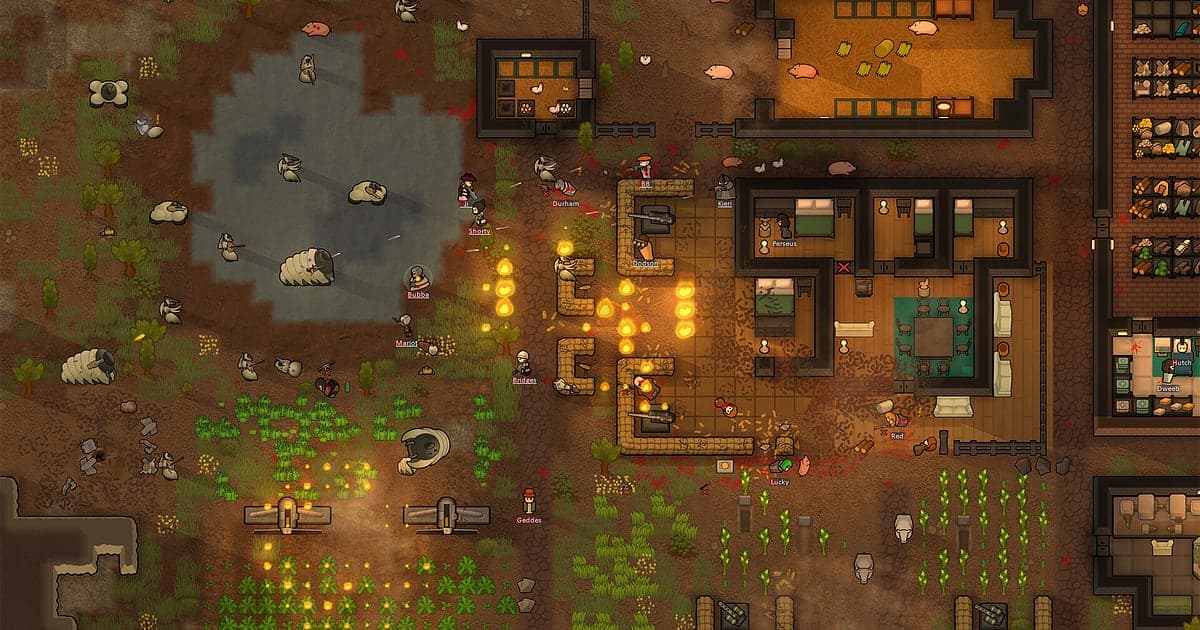
RimWorld is fairly light, so recording runs smoothly even at minimum spec. The top down colony view looks sharp at the default 1080p and 30fps, with colonist names and room layouts easy to read. Pick 60fps if you want combat animations smoother, or the 720p/30fps mode if a big colony is pushing an older PC, and see recording games on a low end PC. Recordings get long in this game, so adjust settings with reducing game recording file size. Fullscreen, windowed and borderless windows all record. DOR uses GPU hardware encoding so the frame rate impact is small, has no cheat features and never touches game files, saves or mods.
| Symptom | What to check | Fix |
|---|---|---|
| The recording is a black screen | The display mode in the game settings | DOR records fullscreen, windowed and borderless alike. If it is still black, follow [fixing fullscreen recording](fullscreen-recording-not-working) to switch to monitor capture. |
| Stutter while recording a big colony | Recording resolution, frame rate and mod count | Drop to 720p/30fps mode and work through [fixing FPS drops while recording](game-recording-fps-drop-fix). |
| Sped up stretches are too fast to follow | Game speed during the event | Lower the speed when an event you want to show starts, and trim away the fast stretches. |
| Not sure whether a recording mod is needed | How DOR records | DOR records the game screen directly, so no recording mod is needed. |
| Worried your mod setup could change | How DOR works | DOR only captures the screen, has no cheat features and does not modify game files, mods or saves. |